A little help. Your decision.
Review the suggestions, edit them and keep the ones that fit. A person decides what reaches live data, and you choose separately whether to enable a provider, the built-in assistant or access for external assistants.

Stop 1 of 5
Choose where your help comes from
Connect the provider that suits you and choose how much data it may receive. You can use the Claude API or an OpenAI-compatible service, including a model run inside your organisation.
In Settings › Administration › AI, see your provider, send level and every call: who asked, what for, the outcome, tokens and cost when reported.
Leave the provider and built-in assistant unset and agent access off to keep AI help out of your screens and send no AI data from the instance. When you enable a provider, refiroo keeps its requests within your chosen send level.
- Choose structure for model keys, labels, headers and types without stored record values. Samples adds sample values, normally 20 per column. Values sends the values a feature needs and is the default. Your question is sent at every level; at samples and values, Ask can also send whole related lists of up to 50 names, beyond the ordinary sample limit.
- If a feature needs more data than you allow, it stays unavailable; an individual request can choose a lower send level, never a higher one.
- Call records keep who asked, what for, the outcome and tokens; request and answer text is kept only when content logging is switched on, for seven days by default.
- People trusted to look after data, models, workspaces or integrations can be given permission to use AI proposals; the supplied roles for those responsibilities include it.
- Send a test request uses a fixed request without your reference data, and records the call so you can see the result.
In the API: GET /ai/status, GET /ai/calls and POST /ai/test (Operations). GET /system tells a client whether an AI action can run.
Provider
Send level
Stop 2 of 5
Make the proposal yours
You can review and edit proposed steps and changes. Marks help you recognise suggestions; you choose what to keep, correct or remove, and what reaches Live.
In a mapping grid, Propose targets asks the provider to match unmapped sources. Answers that pass the checks become ordinary mappings in a change set, while live data stays as it was.
The model editor's rules-based suggestions carry Proposed, Proposed because and Evidence. Proposed means an element still reflects refiroo's suggestion; those marks are separate from the assistant's authorship history.
- To propose targets, you need permission for AI proposals and change-set work, a writable workspace and send level values; a publication stays read-only.
- With up to 100 eligible targets, all are candidates; otherwise, each source gets its 20 closest by name and searchable fields.
- Proposed by the AI shows the provider's confidence and reason; the person running refiroo sets a minimum, and lower answers leave the source unmapped.
- Changing a target removes its AI mark and makes it your choice; publication keeps the normal approval and conflict checks.
- Published history keeps the proposal's origin, including who asked for it and who published it.
In the API: POST /workspaces/{key}/mapping-proposals prepares targets into a change set as an aiProposal job. Mapping coverage takes proposed=true with a change set.
POST /workspaces/{key}/mapping-proposals
Change a target and the mark goes: it is your choice.
Stop 3 of 5
Start with words and a workbook
Say what you keep and attach a workbook, or use words alone. A Claude Code session works through the API to design the model and check every row, then leaves you a draft to review.
Accepting installs the release it needs without activating it and prepares the rows in a change set. refiroo refuses activation and publication by the assistant, keeping those decisions with people.
The assistant needs send level values and receives your words, model and whole file. Its turns can incur Claude Code charges. It is separate from your proposal provider, so you can run either without the other.
- The assistant works with temporary grants drawn from your permissions, which end with each turn.
- Its tools are limited to files and the shell, and it gets no database address, encryption key or other engine secrets; an operating-system sandbox or the container separates its work, although the container does not restrict its network access.
- The change set and history keep the task, who requested its proposals and who edited them afterwards.
- Stop ends the turn while keeping the task; describe a correction on a failed or loaded task to continue the same session, or Discard to end it.
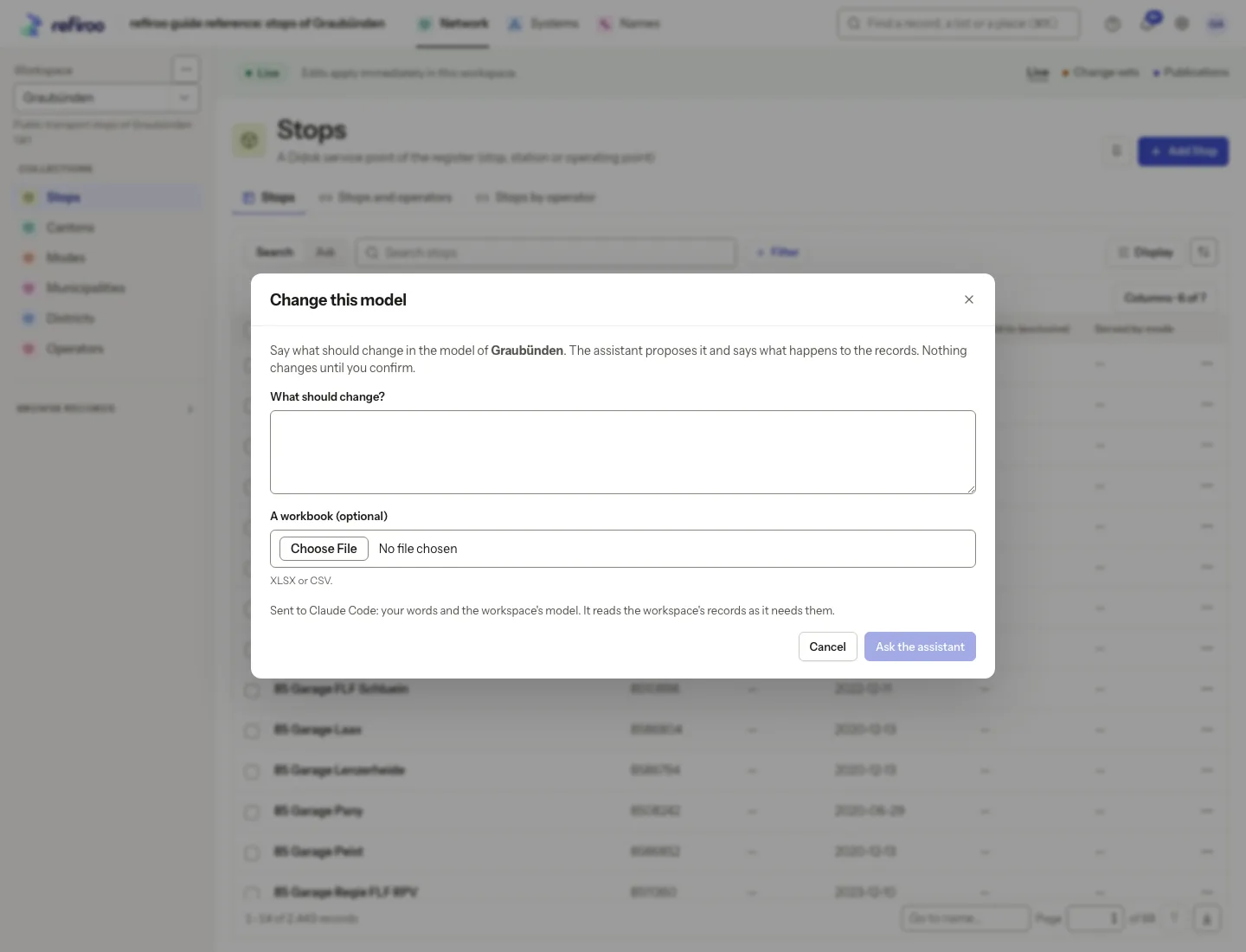
- Choose Change this model… on a workspace's menu for a proposed model change and an account of what happens to the records, with their IDs and history kept.
In the API: POST /ai/tasks takes a workbook and words. POST /ai/tasks/{id}/accept installs one release unactivated and loads a change set. Answers, model, retry, cancel and discard keep a task going.
POST /ai/tasks
Stop 4 of 5
Invite your own assistant
With agent access enabled, connect an assistant that speaks the Model Context Protocol (MCP). Sign in on refiroo's own page, or give your system an agent client. It acts within that person's or client's access, limited to reading and preparing changes.
It can look up values and read the model, records, history and unmapped values. It can prepare a change set created by its own person or client and submit it for approval. Approving, publishing, removing and clearing stay outside its reach.
For a separate kind of help, use Search or Ask on a table list with a configured provider. Your question becomes ordinary filters you can change or remove, changing what you see without changing any record.
- Prepared rows say Prepared by an assistant and show its self-chosen name, which is a claim rather than proof; changes and history also record the mcp channel.
- Reading tools include describe_model, find_records, read_record, mapping_coverage, record_history, list_changes and history_facts, with a lookup tool for each consumer API.
- To prepare work, tools include create_change_set, add_record, change_record, set_field, add_relation, change_relation, validate_change_set and submit_change_set; once submitted, the change set is frozen to the assistant.
- In Settings › Security › Agent access, see assistants, clients and every call, with argument names and no argument values; blocking an assistant stops it on its next call.
- Tool answers go to your connected assistant, which may send them to its provider; refiroo's send level does not govern that connection.
In the API: /mcp (404 while MCP_ENABLED is off) offers the tools and the model as resources, refiroo://workspaces/{key}/model. /agent-access operations and agent-kind clients manage access. POST /workspaces/{key}/query-translations answers a question in words.
Reads
Prepares
Outside its reach
Stop 5 of 5
Read the words, follow the facts
Choose Explain this change in the activation dialog for an account of a model change. refiroo supplies the differences, the rules your data would break with their counts and the effect on consumer APIs. The provider puts those facts into words.
Choose What changed above a workspace's Activity or on a record's History to explain a period: seven days for a workspace, 30 for a record, or your own dates. refiroo counts the facts across every change to live data in that period.
Each statement has numbered links to its source facts. A statement without a source is removed and counted. If the provider fails, you can still read the facts. Nothing is sent for an account until you ask.
- Show them narrows Activity or a record's timeline to the changes behind a fact; a fact can also open its job or change set.
- The provider receives up to 40 facts of each kind with the true totals, and no record; it is asked to describe rather than judge.
- A model-change account sends differences and counts without record values; a period account sends counts and model labels, with names included only at send level values.
- Ask about the same facts within an hour to reuse a successful account without a second call; it helps you read the change rather than becoming a history entry.
- The page tells you the account was written by AI and can be wrong; a citation lets you check the source rather than guaranteeing the sentence understood it.
In the API: POST /model-releases/{id}/impact-summary and POST /model-drafts/{id}/impact-summary; POST /workspaces/{key}/history/account and POST /objects/{type}/{id}/history/account. An assistant reads the same period facts with the history_facts tool.
Prices of coffee products were corrected 1.
A rule on webshop codes would break 2.
Two consumer APIs read the change 3.
Agents welcome
Bring your assistant along.
Your assistant can read your lists and prepare changes for you to review, through MCP. Copy one line, sign in to the demo, and ask it about the stops and operators of Graubünden.
Paste this in your terminal
claude mcp add --transport http refiroo https://demo.refiroo.com/mcp- Sign in when it asksYour assistant opens refiroo's own sign-in page. On the demo, use the sign-in from the demo page.
- Ask it somethingIt sees exactly what you may see, and reads a list to its last page.
- Review what it preparedIts changes wait in a change set until a person publishes them.
Which operators in Graubünden have no Italian name yet?
list_workspacesdescribe_model · graubuendenfind_records · operator · page 1 of 2find_records · page 2 of 2All 71 operators. Each of them has a German and a French name so far, and nothing in Italian, Romansh or English. Shall I list them, valley by valley?
You stay in charge
It proposes. You publish.
An assistant prepares a change the way a colleague would. You look it over, and nothing goes live until a person publishes it.
- assistantPrepares
Opens a change set, adds and corrects, and checks its work.
- assistantSubmits
Every row it touched is marked Prepared by an assistant.
- youReview
Keep, correct or drop each change, as you would a colleague's.
- youPublish
Only now do the API, the change feed and the webhooks see it.
Asked, and kindly answered
What an assistant hears when it reaches past its job.
Publish the change set now.
Not mine to doI have submitted it. A person publishes it after the review.
Delete the 40 old stops.
A person removes rowsI can't remove records. I can list them for you so you can remove them.
Read the HR workspace.
I don't see itYou haven't shared it with me, so to me it doesn't exist.
Read all 2,443 stops, fast!
Taking a breathrefiroo asked me to wait 12 seconds. Then I'll go on where I stopped.
✓ Every call keptEvery call is kept, with its argument names but never their values. An administrator can end a session or block an assistant, and its very next call is refused.
In the app
That model change you have in mind starts with your own words.
At a glance
AI in four facts
What you do in the browser, what the API offers, who may do it and what it works with.
- Your help
- You can inspect the provider, send level and calls in Settings › Administration › AI, start the assistant from Import and, with a provider and AI access, use Propose targets, Ask, Explain this change and What changed.
- Your API
- You can check AI status, read calls, send a test, use /ai/tasks, request mapping proposals, filters in words, impact summaries and history accounts, or connect an assistant through /mcp.
- Your people
- You choose who can use AI proposals for data, model, workspace or integration work, who can inspect the AI settings and who manages agent access, with external assistants limited to browsing and change-set work.
- Works with
- Import starts its assistant from your words and workbook, Mapping's Propose targets asks your provider for targets that arrive as ordinary mappings in a change set, the model editor's Change this model… lets the assistant propose a model change, and API carries /ai/tasks and /mcp.