Plug it into everything - your systems are invited
Keep other systems in step with a change feed and webhooks, let bulk writes continue as resumable jobs, and read the records valid on a chosen business date.

Stop 1 of 4
The management API
Everything you do in the browser is available through the API too, with the same records and rules. Your scripts also get operations the browser does not use.
Find records across every type, or query one type by its fields, an ancestor or a related record. You choose which fields come back.
Send up to a million records in one bulk request, within the configured limits, and run it inline or in the background. Each item gets an outcome. Choose all-or-nothing or item-by-item, with a background preview when you want to look first.
- Export the scope you need as JSON Lines, CSV or an Excel workbook, or preview and import a workbook or CSV through a profile.
- Use an idempotency key to retry the same request safely, then follow the job's progress or cancel it.
- A successfully processed request can still contain refused items, so read its job result.
- Give each of your systems its own client identity, so you can tell their work apart.
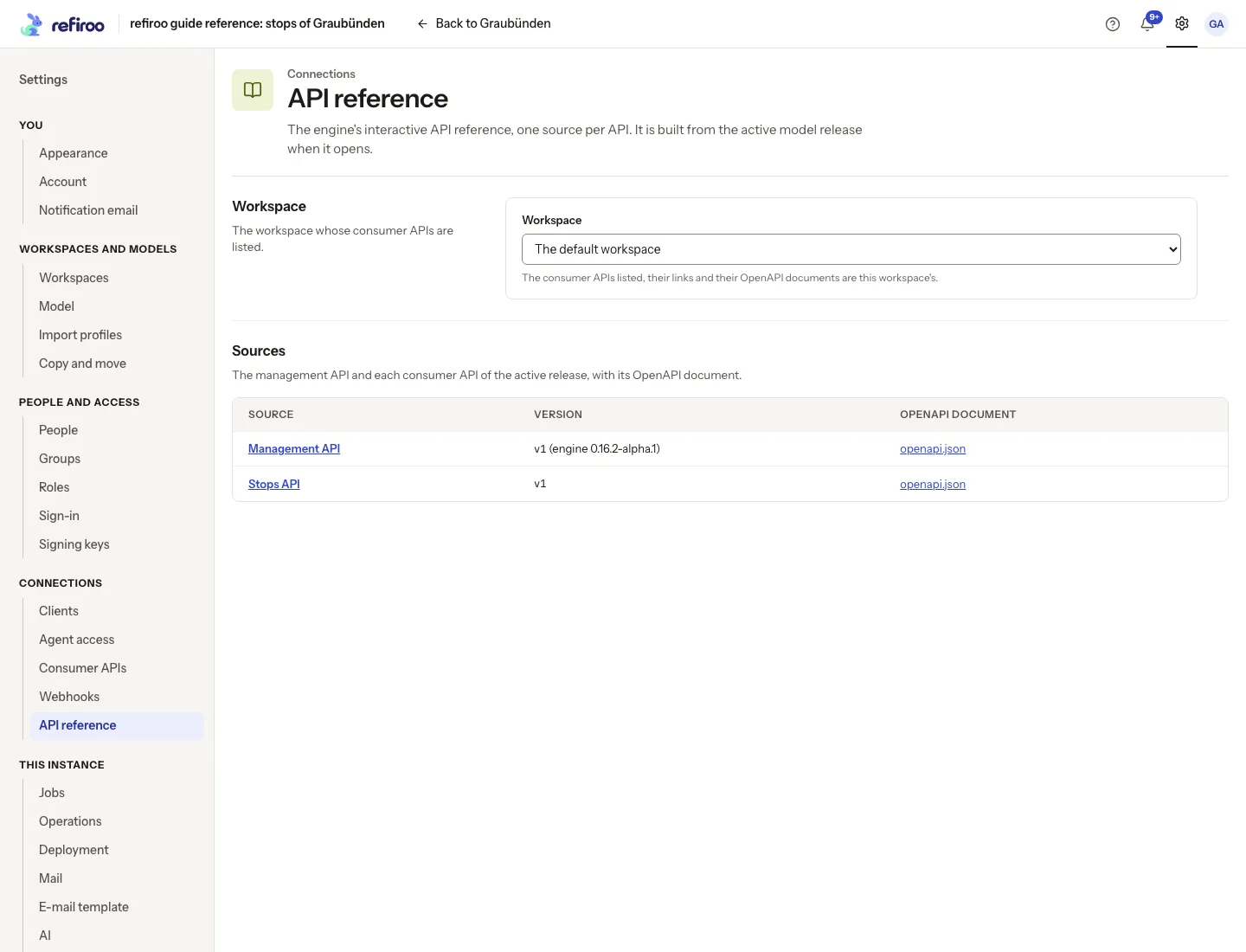
- The API reference served with refiroo works without internet access.
In the API: the management API groups objects, relations, change sets, mappings and relation matrices, each with its reference at /docs.
- objects
- relations
- change sets
- mappings
- relation matrices
Stop 2 of 4
A consumer API - give your systems a clear answer
Choose what other systems can read by declaring a consumer API in your model. Each is a read-only contract, with a higher contract version needed when you make a breaking change.
A system can read a business object by its record ID, page through declared lists or look up an object by code, ID or name. Where validity periods are declared, it can ask which records are valid on a day with asOf.
Live reads see committed live data, while unpublished change-set work waits out of view. For an extract that stays fixed, choose a publication by ID or the current publication.
- Each contract has its own version and generated OpenAPI document, with the API index helping you find it.
- Your client needs a token for consumer reads and a consumer API grant in the workspace; management access alone does not open that data.
- GET reads support conditional caching, and errors give you a code and message, with details when needed, inside error.
- In Settings › Integration, you can see each declared API's version, base URL, exposed types, lists and events.
In the API: each consumer API can offer Get by ID, lists, XREF lookup, Batch resolve, Crosswalk, asOf business-date reads and publication reads, plus an API index.
Stop 3 of 4
Webhooks and the change feed
Each live change takes the next number in its workspace's gapless change feed. Save the last position you processed to carry on after an interruption. Entries tell you what changed and why; read the records separately for their values.
Consumer events tell your systems when a business object is created, updated or deleted. Read them from the contract's Events operation, or have a webhook deliver them to your receiver.
In Settings › Integration › Webhooks, choose one event per request or batches, full objects or notifications, and RDM JSON or CloudEvents 1.0. Keep the signing key when it appears; you see it only once.
- Verify the HMAC-SHA256 signature over the timestamp, a dot and the raw body, and use event IDs to recognise repeats.
- Requests arrive one at a time per subscription in event order; failed requests are retried, with delivery paused after 24 hours of failure.
- Open a webhook's Deliveries to see its attempts, requests and your receiver's answers.
- Feed retention defaults to 30 days; if your saved position expires, refiroo points you to the publication to reread.
- Webhooks start off disabled, and you need permission to administer integrations to manage them.
In the API: the change-feed operation reads entries after a saved position, the contract's Events operation pulls business events, and consumer subscription operations manage webhooks.
GET /workspaces/{workspace_key}/feed?after=1842
Your receiver
attempt 1200
Stop 4 of 4
Pick up the work, pick a date
Bulk writes, imports and exports each have a job you can follow. Background writes work in chunks and, after a restart, continue from the first uncommitted item without repeating or skipping committed work. An interrupted export starts again to make one consistent file.
Choose all-or-nothing or item-by-item and inline or background execution for a batch. Preview a background batch, follow progress, cancel or retry safely with an idempotency key.
When your model gives a record type a business validity period, asOf finds the records valid on a day. It checks those dates rather than rewinding edits.
- The defaults give you 1,000 items and 5 MB inline, 1,000,000 items and 50 MB for a background JSON batch, and 10,000 items for an all-or-nothing job.
- HTTP 200 means the batch was processed; look at each item's applied, rejected or unprocessed outcome to see what happened.
- Jobs are kept for seven days by default; after that, the summary stays while outcomes, files and idempotency keys are removed.
- A validity period includes its start day and excludes its end day; an empty bound leaves that side open, and the record is absent on its end date.
- Give asOf one calendar day in YYYY-MM-DD form; a type without a declared period returns AS_OF_NOT_SUPPORTED.
In the API: batches under jobs, with an Idempotency-Key header, stage: preview, then POST /jobs/{id}/confirm or /cancel. asOf=YYYY-MM-DD works on per-type lists, queries, exports and consumer reads.
POST /jobs/{id}/confirm · Idempotency-Key
In the app
Your next connection starts here, with API references ready for you to explore.
At a glance
API in four facts
What you do in the browser, what the API offers, who may do it and what it works with.
- Your connections
- In Settings › Integration you can inspect each consumer API's version, base URL, exposed types, lists and events, follow and cancel jobs and subscribe webhooks.
- Your API
- You can work through the management API, run bulk writes and imports as jobs, read consumer APIs and business dates, and follow changes through feeds, events and webhooks.
- Your people
- You choose who may administer integrations and webhooks, run bulk writes and imports or read the change feed, and give each consumer client its own API grant.
- Works with
- Model declares the consumer APIs and the validity periods that asOf reads, Mapping's consumer API offers XREF lookup, Batch resolve and Crosswalk, Change sets keep unpublished work out of view until it is published, Import previews a workbook or CSV as a job, and AI connects an assistant through /mcp.