More ways to say it.
Keep a product's names together in every language you sell in, and see which translations still need a little care.

Stop 1 of 4
Give each language a place
Your products can have names in several languages. That is one way to put refiroo's records and relationships to work; your model chooses the types and rules.
A language is a record, and so is a translation. Each translation has its own name, content fields, version and history, sits beneath a language and belongs to the record it translates.
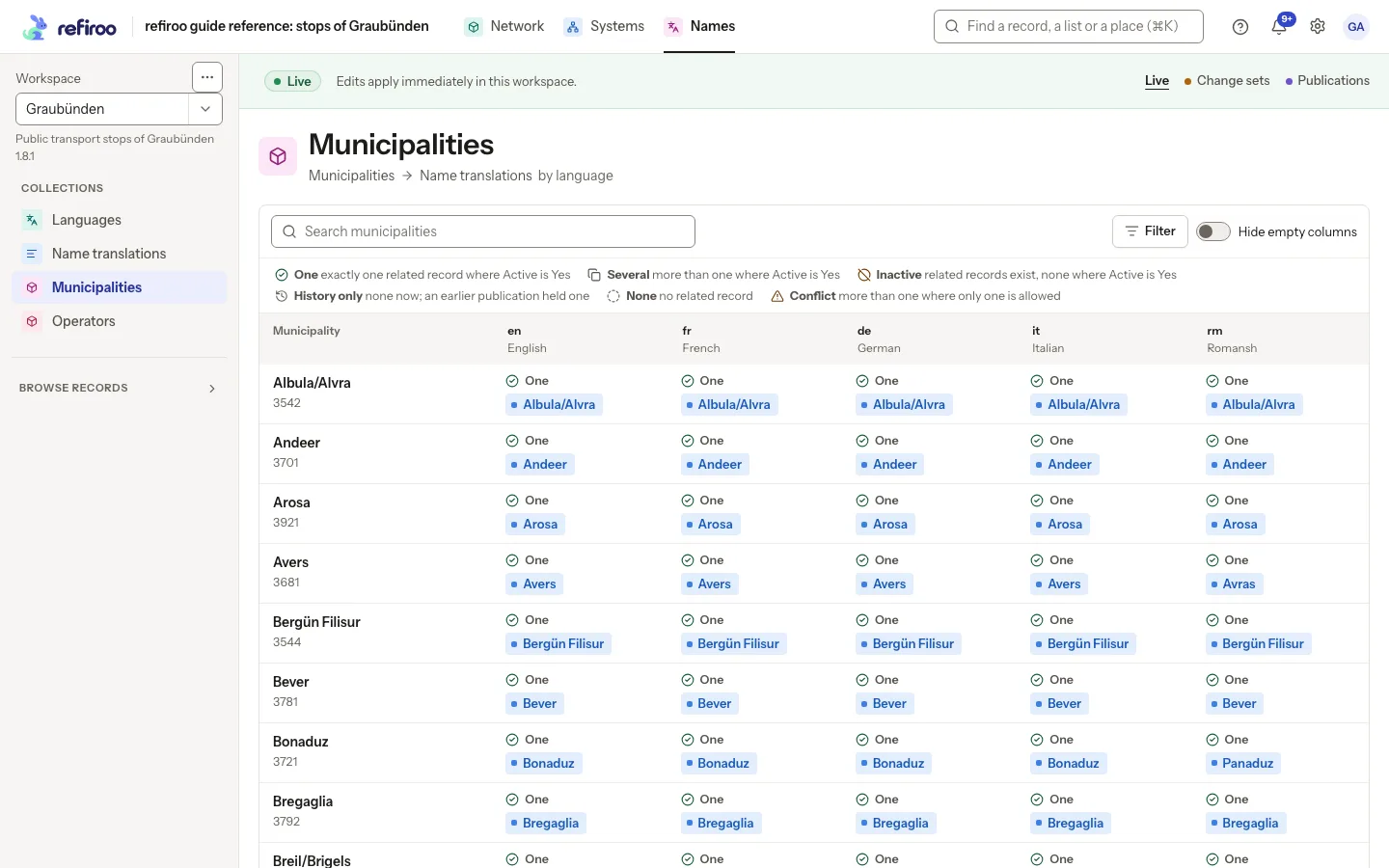
A relation matrix brings it all into view: the records being translated form the rows, languages form the columns and translations fill the cells. The same view can compare records against another list too.
- In the starter model, translations hold a translated name, description and value, plus Active, with only one active translation per owner and language.
- The same kind of matrix can put systems in the columns instead of languages.
- You supply the words; refiroo stores them, and the matrix does not generate translated text.
- A cell shows its full count and previews up to five records, with up to 20 columns visible at once.
In the API: the relation-matrix operation reads a relationMatrix view in live, change-set and publication contexts; columns are named with columnIds, at most 20.
Stop 2 of 4
Find the gaps, wherever they are
See what is current, missing, inactive or kept only in history, then filter to the gaps across the whole list.
Choose your columns, then a state. The filter finds rows with that state in at least one chosen column, including rows you have not scrolled to. The result covers those columns alone.
Work through translations across the list, with less opening records one by one.
- Your legend names the states: One, Several, Inactive, History only, None and Conflict.
- None means there is no related record; a translation record with blank text is a different thing.
- One means one record counts, so its wording can still need your review.
- History only means an earlier publication held a record; where offered, Create from this prepares a new record from it.
- Your page address keeps the search, selected columns, state and row position, ready for your return.
In the API: the relation-matrix read filters by cell state, which needs a column scope (RELATION_MATRIX_STATE_REQUIRES_COLUMNS otherwise).
Stop 3 of 4
Fill in the words
Create, correct, link or unlink from a cell wherever your model offers those actions. In the translation setup, refiroo refuses a second active translation for the same record and language, helping you keep one current answer.
When you create from a cell, the row and column are already chosen. Pick where beneath that column the record belongs; the record and its required connection are created together.
Prefer a workbook? Fill a new language's column to add the translations together, then import it back without a profile to load your edits.
- If an active translation is already there, open and correct it rather than adding another.
- For an inactive cell, look at its existing records first; changing Active can make one count again.
- A save in Live applies straight away; in a change set, it waits for publication.
- Changed elsewhere means someone changed the cell while you worked; review it alongside your preserved input before trying again.
- Deleting an owner can delete its translations too, so you get the impact to review first.
In the API: translations are ordinary records and relationships, written with the same operations and checks. An import profile can load related records such as translations.
Stop 4 of 4
Pass along the right name
Your consumer API can return translations alongside system codes, a parent and an ancestor path, all as declared parts of the same object.
A lookup can find a record by its translated name, and a crosswalk can find the corresponding name in another language where your API declares that route.
That gives the systems your people use the labels they need in their language.
- Your consumer API defines which parts appear and whether each holds one item or several; its generated OpenAPI document shows the shape.
- Your client needs a token for consumer reads and a consumer API grant in the workspace.
- Each contract has its own version, with a higher version needed for a breaking change.
- GET reads support conditional caching, so an unchanged answer can be reused.
In the API: a consumer API's Get by ID, lists and XREF answers carry translations as declared; a crosswalk asks for a target representation.
ENArabica coffee, 1 kg
DEArabica-Kaffee, 1 kg
FRCafé arabica, 1 kg
ESCafé arábica, 1 kg
ParentCoffee
In the app
Here you can see which names still need a little care.
At a glance
Translations in four facts
What you do in the browser, what the API offers, who may do it and what it works with.
- Your languages
- You can compare records against languages in a matrix, filter to missing or inactive cells and create, correct, link or unlink there, or fill a new language's workbook column.
- Your API
- You can read matrix cells and states, write translations as ordinary records and relationships and return them through a consumer API as declared.
- Your people
- Anyone looking after names in several languages can browse them, edit Live or prepare change sets, according to the access you choose.
- Works with
- Views show your records against languages in a relation matrix; Import loads a new language's column from a workbook; Change sets hold translation edits until publication; the consumer API returns translations as declared, and a crosswalk looks up the name in another language.