How refiroo works
One engine, many applications: a model defines what people can keep and how they work with it. Connections keep their meaning through the model’s relationship rules. Each workspace holds its data under its own selected model release; several workspaces in one installation can share a model or use different ones. See What refiroo is for the overview.
The model gives data its meaning
Section titled “The model gives data its meaning”An application model, usually called a model, defines applications, record types, fields, relationships and views. An application groups relevant types and views into a working area.
A record type, also called an object type in the model editor, defines one kind of item. A record is an item of that type. A field, also called an attribute, holds a typed value: text, a number, a date or a yes/no value. Fields can be reused across types. A binding says where a reusable field or relationship may be used and which rules apply there.
The model determines which views an application offers. A table, tree, mapping grid or relation matrix is available because the model declares it and the data’s structure supports it. See Applications and Types, attributes and relations.
Connections carry meaning
Section titled “Connections carry meaning”A relationship is a named, directed connection between records. Its rules decide which types may connect, how many connections they may hold and whether a connection is required.
Containment is the parent/child relationship that gives a record its place in a hierarchy. Moving a record updates its parent and that relationship together; editing an ordinary relationship cannot move it. A hierarchy editor is a tree view for browsing and maintaining this structure.
A mapping connects a value to its equivalent or representation elsewhere. A mapping grid helps people find sources with no target or several possible targets. A relation matrix compares records against groups defined by an ancestor type, making missing connections visible as empty cells.
Translations are one use of records and relationships: a language-specific record connects to the thing it names and belongs to a language group. They are configured in a model, rather than built into every record. See the translation example.
Read more about relationships, hierarchies, mapping grids and relation matrices.
One workspace, several views of its data
Section titled “One workspace, several views of its data”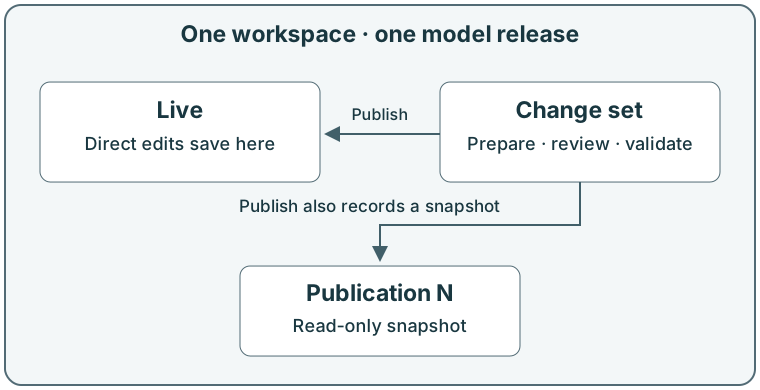
Live is the workspace’s current data. A direct live edit takes effect when saved. A record version protects each save: if the record changed after it was read, the save is refused as a conflict so that newer work is not silently overwritten.
A change set holds coordinated changes away from Live. Its candidate is the proposed complete content: the source data with its prepared changes applied. Validate the change set to check that result, then publish it to apply its changes together over current Live data.
Publishing also creates a publication, an immutable snapshot. Immutable means its content cannot be edited afterwards. Publication N uses a number counted within the workspace; this continues across model releases and is separate from a record version. Later live edits do not rewrite publications.
Withdraw a publication to remove its current designation; this leaves Live and history unchanged. Retire a workspace to make its data, change sets and publications read-only. See Workspaces, Change sets and Publications.
Change the rules separately
Section titled “Change the rules separately”A model draft proposes changes to the definition. Install a validated draft to create an immutable model release. Activate the release to use it in a workspace; installing alone does not switch the workspace. Existing data must fit the selected release, or an administrator must review a migration.
Three kinds of change explains when to edit Live, prepare a change set or change the model. Model releases explains installation and activation.
Shape the working screens
Section titled “Shape the working screens”A model administrator uses the model editor to change a draft, review its issues and history, and preview it against records without changing those records. Types, attributes and relations defines the reusable fields, permitted parents, ownership and candidate rules behind the screens.
Applications and views chooses collections, navigation groups and the table, tree, mapping-grid or relation-matrix views each collection offers. Record pages and tables arranges fields, related-record panels, columns, filters and sort choices. Hiding a panel changes presentation; it does not remove stored data or revoke access.
Issues and dry runs distinguishes a valid definition from one that also fits existing records or a proposed workbook load. Workbook proposals can help turn sheets and columns into a reviewed design. The specialist workbench handles supported definitions without visual forms; an absent form does not necessarily mean the capability is unavailable.
For later changes, use migrations to convert existing data under an explicit loss review. A model mapping describes how records transfer between workspaces with different definitions. Neither installing a draft nor switching to another workspace transfers records by itself.