Mapping grids
Use a mapping grid to connect records on one side of a relationship to records on the other. One use is connecting codes from another system to the records whose meaning they represent. The model chooses both sides, their fields and the relationship; neither side has a fixed role in refiroo. Follow Map codes between systems for the steps.
A collection can offer several mapping grids as views beside its table. When you open the collection from a parent record, for example the values of one group, the row of views lists only the mapping grids that already map at least one record under that parent, along with its other views and the view you are on. If none of them maps anything there yet, or refiroo cannot tell, every view is listed. To start the first mapping in another grid, open that view from the collection itself rather than from the parent.
Reading a mapping
Section titled “Reading a mapping”Each row identifies a source record, its mapping state and its connected targets. Target chips use the target type’s colour and show names with identifying fields chosen by the model. Read those fields before deciding that two similar names mean the same thing.
Select the source record’s name to open its record page. Each target chip opens that target’s record page. When editing is permitted, clicking elsewhere on the row opens Change mapping, as do Map and Change.
The model may also show the name of a source record’s nearest parent of a chosen type, even several levels above it. The column heading is that type’s name. Search looks at source names and the source’s displayed attributes, not these parent names.
Drag a column’s right edge to change its width. With a keyboard, Tab to the edge and use the Left or Right arrow key. refiroo remembers widths for this view in your browser on this device. Rows keep their values on one line; a row with several targets lists them on separate lines. If a value is cut off, point at the cell or move keyboard focus into it to see the full value in a box beside the cell. The box usually appears below it and moves above when space is short.
| State | Meaning |
|---|---|
| Unmapped | No target is connected through this view’s relationship. |
| Mapped | At least one target is connected. When a row has several, the count says how many. |
| Ambiguous | More than one target is connected, on a view where a source may hold only one. |
A relationship decides what several targets mean. Where a source may hold many targets, such as the “one” side of a one-to-many relationship, several targets are normal: the row is Mapped with its count, and the view has no Ambiguous choice. Ambiguous appears only where a source may hold at most one target, and describes multiple stored connections rather than uncertainty about a suggested match. Decide whether one or several is correct for the data before replacing anything. An unmapped row can be intentional.
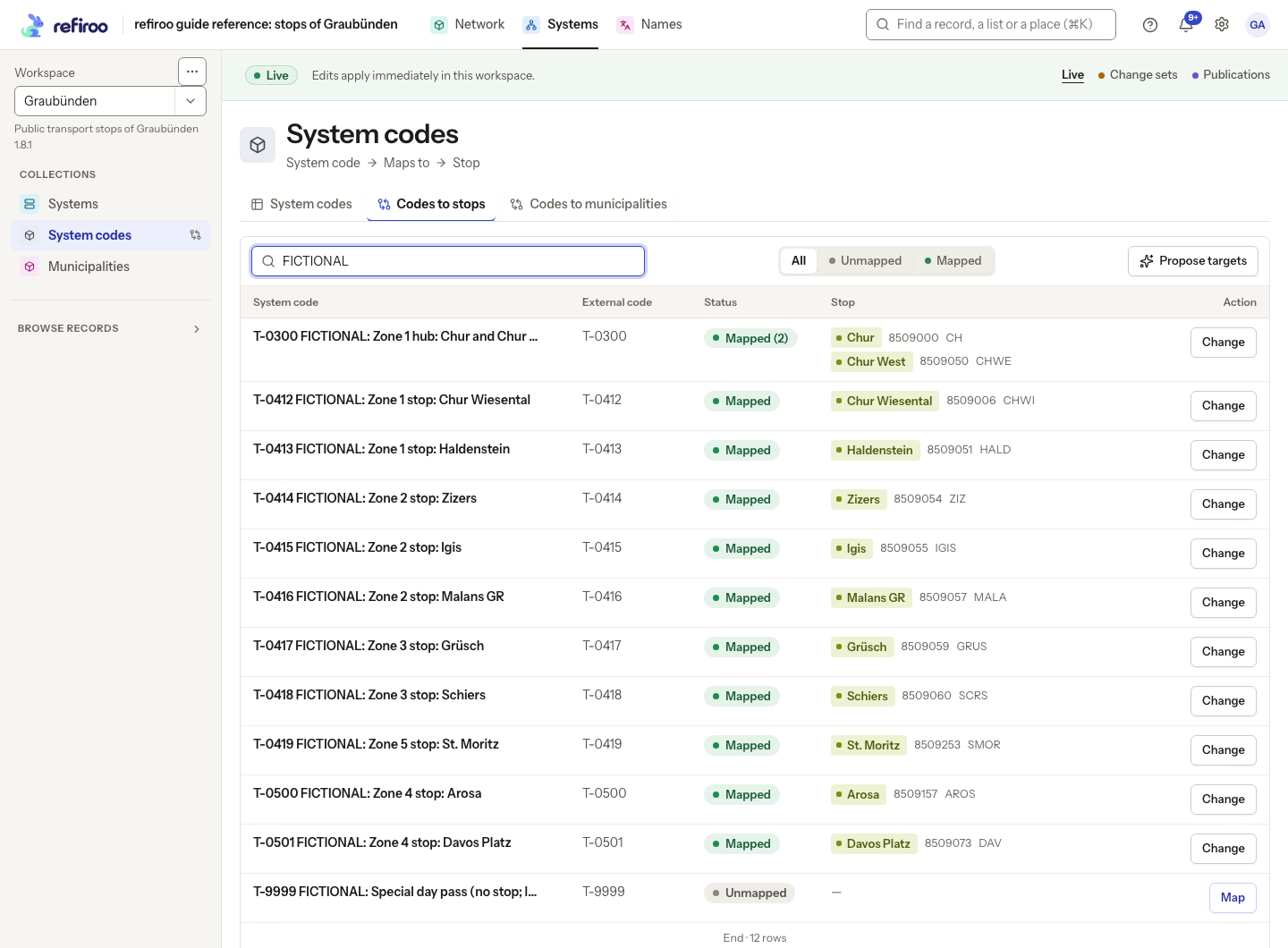
Above: Codes to stops in Systems, searched for FICTIONAL, shows the invented Regional ticketing system. T-0300 is Mapped (2), connected to Chur and Chur West; the other mapped codes each show one stop. T-9999 is deliberately Unmapped, with Map available. This view allows several stops per code, so its filters are All, Unmapped and Mapped. Select a name in the first column to open the source record.
All, Unmapped, Mapped and, where it applies, Ambiguous narrow the whole list, together with search. An empty result says nothing about rows excluded by these conditions. A loading failure is not an unmapped state; retry the read before editing.
Choosing or clearing targets
Section titled “Choosing or clearing targets”Map on an unmapped row and Change on a filled row open Change mapping. Choosing a target and saving sets that row’s mapping to the chosen target. If several were connected, the selection replaces them with one; it does not add another target alongside them.
Where offered, Create new followed by the target type opens a record creation form. Creating a target and saving its mapping are distinct steps: review the selected target and finish Save. Cancelling the mapping does not undo a target already created.
Remove mapping, where available, clears the connection rather than deleting either record. A required connection cannot be cleared. Changes are saved together or refused, so an unsuccessful replacement does not leave a half-changed mapping. See Relationships for candidate restrictions and number limits.
A mapping grid works with voluntary associations, not parent containment or required ownership. To create owned related records across columns, use a relation matrix. To keep several targets, use the record’s relationship controls rather than replacing the set with one selection in the grid.
Permissions, context and conflicts
Section titled “Permissions, context and conflicts”Reading needs Browse. Saving needs Edit live or Work in change sets for the relevant data. Reader can inspect; Contributor can prepare change-set work; Data steward and Data owner can also edit Live. Scoped grants can restrict the types you change. Publications and retired workspaces are read-only. See Record permissions.
In Live, a saved mapping applies immediately. In a change set it remains proposed until publication. If someone changes the mapping after you read it, Mapping conflict shows the current mapping. Review it before continuing with your selection or cancelling. Publishing also checks intervening live changes; see Change sets.
The counts and All, Unmapped, Mapped and, where it applies, Ambiguous state choices describe the whole matching list. Use them with search to find work beyond the visible rows. Target chips preview the connected records so you can inspect identifying fields before replacing them. An atomic replacement retains the existing relationship’s identity and fields. Publishing a change set refuses mappings that diverged from Live; review the current connections before preparing another attempt.
Screenshot data: Source: opentransportdata.swiss, Service Points (Didok), Federal Office of Transport / SBB, snapshot 2026-11-02. Wikidata, CC0. See The example data for sources and fictional additions.
More targets and newly created records
Section titled “More targets and newly created records”Mapping status groups All, Unmapped, Mapped and, where it applies, Ambiguous. A mapping row counts eligible sources plus sources already connected, so changing candidate conditions does not hide existing mappings. Show all … targets for … expands a row’s remaining targets.
Creating a missing target asks for its application. Parent choices belong to that application; if no required parent can stand there, creation is refused. Create or select a suitable parent rather than choosing one from another application. Creating the target selects it in the mapping form but does not save the mapping: finish Save separately.
A replacement keeps the values of connections it retains when no new relationship values are supplied. Explicit replacement values replace the whole collection of fields, and clearing all is allowed only if the model accepts it. In the ordinary mapping picker, choosing a target alone does not clear its existing relationship fields.
Empty results and an unavailable view
Section titled “Empty results and an unavailable view”No results match these filters means the mapping-state filter has no matching rows. Choose All and clear other conditions to widen the list. No results match this search means the search has no matches; change or clear it. No … in this workspace yet names the source record type when there are no rows and neither a state filter nor search is applied. Check that you are in the intended workspace and context before adding records.
This mapping view references an object type that does not exist in the active model. means the view cannot be drawn. Reload after a model change. If it persists, give a model administrator the view name and message so they can correct the model; changing mappings cannot repair a missing type.
Targets proposed by AI
Section titled “Targets proposed by AI”Propose targets asks the configured AI provider to choose targets for unmapped sources. It needs Use AI proposals, Work in change sets, a writable workspace and the send level values. It is unavailable in a publication. Follow Propose targets to prepare and review them.
Search and the chosen parent narrow which sources are considered. The provider receives source and candidate target names and the fields this view shows. Only targets the grid permits are candidates: all eligible targets when there are at most 100, otherwise each source’s 20 closest by name and searchable fields. Requests normally group 25 sources, or fewer for a small model context. This shortlist can miss a good target; the proposal is help, not proof of a match. Requests can cost money and their outcome is kept. See AI and your data for sending, access and retention.
Each accepted answer becomes an ordinary mapping in the chosen change set. Live data stays as it was. Proposed under Mapping status shows sources with AI-proposed targets in that change set. Proposed by the AI shows the confidence and reason; on a phone, open Why? to read the reason. Confidence is the provider’s estimate, not a guarantee. The operator sets a minimum confidence, normally 0.5 out of 1; lower answers and invented or missing targets are left unmapped.
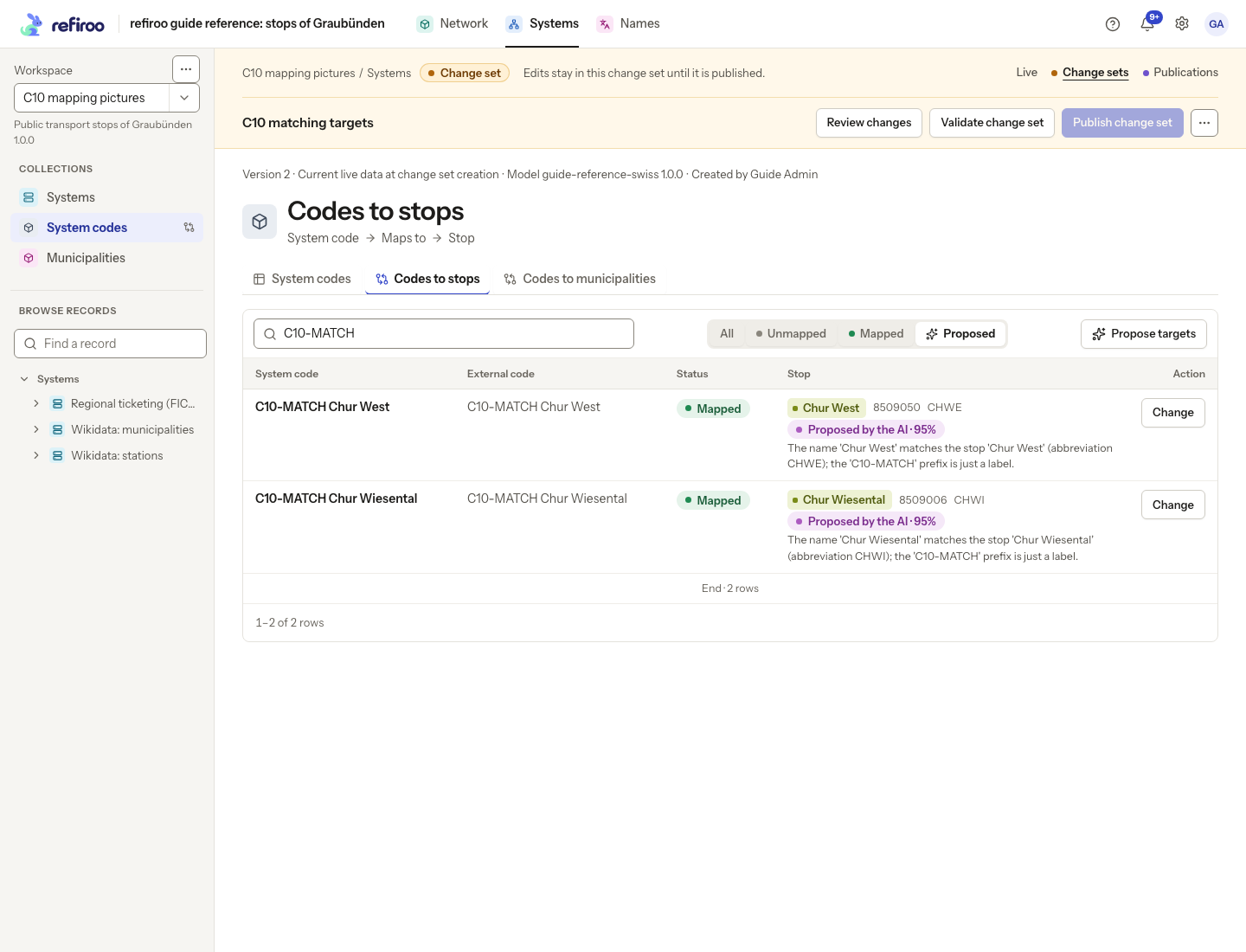
Correct a wrong target through Change and Save, or remove the mapping if allowed. Changing the target removes its AI mark because the replacement is your choice. Publishing uses the usual approval and conflict checks. The published relationship’s history keeps the proposal’s origin and model, and separately names the person who published it.
The job’s result counts Proposed, Left unmapped: no likely target and Changed meanwhile, not touched. It also reports refused or unanswered rows when present. Concurrently mapped sources are left alone. Failed calls produce warnings; their rows are not proposed. Earlier successful batches can remain after a later failure. Stop likewise keeps proposals already written. Inspect the change set before publishing even when the job ended early.