Propose a change
A Contributor prepares changes in a change set for someone authorised to publish. Read Change sets for shared work and publication.
- In Live, open the record and choose Propose a change, or choose Propose a new … on a collection to add a record. These offers depend on your permission for that type.
- If you have no open change set of your own, the Propose a change dialog asks for Change set name. Give the work a recognisable name, then choose Start and edit. Cancel leaves Live unchanged. If one already exists, refiroo continues your newest open change set instead of asking for another name.
- Check the amber band for the change-set name. The Live band can also identify Your change set and its count. Make the correction with the ordinary field or record form; the save goes into the change set.
- Open Review changes and check every proposed record and relationship. Your change set is shared with other authorised workers, so it can contain work beyond your latest edit.
- Submit it for publication where offered, or ask someone holding Publish in this workspace to publish it. Submission freezes editing until withdrawal or send-back.
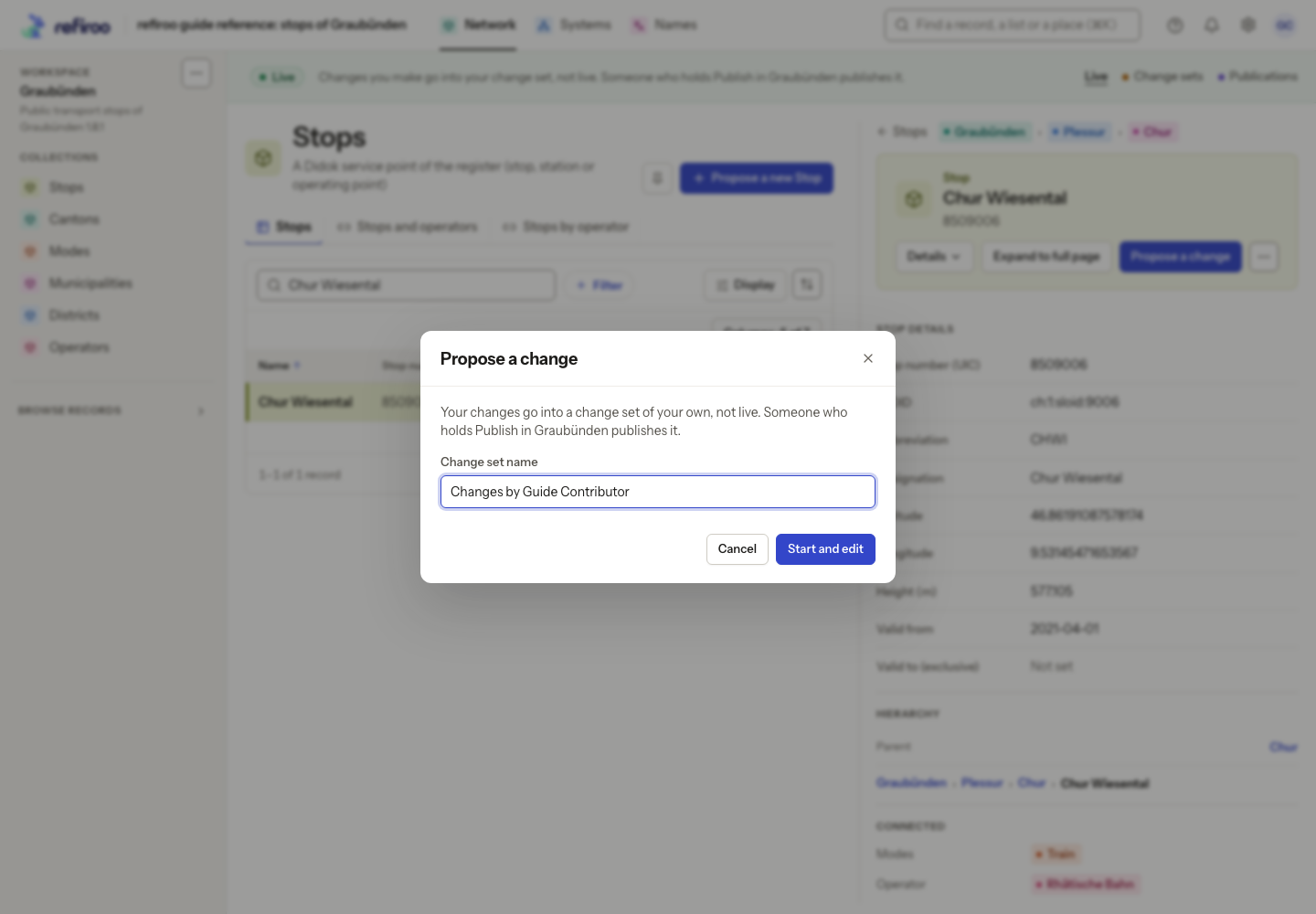
Above: a Contributor proposes a correction to Chur Wiesental in the Network application, Graubünden workspace. Cancel closes the dialog without starting a change set.
A Reader sees You can read this workspace and whom to ask, rather than proposal controls. Narrowed permissions show actions only for the covered types. Check Account › What you can do if an expected offer is absent. A publication and a retired workspace remain read-only.