Consumer APIs in the model
A consumer API gives other systems a deliberate view of workspace data. Its contract chooses which types and fields they read and the operations available to them. It is not a second copy of the records. You need Model authoring to edit the draft; activation needs release access. Start with Define a consumer API.
Choose the content within a shared form
Section titled “Choose the content within a shared form”Every consumer API uses the same patterns for presenting business objects, reading lists, looking up values, resolving several inputs and reporting changes. Within your API, all exposed record types share one declared object shape. Selected fields, related records, system codes, translations and parent information fit into that shape. A field without a value uses its declared fallback or stays empty; it does not require a different form for that record type.
Your choices supply the content: which types are exposed, what fields mean, which relationships are followed, how lookups match and which changes are reported. The engine supplies the common forms for objects, pages, errors and events. Systems that read your API can reuse their reading and change-handling processes across types and contracts.
You still choose public field names, related fields and whether a relationship returns one record or several. You also choose which operations are offered. These choices define your particular contract; another consumer API can make different choices. A consuming system that reads the contract’s declared structure can adopt new types through configuration, while one written for fixed names may need changes. Review the generated documents with that system’s team.
Keep the agreed output stable as the underlying model evolves. The consumer contract’s version is separate from the model release version; a breaking change needs a higher contract version. See the shared patterns and two example record types for the integrator’s explanation.
From an editor choice to a consumer’s answer
Section titled “From an editor choice to a consumer’s answer”A business object is one record presented in the shape you choose for other systems. It can include fields from that record, its parent and related records. Get by ID, lists and lookups all return this same shape. A lookup adds a match score; a list wraps objects in a page. Changing the shape therefore affects more than one operation.
Reference-data example: Stops API exposes stops, municipalities, operators and modes. A stop’s business object includes its name, stop number, operator, modes and selected system codes. An operator uses the same declared fields, with stop-specific values empty. These are choices in this model, not built-in transport features.
The business object consumers read
Section titled “The business object consumers read”On Fields, Role says which field supplies the identity, code, name or validity dates. The identity role always reads the record’s stable ID. A business code such as a stop number is a separate field; it does not replace that ID. Output name controls the name in the answer, while Served type shows the value’s type and whether it can be missing.
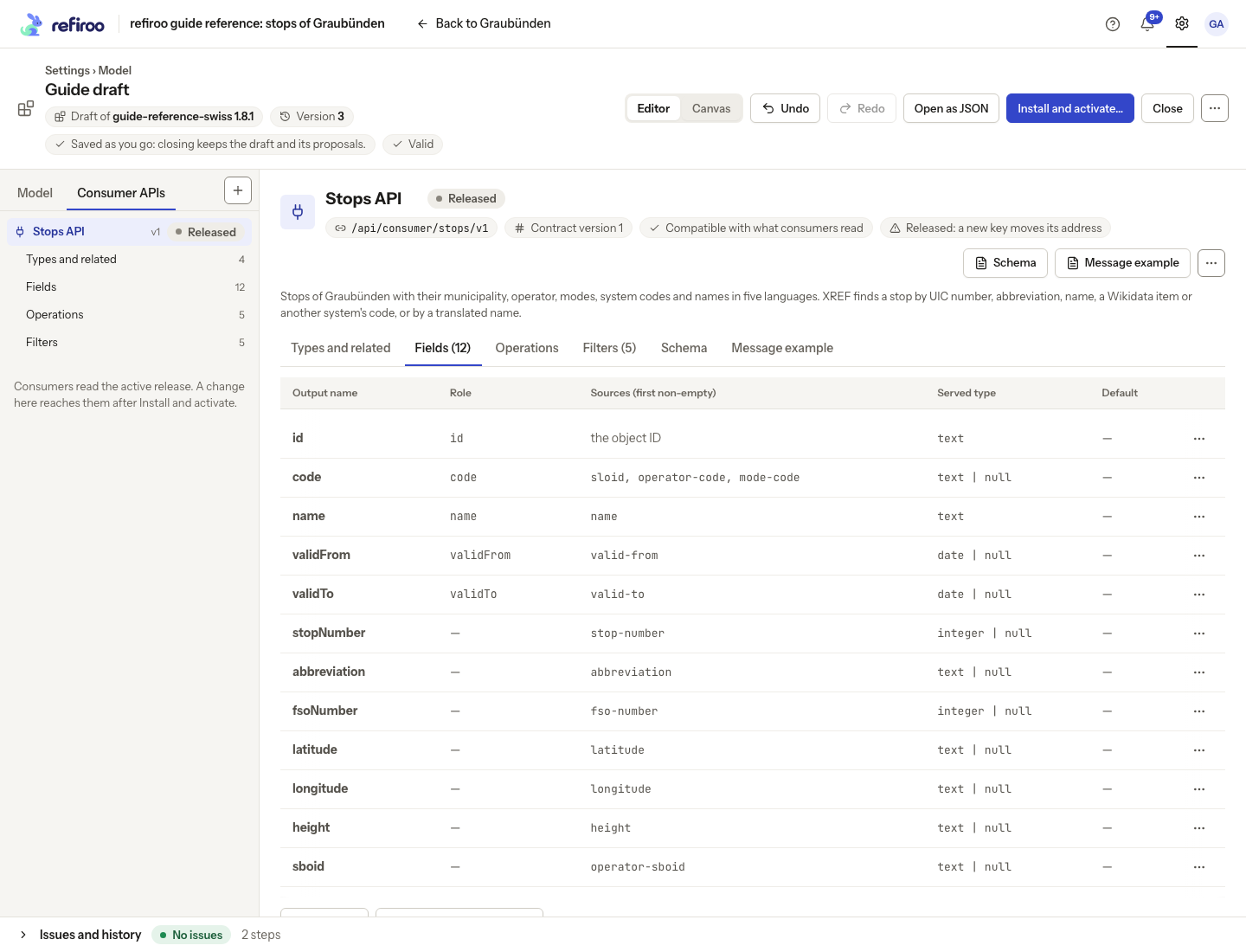
Above: Stops API in the reference model. The code has three ordered sources; stopNumber is an integer and validTo can be null.
Reference-data example: Chur’s stop is named Chur, has stop number 8509000 and abbreviation CH. Its operator is Schweizerische Bundesbahnen SBB and its mode is Train. The containment path names Graubünden, Plessur and Chur, excluding the stop itself.
A field does not inherit a parent’s or related record’s value automatically. Choose the parent’s fields in Parent, or publish related values through an explicit related block. A single-valued relationship gives one related object or an empty value; a many-valued relationship gives a list, which can be empty. This shape follows the relationship’s cardinality and is part of the contract. Decimal values retain precision; integers, booleans and dates keep their declared types.
The parent can carry its own values
Section titled “The parent can carry its own values”Serve the parent when consumers need the containing record’s identity and values in the same answer as the child. On Fields, choose Parent, path and hierarchy… and turn on Serve the parent (objectType, id, code, name). Below the object’s fields, Parent then shows Output name and Fields. The field picker offers the built-in type, identity, code and name choices, plus attributes attached to the types that can directly contain an exposed type. Those parent types do not have to be exposed as business objects themselves.
Each parent field has a public output name you choose and a source it reads. In Parent fields…, review the rows pairing a name with its source. The editor proposes camelCase words for the name; you can change it. The Parent table shows name=source when they differ. For example, a category’s approval flag can be published as isApproved.
A parent field keeps its declared type. Without a default, it answers null if this parent’s type does not bind its source or the record has no value. With no parent, the whole parent output is null. An unexposed parent’s public type is null. A specialist can also give a field ordered sources and a default, as for the object’s fields. Sources must share a value type.
An existing short list of parent sources remains valid. Built-in fields keep their role’s public output name; other sources use their words in camelCase. For example, a category-code source is served as categoryCode. Editing the parent writes out the explicit names.
Under Parent’s related records, use Add related, then choose Output name, Via and Fields. The relationship starts from the parent, rather than the child. The block appears beside the parent’s selected fields, as an object or list according to cardinality. There is one parent level: it has no nested parent, path or hierarchy. The main object’s path and hierarchy remain available for ancestor names. A specialist can also select a value from the parent’s own ancestors; the field picker does not offer new ancestor sources.
Example: a catalogue item can carry its category’s identity, an approval flag and related external codes. The consuming system can read them together without fetching the category separately. On a list, the category’s block repeats on every child row. Consider serving a large or rarely used block only on request.
Serve related records always or on request
Section titled “Serve related records always or on request”In Types and related, each related block has a Served column. The same column appears under Parent’s related records on Fields. Choose Always for a block in every answer, or On request when consumers should explicitly ask for it. Always is the default for an existing block and for a new one.
An on-request block is absent from an ordinary answer. When requested, it has its usual object or list shape, including null or an empty list when there is no related record. This keeps the default answer small without losing its declared types. On Operations, Include lists the accepted choices automatically; edit Served to change that list. Parent choices have a parent prefix there, even when you choose a different output name for the parent itself.
A filter can still use an on-request block without returning it. On Filters, On related offers both the object’s blocks and the parent’s. Keep only matching records removes a child if its parent’s selected block has no matching item. Without that option, the filter only trims the block. Crosswalk applies to the object’s own blocks, not the parent’s. The filter’s Name belongs to the contract; the Include parameter’s name is reserved.
Turning an always-served block into an on-request block removes it from existing consumers’ ordinary answers. Review the compatibility warning and raise the contract version. Adding parent fields or blocks, or adding filters, does not by itself require a higher version.
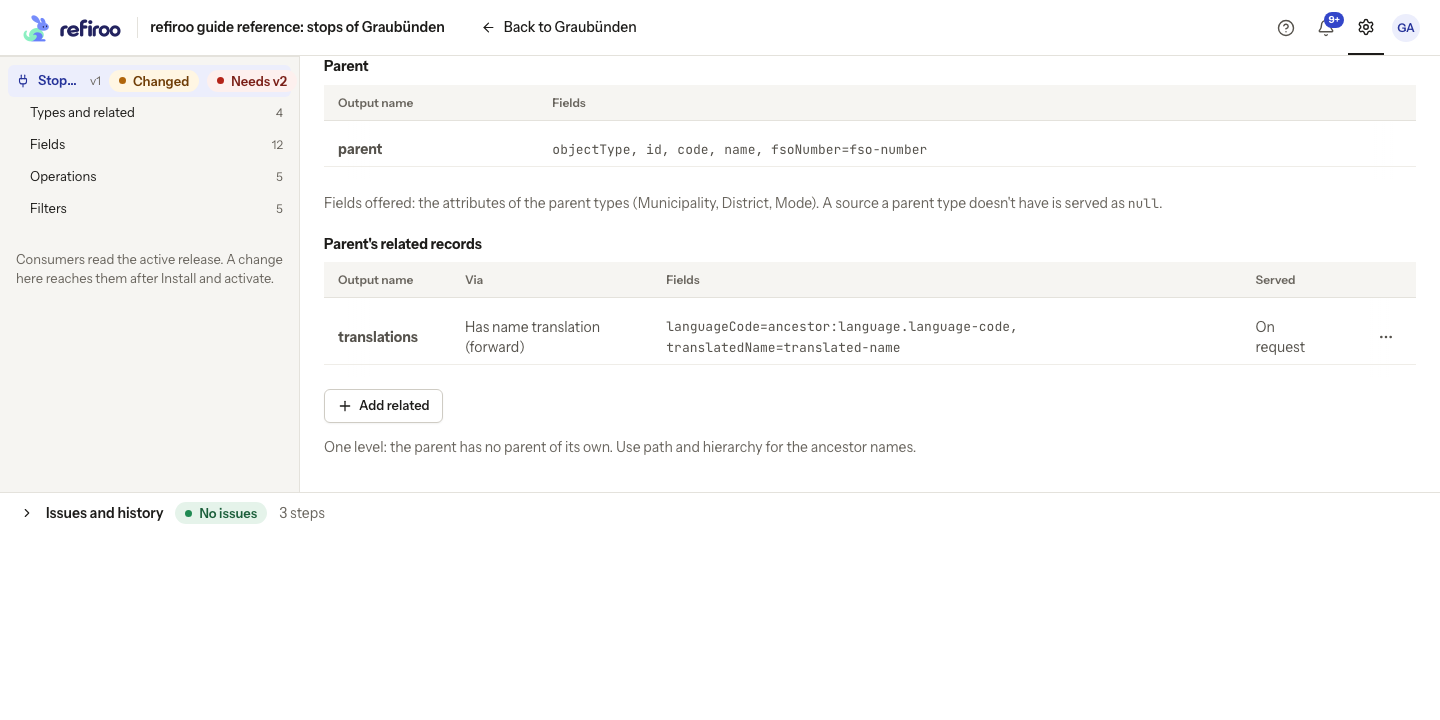
The Parent section shows the selected parent attributes and Parent’s related records, including Via, Fields and Served.
Sources and defaults
Section titled “Sources and defaults”Sources are tried in the displayed order, skipping missing values and empty text. Zero and false are values, not missing data. If none supplies a value, the declared Default is used; without one, the answer contains null. A default affects the output only and never writes a value into a record. It must have the field’s served type.
Reference-data example: the reference API has no field defaults. If you set a default abbreviation of “—”, records without an abbreviation receive that fallback in the consumer answer. Chur still shows CH. Neither record’s stored abbreviation changes.
Values belonging to a relationship
Section titled “Values belonging to a relationship”A related block can publish values of the connection as well as values of the related record. In its Fields picker, Attributes of the relationship lists the shared attributes carried by the allowed pair in the selected direction. Choose a public output name for each one. The answer uses its declared type: Yes or no stays boolean, for example. A connection without a held value returns null for that field. If no related record exists, the whole block still uses its usual empty object-or-list form.
These choices belong inside the related block, not the main object’s Fields. The main object has no single connection from which to read such a value. If a carried field is missing from the picker, review Via, the exposed types and the allowed pair’s Carries before editing the contract. The same values appear in object reads, lists, lookups and resolved objects. Publications retain their saved values; a business date filters validity rather than rewinding later edits. See the integrator’s reference example for the resulting contract and answers.
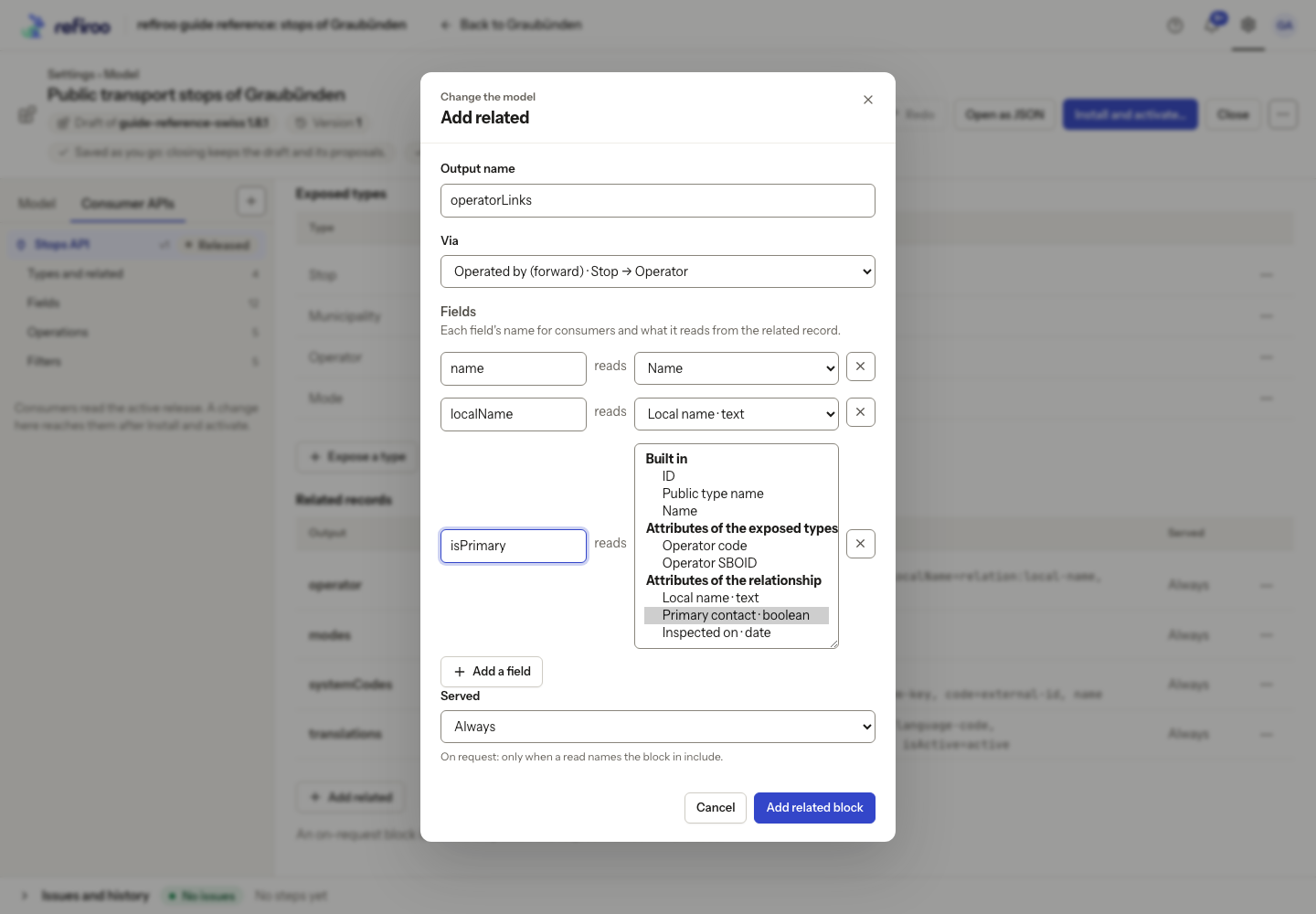
Above: Stops API’s Add related dialog in a reference-model draft. The proposed output operatorLinks follows Operated by (forward) from Stop to Operator and has fields name, localName and isPrimary. The isPrimary source list is open: Attributes of the relationship offers Local name (text), Primary contact (boolean) and Inspected on (date), with Primary contact selected. Built in and Attributes of the exposed types are separate groups. Nothing has been applied.
An On related filter can select one of these carried attributes in Matches on. It matches that particular connection, not every object connected to the same related record. A lookup’s Also match through rule can also use a carried text value in First of. A scored match needs text; a filter can compare other declared types, including Yes or no. These matching choices do not require the attribute to be searchable or unique.
Lists, filters and the requests they enable
Section titled “Lists, filters and the requests they enable”A list selects the type to return and its order. Within the filter gives a list a containment scope. A filter’s Name becomes a parameter name; Matches on chooses which values a consumer can supply. These are public choices: changing a filter name or its accepted values can break a consuming system even if the output fields stay the same.
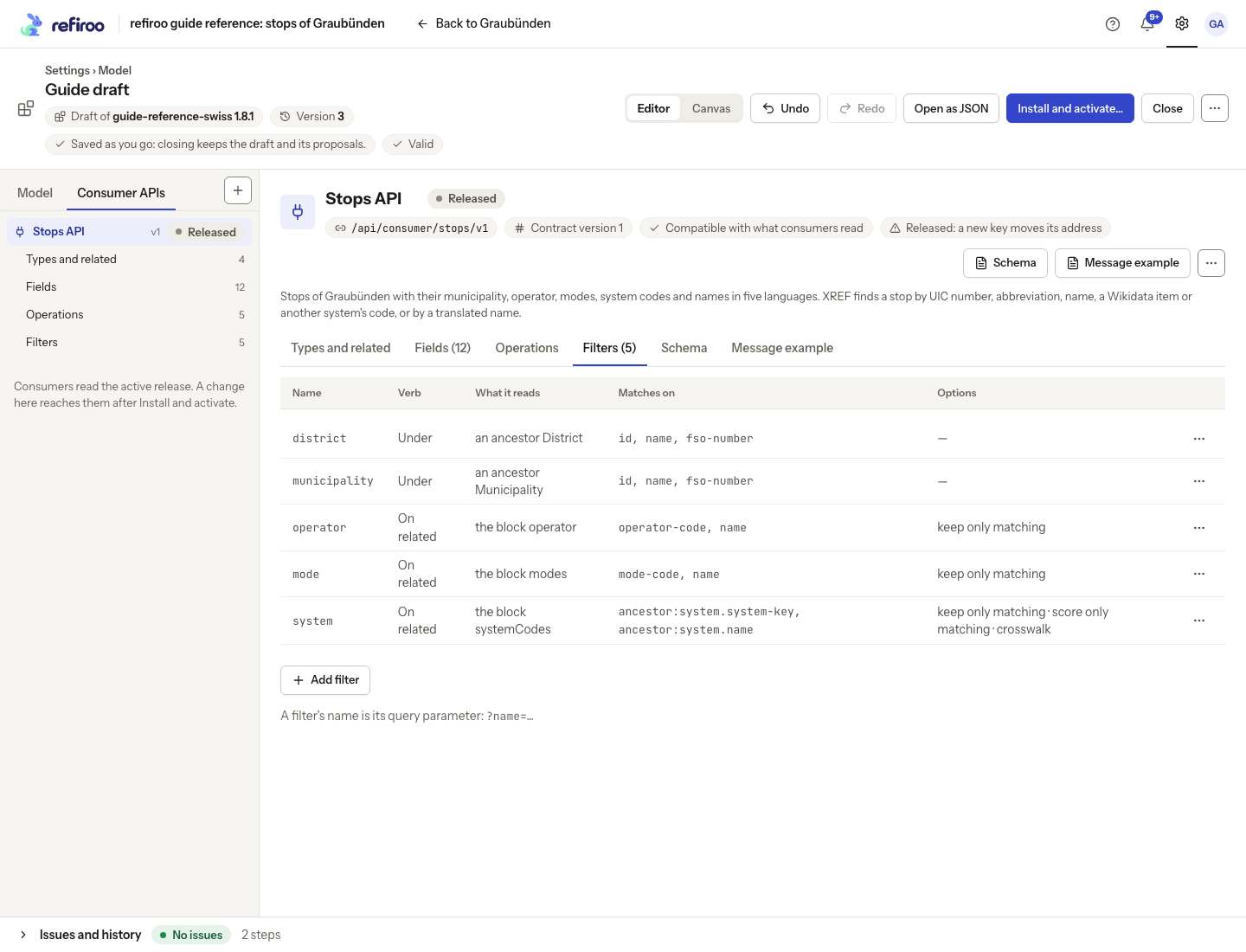
Above: the reference API’s municipality filter matches an ancestor by ID, name or FSO number on ordinary reads. A list’s Within parameter with the same name takes parent IDs only. Its mode filter reads related modes and keeps only matching records.
Reference-data example: the reference API has a list of stops within a municipality, sorted by stop number. A consumer selects the municipality by its stable identity. On a list without that special parent scope, the ordinary municipality filter can match a municipality’s name or FSO number instead. Omitting the parent selection returns the whole listed type. A page size controls one response, not the entire collection.
A related mode filter can keep only stops linked to Train and show only matching modes in their related block. Another related filter can trim the block without removing the object. A filter does not create another output field. Agree both effects with the consuming team.
Lookups and batch answers
Section titled “Lookups and batch answers”XREF finds records by the values another system knows. Exact and Contains are numeric weights. Exact comparison ignores letter case for text; Contains matches part of text and applies only to terms of at least three characters. A higher match score ranks first; it is not a percentage or a guarantee that the record is the intended one.
Reference-data example: the stop number rule has an Exact weight of 900. Looking up 8509000 identifies Chur with that score. Looking up its Wikidata code Q663869 instead reaches Chur through a related system-code record, with the configured weight of 90. These weights rank candidates; they are not confidence percentages.
Use Preferred types… on an Also match through row to select Prefer records of these types. The choices are exposed types; clear them for no preference. Review its effect with the consuming team, especially when the same related value reaches several types.
A request for one answer succeeds only with an untied best candidate. No match and a tied best score are distinct outcomes. Also match through lets related records identify their owners. First of uses the first matching related rule; Prefers can choose which exposed owner types receive its score.
Resolve applies Get by ID or lookup rules to many inputs. Each gets its own found, missing, ambiguous or refused outcome, in input order. Shared request filters can be overridden for an individual item; those defaults narrow the question, whereas a field’s Default fills a missing output value. Crosswalk enables asking for a selected related representation, such as a system code. It does not resolve a tied source match by guessing which source has a target.
Events describe changes to the output
Section titled “Events describe changes to the output”An event’s Types selects the records, Changes selects creation, update or deletion,
and Watches limits which output changes trigger an update event. Leaving Watches empty
watches any change to the business object, including related blocks. Events per type
adds a standard event for each exposed type. The reference API leaves that option off
and declares only its custom stops-changed event.
Reference-data example: Stops API watches code, name and validity dates. Renaming Chur to Chur Bahnhof produces an update notification naming the name output. Changing latitude alone does not trigger that event. This is an example change, not a record of a change in the reference snapshot.
A related record’s edit or a relationship joining or leaving a watched block can also trigger an update. Changes to a parent’s selected attributes, values read from its ancestors or items in its related blocks can report an update for each child showing that parent. Watch the parent output, or leave Watches empty, to cover those changes. Events and webhook deliveries have no Include choice: their full objects leave on-request blocks out. If a block exposes connection values, an update of that relationship can report the block as changed too. Add the block to Watches, or leave Watches empty to include all output changes. A notification watching only unrelated main fields does not report that edit. Watched source changes can be reported even if a fallback leaves the displayed answer equal. A validity date passing without a write produces no notification. Moving a record into an event’s types counts as creation, moving it out as deletion, and moving between included types as an update to its type.
Full notifications carry current business objects when delivered, rather than a saved historical copy. Deleted records have no object body. Declaring an event does not register a receiver or grant access. Administrators manage delivery separately; see Webhooks.
What the editor shows
Section titled “What the editor shows”Select Consumer APIs in the model pane, then an API. Its facts show Contract version and Compatible with what consumers read, Needs contract version …, or Checked once the draft is valid. Fix model errors before relying on the compatibility result.
| Tab | What you decide or inspect |
|---|---|
| Types and related | Exposed record types, their public names, related blocks and optional parent, path and hierarchy. |
| Fields | Output names, value sources and roles. Ordered sources use the first non-empty value. |
| Operations | Get by ID, cross-reference and resolve choices, lists and custom events. |
| Filters | Named ways to narrow or match records, including through related blocks. |
| Schema | The generated description of the data shape. |
| Message example | A generated example of the declared shape, rather than a live record sample. |
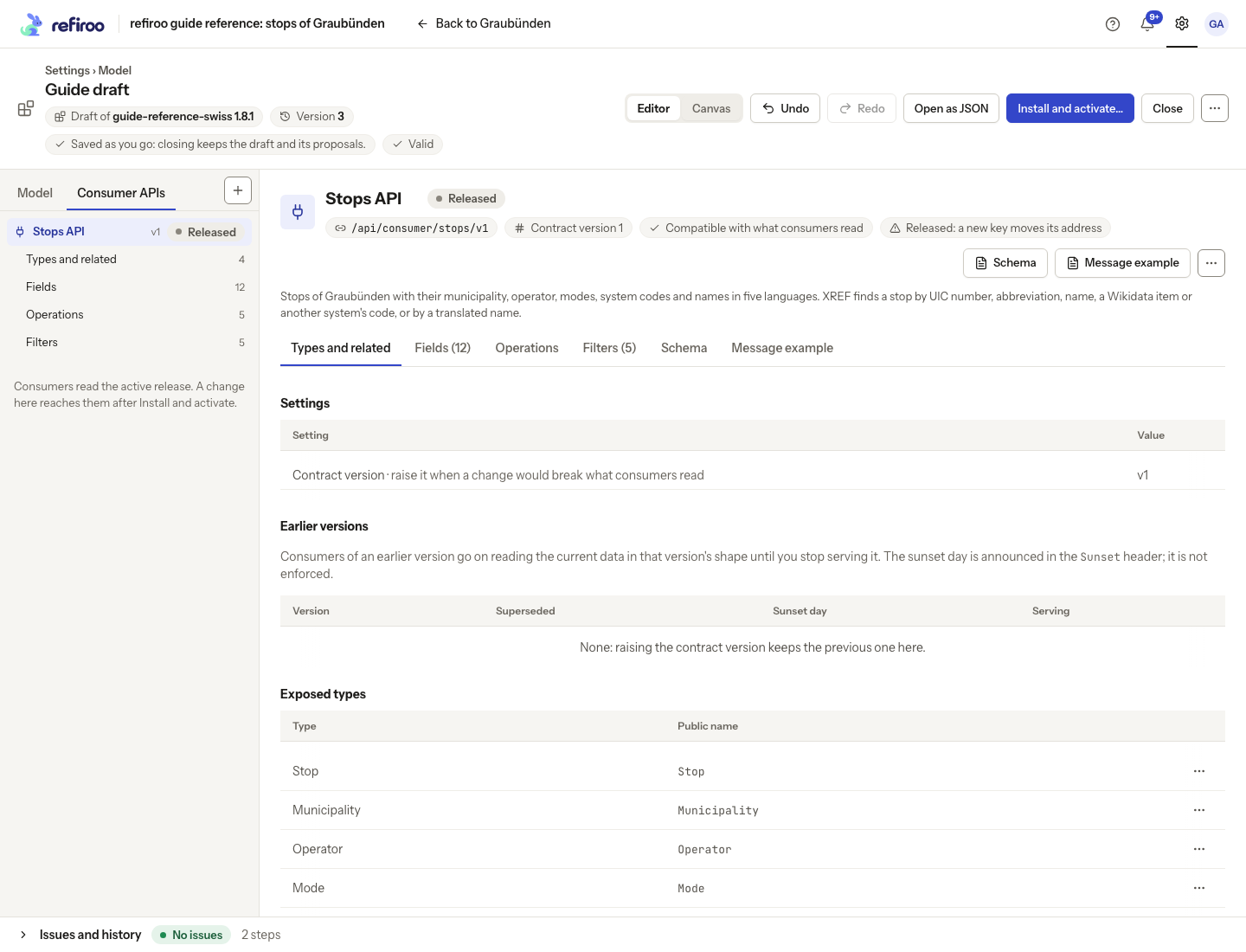
A field’s Output name is the word consumers receive. Sources… chooses the fields it reads, in order; Role identifies a purpose used by the contract. Add related… follows an allowed relationship and selects the related fields to expose. The declaration can also serve parent, path and hierarchy information.
Operations and matching
Section titled “Operations and matching”Get by ID, XREF and Resolve are offered for the API’s exposed types. Resolve requires both Get by ID and XREF; Events per type enables the standard type events. Lists specify Of, an optional Within the filter and Sorted by. Cross-reference rules choose how values identify related records. Matching can use Exact and Contains weights and Also match through a related block. Check Matches on…, Fields…, First of and Prefers where shown rather than assuming the display name is the unique identifier.
Filters have a Name and Verb: By type, Under, Linked to or On related. Their further choices depend on what they read. Through can use the record itself, a related block or records sharing that block. On related can keep only matching records, score only matching items or expose a crosswalk. These choices change what a consumer can ask and receive. Custom events select Types, Changes and Watches; leaving Watches empty watches any change to what consumers read. An event declaration does not create a delivery subscription.
Contracts, access and limits
Section titled “Contracts, access and limits”A contract version is separate from the model release version, draft version and model language version. Removing or changing something consumers read can require a higher contract version. Renaming a public field or changing relationship cardinality can affect the output too. Review the differences with the consuming teams, then raise the contract version. Raising it keeps the previous definition served beside the new version by default. The editor preserves the definition from the draft’s base release, including when the draft already contains breaking edits. An API or version not served by that base release has no previous definition to retain. An invalid model still needs repair.
A consuming system needs a client granted this particular API in each workspace it reads. Defining the API, granting a role or giving a person Model authoring does not grant consumer access. A security administrator manages these grants. Without the API grant, a data read is refused with Forbidden; the consumer does not receive a reduced version of the object. Agree the exposed fields with that administrator: a grant opens this API’s declared output, not a field-by-field selection. Rename… changes its display name; Describe… supplies its generated description. A released key identifies consumers’ existing access point: keep it stable. A released API’s key can still be changed, but consumers of the old key then get 404, as with removal. Removing an API stops its consumers reading it once active. Review that warning even where removal is allowed.
A specialist can edit the definition or an item as one saved step. No visual form covers every detail of the model language. Use the specialist view with a specialist for unsupported combinations, then inspect Issues and the generated documents. Do not infer support solely from a field being accepted as text.
See the generated documents for review and handover; integrators use Integrate for requests and authentication.
Review edits that remove behavior
Section titled “Review edits that remove behavior”Turning XREF off asks Stop offering XREF?. It removes the match rules and also stops Resolve, which depends on XREF. Undo restores the step; switching XREF on again starts without those rules. Inspect the contract changes before activating. An operation not declared in the contract is unavailable to consumers and absent from its generated operation document.
A field’s editable Default supplies its declared fallback when sources do not yield a value; it differs from a default on a record attribute. An identity-role output reads the record’s stable ID; publish other identifiers as separate fields. Output roles must not conflict, related blocks must name valid relationships, and a filter must choose one kind of read. The Issues list points to invalid references or combinations.
The model language also supports per-type events, watched fields and related blocks, scoped lists and parameters based on types, ancestors or related records. Use the specialist document view for declarations the current form does not expose. Reducing event coverage, changing crosswalk availability or removing an operation can require a higher contract version just as removing a field does. Adding more output is usually compatible; lowering a contract version is refused.
Source for the reference examples: opentransportdata.swiss, Service Points (Didok), Federal Office of Transport / SBB, snapshot 2026-11-02. Wikidata, CC0.
Keep an earlier version available
Section titled “Keep an earlier version available”Use this when consuming systems need time to move to a changed contract. In the model editor, select the consumer API and open Types and related. You need Model authoring to edit; the release must then be installed and activated in each workspace that serves it.
- Raise Contract version when changing what existing consumers read. Raise contract version to … advances it by one. The editor keeps the definition from the draft’s base release, rather than copying any breaking edits already made in the draft. An API or version not served by that base release leaves no earlier version to keep.
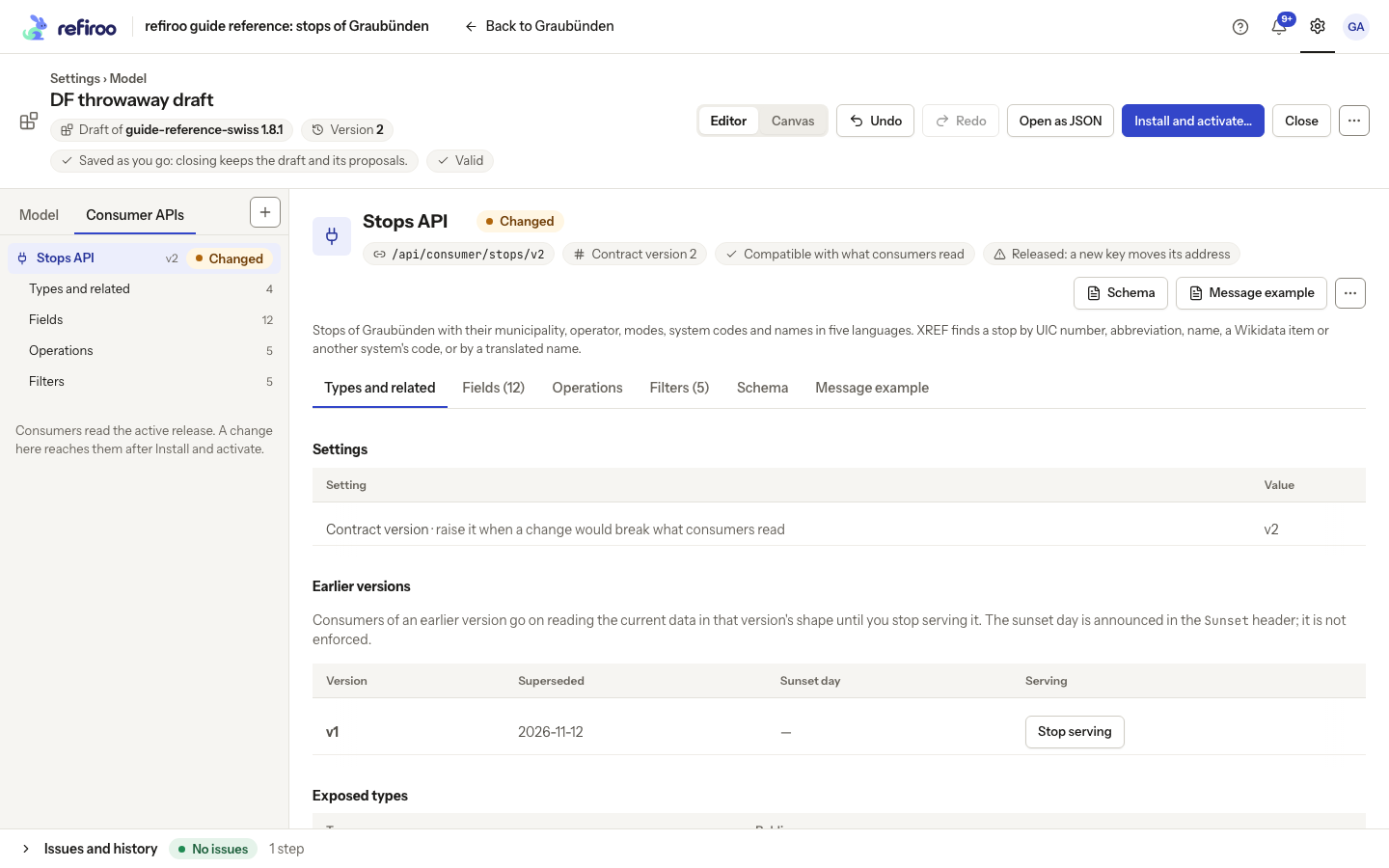
- Make the breaking edits to the new current version. In Earlier versions, check the retained Version, Superseded day and Sunset day. Earlier versions keep their output shape but read current data; they are not historical copies of records.
- To announce an end date, select the row’s Sunset day value or its pencil. In Sunset day (YYYY-MM-DD), enter the calendar date, then leave the field or press Enter to save. Escape puts the old date back; an unchanged input saves nothing. Emptying it and leaving the field withdraws the announcement; the table then shows a dash. A refused date stays in the input with Not saved and its reason; the saved date is unchanged. Cancel and Save again appear beneath the reason. Correct the date before leaving it to retry, or choose Save again after reviewing the reason. The day is announced to consumers in the response’s Sunset header after activation. It is an announcement: refiroo serves the version until you explicitly stop it, whatever the date.
- Review Issues and the generated documents, then install and activate the release. Installing alone does not change a workspace. Existing consumers and webhooks on a retained version continue using that version’s shape.
The model administrator chooses the notice period with the consuming teams. The software’s own compatibility period does not impose a deadline on your organisation’s consumer APIs.
If you already made breaking edits, Needs contract version … offers Raise to version … and Raise and stop serving version …. Raise to version … keeps the base release’s definition while your edited definition becomes the new version. Choosing Raise and stop serving version … instead leaves no copy of the version being replaced. Use that choice only when its consumers are ready to lose access.
Stop serving and undo
Section titled “Stop serving and undo”In Earlier versions, choose Stop serving for the intended version. Read the confirmation: consumers lose access once the draft is active. Cancel to keep serving it, or confirm the removal. Undo restores that draft step before activation. Review compatibility, install and activate the release only after the receiving teams have moved. Stopping an earlier version preserves records and other versions. It stops that version’s reads and suspends subscriptions bound to it; ask the integration administrator to check the receiver before resuming on the current version.
Follow Stop serving an earlier contract version for the sunset announcement, removal and undo steps.
After activation, restoring service needs a release that retains the original definition again; an old installed release does not keep a route running by itself. Do not recreate an earlier version with a changed shape under the same number.
When the retained version prevents activation
Section titled “When the retained version prevents activation”Every retained version must still refer to types, fields and relationships present in the new model. Keep those sources while consumers need them. An issue names the version and the missing source; restore the source or coordinate stopping that version.
A retained number must be lower than the current version and appear only once. Invalid dates, duplicate numbers and invalid references must be corrected before release. If a kept contract would change, the finding says a kept version is served as it was: restore it, or stop serving it. Raising the current version again does not repair the retained copy. The install review shows this finding rather than offering a version-raise fix for it. A warning that a version stops serving is expected only when removal is deliberate; inspect it before activation.
Edit version and remove a contract
Section titled “Edit version and remove a contract”The API’s Settings table has an editable Contract version. Enter a positive whole number and Save, or Cancel to leave it unchanged. The menu’s Raise contract version to … advances it by one without typing. Lowering a version is refused; increasing it does not repair an invalid definition. When the draft’s base release served the version being raised, its definition appears in Earlier versions and remains available after activation.
Use Remove consumer API only after coordinating with its consumers. The confirmation warns that they receive 404 once this draft is active. Cancel keeps it; Undo restores a saved removal in the draft. Existing releases remain immutable, but do not keep the old contract running in a workspace that activates the new model.
Edit as JSON… on the API edits its complete definition as one step; on a row, it edits that item. These are specialist controls, not a prerequisite for the named forms. Ask a specialist to handle combinations the forms do not expose, then review Issues, compatibility and the generated documents again.