Stop serving an earlier contract version
Use this task after consuming teams have moved off an earlier version. You need Model authoring to edit and Model release in each workspace where you activate the change. Stopping a version removes its reads without deleting records or stopping the other versions. Read Earlier versions before starting.
Announce the end date
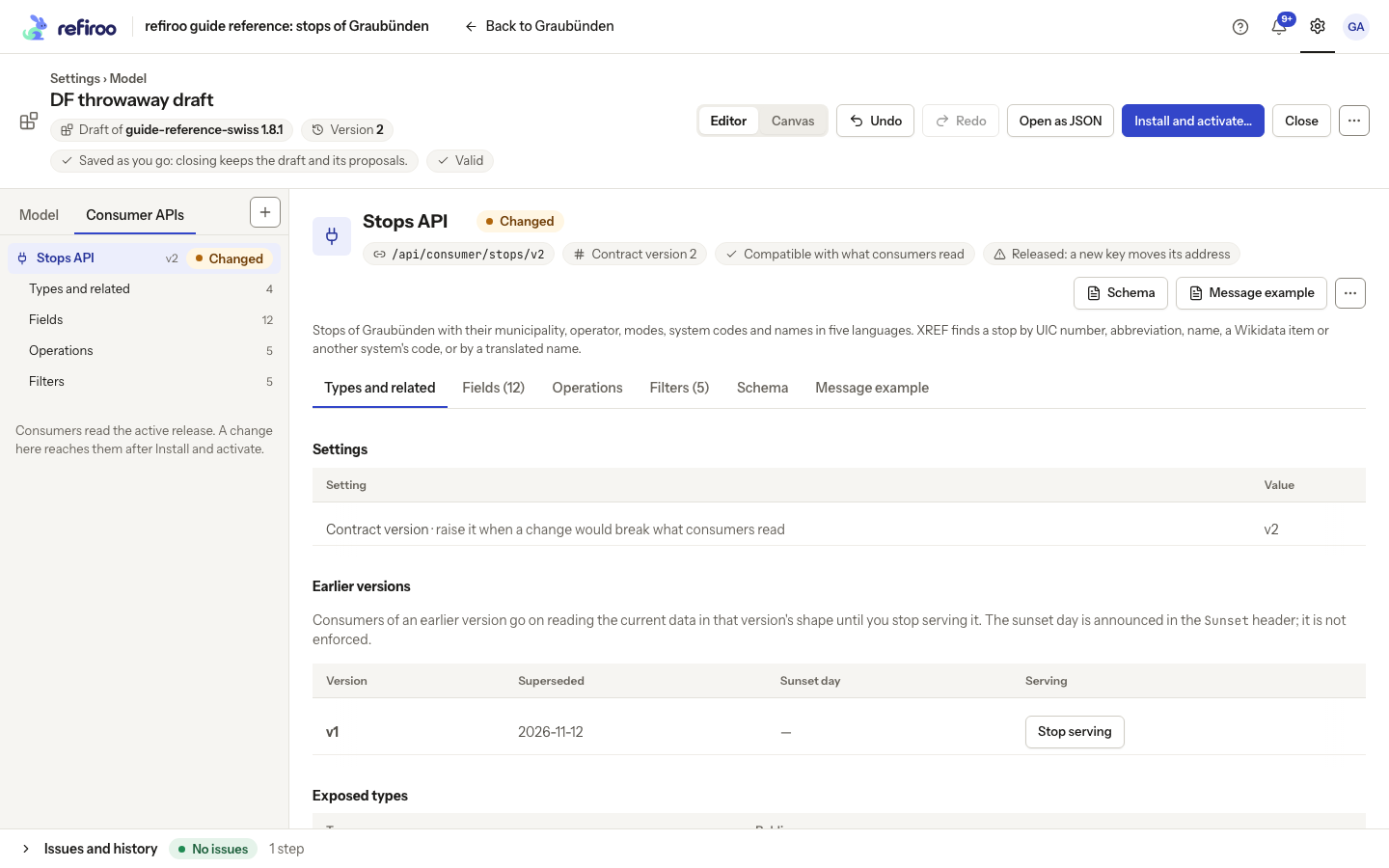
Section titled “Announce the end date”- Open a draft based on the workspace’s active release. Select Consumer APIs, the API, then Types and related. In Earlier versions, check Version and Superseded to identify the version you intend to retire. This table does not stop the current version; raise it first if it needs a replacement.
- Agree a notice period with every consuming team, including owners of webhook receivers. You choose that period; refiroo does not enforce a minimum for your consumer contracts.
- Select that row’s Sunset day value or its pencil. In Sunset day (YYYY-MM-DD), enter the agreed calendar date, then leave the field or press Enter to save. Escape puts the old date back; an unchanged input saves nothing. Clear it and leave the field to withdraw the announcement; the table shows a dash when no day is set. A date that is not a valid calendar day stays in the input with Not saved and the reason; the previously saved value remains unchanged. Cancel and Save again appear beneath the reason. Correct the date before leaving it to retry, or choose Save again after reviewing it. The date announces the end in the response’s Sunset header after activation; the version stays served until you stop it explicitly, whatever the day.
- Review and install and activate the announcement in the intended workspaces. Integrators then see the planned end date in the contract’s documents and responses. The date alone never turns the version off.
Remove the version when consumers are ready
Section titled “Remove the version when consumers are ready”- Open a new draft from the release that still serves the earlier version. Check the API and the intended row in Earlier versions again.
- Choose that row’s Stop serving. Read the confirmation naming the version and warning that its consumers lose access once the draft is active. Choose Cancel to keep the row, or confirm Stop serving to remove it from this draft. Live workspaces are unchanged.
- If you removed the wrong row, choose Undo or use the draft’s History to undo that saved step. Check that the version and its sunset day are back before continuing.
- Review Issues, then open Install and activate…. Its Consumer APIs list names the API
and says it stops serving version … and its consumers get
CONTRACT_VERSION_NOT_FOUND, not Compatible; the activation dialog of each workspace says the same. Confirm that this is the removal you agreed. A finding that a kept version changed needs repair; raising the current version again does not repair it. - Install and activate the release in each intended workspace. Installation alone does not stop reads. Check each workspace’s active release; a workspace left on the old release keeps serving the version.
- Ask the integration administrator to review affected webhooks with their receiver owners. A webhook whose accepted version stopped is suspended. Resuming accepts the current version after its events and filters pass validation; the receiver must be ready for that shape. Follow Find out why a webhook paused.
An earlier version’s reads and change feed stop after activation. Keeping an older release installed or an older publication does not keep that route available. Other served versions continue reading the same stored data.
Restore service after activation
Section titled “Restore service after activation”Draft Undo alone cannot change a live workspace. Prepare a release that retains the original definition and its model sources again, review its compatibility against the workspace, then activate it. Do not reuse the earlier number for a different contract. Check suspended webhooks separately; a restored route does not itself resume delivery. If the required source fields or relationships have been removed, restore them too or agree a different recovery with the consumers.