Delete a record
Delete only when the record should be removed. To keep it for history and stop offering it, see Stop offering a value. Read Records for ownership rules.
- Open the record and check its workspace and Live or change-set band. Open ⋯ and choose Delete record. You need permission for the record and dependants the deletion removes.
- Read Delete …?. Wait while Checking what deleting it would take… is shown. Nothing is deleted while refiroo reads the impact. If that read fails, choose Retry after resolving the stated problem, or Cancel to leave it.
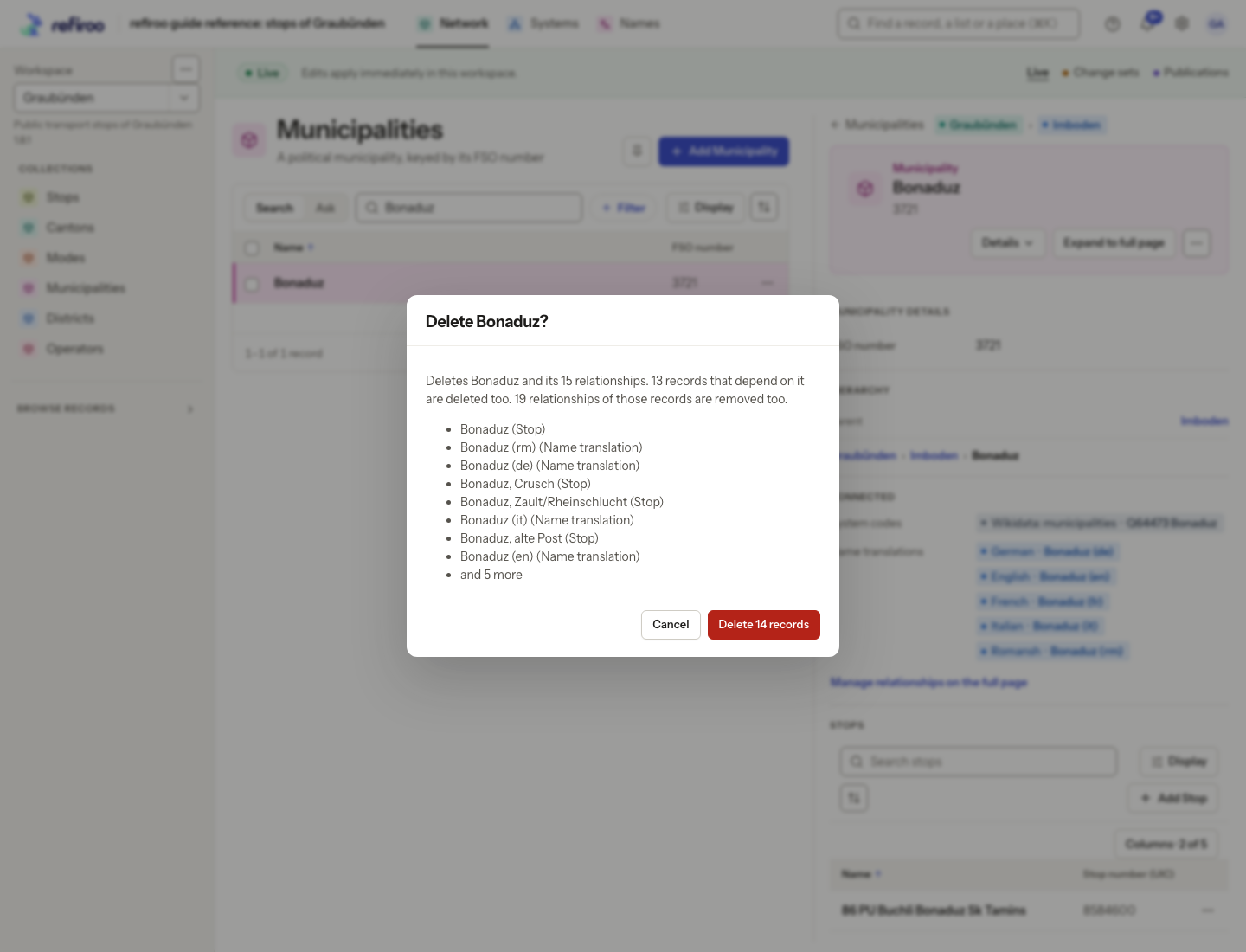
- Review the counts of records and relationships removed. Dependants are named with their types, up to eight names followed by and N more for a longer list. Children and owned dependants go with the record, including owned records in another application. Independent records and their hierarchies remain.
- Confirm once, only when that is the intended impact. The button says Delete N records when dependants are included, or Delete followed by the record type’s name for a single record. Cancel leaves everything in place.
- After success, the list opens. In Live the removal is immediate; in a change set it stays proposed until publication. Earlier publications and history are not erased.
If someone changes the record or adds a dependant before confirmation, the stale deletion is refused. The confirmation refreshes the impact and says The record changed after this was shown. Review the new impact before confirming again; it does not silently delete a larger set. If the refresh fails, resolve that error before proceeding.