Configure refiroo
The engine reads environment settings at startup. In the reference installation, set them in .env.
The file .env.example lists the settings and defaults; uncomment a line only when you need an
override. For AI and agent settings use About AI and Set up AI.
See what is running
Section titled “See what is running”With Operations access, open Settings › This instance › Deployment. Capability groups
shows what this deployment serves. Database shows the migration revision. Each setting has a row with its name, what it controls, its value and source; the default appears only when the value differs.
Environment means explicitly supplied; Default means the engine chose its default.
Secrets show only Set or Not set, and the database address hides its password.
This page is read only. At the top it names the API address used by this browser. Normally that
is the address you opened; VITE_API_URL can select another engine when building the frontend.
Changing that build setting requires rebuilding the frontend, rather than restarting the engine.
The groups are Model administration, Workspace administration, Integration jobs and
Webhook subscriptions, each with On or Off, its switching setting and applicable limits.
Below Database › Migration revision, the settings are grouped under Runtime, Capability settings,
Batch and job limits, Webhook subscriptions and AI proposals. The warning
Cursors do not survive a restart means no stable RDM_CURSOR_SIGNING_KEY was supplied.
Set one shared key and recreate all processes; clients must restart lists using old cursors.
To identify versions, open Settings › This instance › About. Engine lists Engine version, Management API, Schema languages, Licence and Source code (opens in a new tab). Active model release lists Name, Key, Version, Schema language and Activated. Activated is when that release was selected, not when it was installed. Open release opens its page in Settings › Model; access there still requires model-authoring or model-release permission. Use the account menu to enter Settings and Back to {application} to return to the application.
Signed-in callers can read system information; configuration and operational detail require
Operations access. The API reference describes GET /api/v1/system,
GET /api/v1/system/configuration and GET /api/v1/capabilities. If access is refused, ask an access
administrator for the appropriate role; a capability switch does not grant that role.
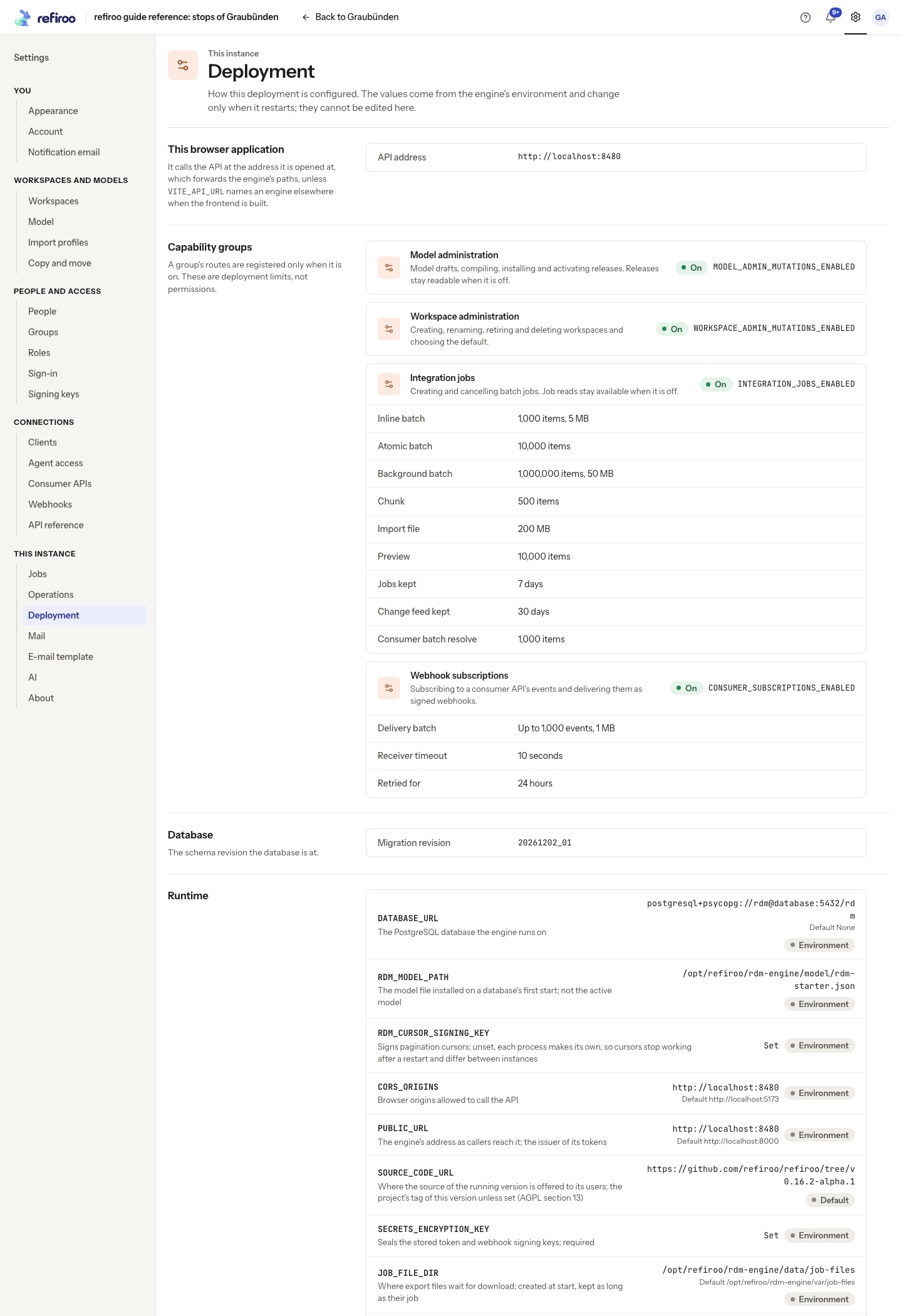
Above: Deployment shows the reference instance’s capability switches, limits, database revision and runtime settings. These values describe this installation; secrets are masked.
Apply a change
Section titled “Apply a change”-
Edit the installation’s private environment file. Keep secret values out of version control.
-
Recreate the affected container with its new environment:
Terminal window docker compose up -d -
Check
/health, then reopen Deployment to confirm the value and source.
A plain docker compose restart does not load an edited environment file. For host development,
restart the engine after changing .dev/settings.env. A refused start names the invalid setting;
correct it and start again. Booleans recognise 1, true, yes and on (case-insensitive) as on;
other values mean off. Check the effective value to catch a spelling mistake. Count and time limits
must be positive integers, except the overflow and idle-transaction settings which also accept zero.
AI confidence is a number from 0 to 1, and a configured AI context window needs at least 256 tokens.
PASSWORD_MIN_LENGTH must be between 1 and 128.
Compose’s explicit environment entries override the file: it constructs DATABASE_URL and sets
CORS_ORIGINS from PUBLIC_URL. It also supplies AI_AGENT_API_URL=http://127.0.0.1:8000 unless
you override that setting, so the assistant reaches the API inside the engine container. The image
supplies the default model and job-file paths. Both the image and Compose set
AI_AGENT_SANDBOX=container; Compose’s value cannot be turned off in .env.
FORWARDED_ALLOW_IPS defaults in Compose to 10.0.0.0/8,172.16.0.0/12,192.168.0.0/16.
Behind another proxy, set it in .env to the proxy addresses that connect to the engine;
see HTTPS.
Custom model input must also be mounted where the engine can read it; naming a host path in the
container’s environment does not mount that file. Troubleshooting covers service failures.
Capability and limit behavior
Section titled “Capability and limit behavior”A capability switch restricts the deployment; it does not grant permissions. People and clients still need roles and grants. With model administration off, installed releases, diff and inline validation stay readable. Change sets and publication withdrawal remain available independently of these groups. Retired workspaces refuse runtime writes. Subscription routes, including reads, are absent with subscriptions off. Job reads remain available with integration jobs off. Enable the intended setting and recreate before retrying an absent route.
Raise limits only after checking workload and storage. Size and item limits apply together.
Larger chunks and previews can make other writes in the same workspace wait longer. A batch over
a limit returns 413 BATCH_TOO_LARGE, naming its setting. Imports can return IMPORT_TOO_LARGE
or IMPORT_TOO_MANY_ITEMS; draft edits use OPERATION_BATCH_TOO_LARGE.
Turning a capability off does not delete its existing records, jobs or configuration. Turning jobs off also stops their hourly cleanup on that instance; keep a job-enabled instance running where cleanup is required. Read Background jobs before using this as a pause mechanism. Limits normally govern new requests or work, rather than undoing work already accepted. Retention changes cannot bring back expired files or details.
An old feed position returns 410 FEED_POSITION_EXPIRED, naming a publication to read again;
consumer events use EVENTS_EXPIRED. Entries after the active publication, or all entries in a
workspace without a publication, remain available. The audit log is not pruned by feed retention.
Settings catalogue: secrecy and restart
Section titled “Settings catalogue: secrecy and restart”All engine settings below are read at process startup. Every row needs engine recreation after
an environment change; none is a live switch. In Compose use docker compose up -d engine, then
check /health and Deployment. Save the previous private file before editing; to undo an ordinary
limit or capability change, restore that value and recreate again. Key changes, database moves
and public-address changes require their linked procedures and cannot be undone safely by treating
them as ordinary limits.
The groups below follow the generated template. Defaults here are engine defaults; the reference image and Compose override paths, the database URL and browser origins as noted above. Secret means the value must be protected, even if it is shown as set/not set. A database URL is partially redacted rather than hidden as a whole. This index includes settings owned by the database, monitoring and sign-in pages; follow those links for the complete procedures.
Runtime catalogue
Section titled “Runtime catalogue”| Setting | Engine default | Secret? | What it changes | When to change |
|---|---|---|---|---|
DATABASE_URL |
Required | Password in URL | The PostgreSQL database the engine runs on. | When moving the database; Compose constructs it, so an .env override alone has no effect. |
RDM_MODEL_PATH |
backend/model/rdm-starter.json, resolved from the package location | No | The model file installed on a database’s first start; not the active model. | Only for different bootstrap input; mount that file, and use model activation for existing workspaces. |
RDM_CURSOR_SIGNING_KEY |
Random per process | Yes | Signs pagination cursors; unset, each process makes its own, so cursors stop working after a restart and differ between instances. | Always supply a stable shared key in production; changing it expires old cursors. |
CORS_ORIGINS |
[‘http://localhost:5173’] | No | Browser origins allowed to call the API. | When browser origins change; Compose derives this from PUBLIC_URL. |
PUBLIC_URL |
http://localhost:8000 | No | The engine’s address as callers reach it; the issuer of its tokens. | Set the permanent production HTTPS origin before first use; changing host affects sessions and passkeys. |
SOURCE_CODE_URL |
Project source tag of running version | No | Where the source of the running version is offered to its users; the project’s tag of this version unless set (AGPL section 13). | When serving a modified build; point to its corresponding source. |
SECRETS_ENCRYPTION_KEY |
Required | Yes | Seals the stored token and webhook signing keys; required. | Set once; change only by resealing. |
JOB_FILE_DIR |
backend/var/job-files | No | Where export files wait for download; created at start, kept as long as their job. | For persistent/shared storage; mount the directory before starting workers. |
RDM_API_REFERENCE_SCRIPT |
bundled | No | Where the API reference page at /docs/api loads its script from: bundled or cdn. | Choose cdn only if browsers should fetch the pinned script externally. |
WEB_CONCURRENCY |
1 | No | Server worker processes on this instance. | After budgeting all database connections. |
DATABASE_POOL_SIZE |
5 | No | Database connections each process keeps open. | For sustained demand, within the server-wide connection budget. |
DATABASE_POOL_MAX_OVERFLOW |
10 | No | Database connections each process opens beyond the pool size when busy. | For short bursts, within the connection budget; zero disables overflow. |
DATABASE_POOL_TIMEOUT |
30 | No | Seconds a request waits for a database connection before it answers 503. | To change how long callers wait before a 503; it does not add capacity. |
DATABASE_IDLE_TRANSACTION_TIMEOUT |
300 | No | Seconds a connection may sit idle inside a transaction before the database ends it, releasing a stalled process’s locks; 0 turns it off. | Raise only for legitimate long gaps between statements; zero disables the protection. |
LOG_FORMAT |
text | No | How the log is written: text lines, or one JSON object a line. | Use json for a log collector. |
LOG_LEVEL |
INFO | No | The lowest level the log writes. | Temporarily use DEBUG for underlying causes; restore INFO afterwards. |
PROCESS_HEARTBEAT_SECONDS |
15 | No | Seconds between each process’s reports of its state to the others. | Only to change reporting and silent-process detection latency. |
ACCESS_TOKEN_MINUTES |
60 | No | Minutes an access token lasts, for people and clients. | To meet token lifetime policy; deactivation still takes effect on the next request. |
TOKEN_SIGNING_KEY_DAYS |
30 | No | Days a token signing key signs before the next token brings a new one. | To meet signing-key rotation policy; old tokens verify until expiry. |
SESSION_IDLE_HOURS |
12 | No | Hours a browser session lasts without being used. | To shorten idle access, including sessions of people removed at a provider. |
SESSION_DAYS |
14 | No | Days a browser session lasts in all before the person signs in again. | To change the maximum time before a fresh sign-in. |
PASSWORD_RESET_HOURS |
24 | No | Hours a password-reset link stays valid. | To change the window for using a one-time reset link. |
PASSWORD_MIN_LENGTH |
15 | No | Characters a local password needs at least; lower only for development. | Leave 15 in production; lowering is for development only. |
Capability groups catalogue
Section titled “Capability groups catalogue”| Setting | Engine default | Secret? | What it changes | When to change |
|---|---|---|---|---|
MODEL_ADMIN_MUTATIONS_ENABLED |
false | No | Model drafts, compiling, installing and activating releases. | Enable on the instance used for model authoring and release changes. |
WORKSPACE_ADMIN_MUTATIONS_ENABLED |
true | No | Creating, renaming, retiring, deleting workspaces and choosing the default. | Disable where workspace administration must be absent. |
INTEGRATION_JOBS_ENABLED |
true | No | Creating and cancelling jobs (POST /batches); job reads stay available. | Disable where job creation and execution must be absent; reads remain. |
CONSUMER_SUBSCRIPTIONS_ENABLED |
false | No | Webhook subscriptions and their delivery. | Enable only when webhook subscriptions and delivery are needed. |
Batch and job limits catalogue
Section titled “Batch and job limits catalogue”| Setting | Engine default | Secret? | What it changes | When to change |
|---|---|---|---|---|
BATCH_MAX_ITEMS |
1000 | No | Items in an inline batch. | Raise only after measuring inline batch latency and contention. |
BATCH_MAX_BYTES |
5242880 | No | Bytes in an inline batch’s body. | Raise for larger inline payloads; item and proxy limits still apply. |
ATOMIC_JOB_MAX_ITEMS |
10000 | No | Items in an atomic batch, inline or background. | Raise only after measuring the longer transaction and lock hold. |
BACKGROUND_JOB_MAX_ITEMS |
1000000 | No | Items in a background batch. | Raise for a larger load with enough database space. |
BATCH_BACKGROUND_MAX_BYTES |
52428800 | No | Bytes in a background batch’s body. | Raise for larger background requests; item and proxy limits still apply. |
JOB_CHUNK_ITEMS |
500 | No | Items one background chunk commits. | Trade transaction size and lock time against chunk overhead; measure before changing. |
IMPORT_MAX_BYTES |
209715200 | No | Bytes in an import’s file. | Raise with WEB_MAX_BODY and enough file storage. |
JOB_PREVIEW_MAX_ITEMS |
10000 | No | Items a preview of an import or a batch runs before it is a sample. | Raise for a fuller preview, accepting a longer write-lock hold. |
MODEL_OPERATION_MAX_ITEMS |
500 | No | Operations in one request to a model draft. | Raise for larger draft edits, accepting slower validation and undo. |
JOB_LEASE_SECONDS |
120 | No | Seconds a worker holds a job, renewed with each chunk. | Change with crash takeover timing in mind; renewed every third of the interval. |
JOB_RETENTION_DAYS |
7 | No | Days a finished job keeps its outcomes and idempotency key. | Raise for longer outcome/download windows and more disk use. |
FEED_RETENTION_DAYS |
30 | No | Days the change feed and consumer events answer a position. | Raise to cover consumer outages; receivers behind the floor must re-sync. |
CONSUMER_RESOLVE_MAX_ITEMS |
1000 | No | Items in one consumer batch resolve. | Raise after measuring consumer batch size and latency. |
Webhook subscriptions catalogue
Section titled “Webhook subscriptions catalogue”| Setting | Engine default | Secret? | What it changes | When to change |
|---|---|---|---|---|
WEBHOOK_PRIVATE_ADDRESSES_ALLOWED |
false | No | Allows loopback, private, unique-local, shared 100.64.0.0/10 and other non-public webhook destinations. Link-local stays refused. | For internal receivers or localhost development. After upgrading, existing private receivers stop delivering until enabled; see Webhook delivery. |
CONSUMER_WEBHOOK_LOG_RETENTION_DAYS |
7 | No | Days the webhook delivery log keeps a request, its body and its attempts. | Raise for longer delivery diagnostics; bodies consume database space. |
AI and agent settings
Section titled “AI and agent settings”The template’s AI group, plus the runtime settings AI_AGENT_COMMAND, AI_AGENT_SANDBOX,
AI_AGENT_TIMEOUT_SECONDS and AI_AGENT_API_URL, are owned by About AI and Set up AI.
Use those pages for their defaults, data policy and deployment requirements.
Compose defaults AI_AGENT_API_URL to http://127.0.0.1:8000. Outside Compose, an unset or empty
value uses PUBLIC_URL; supply a reachable engine API address if the engine’s machine cannot
reach that public address. See Set up AI for the assistant check.
Path defaults and container overrides
Section titled “Path defaults and container overrides”Without RDM_MODEL_PATH, the code resolves model/rdm-starter.json beneath the backend package
root. The reference image explicitly supplies /opt/refiroo/rdm-engine/model/rdm-starter.json.
Do not assume a source checkout’s implicit path exists: development scripts provide the model
path, and a custom process must supply a readable file. JOB_FILE_DIR defaults beneath the backend
root too; the reference image overrides it with the persistent data/job-files mount.
Runtime validation
Section titled “Runtime validation”SECRETS_ENCRYPTION_KEY is exactly 32 bytes encoded as URL-safe base64. Generate it with
python -m app.cli.generate_key in the backend environment. The old
CONSUMER_WEBHOOK_KEY_ENCRYPTION_KEY setting is refused: rename it while keeping its value.
Use the resealing procedure when changing the actual key.
CORS_ORIGINS is a comma-separated list of origins. Each permits sign-in to return to
<origin>/signed-in, so serve the browser application at the root of an allowed origin.
Include the origin where people open /docs/api too. A missing origin can make its request
preflight fail with 400 Disallowed CORS origin before the token request is sent.
RDM_API_REFERENCE_SCRIPT=bundled serves the pinned Scalar script locally and works offline.
cdn fetches that same version from jsDelivr with its integrity hash; other values refuse startup.
PUBLIC_URL and SOURCE_CODE_URL must be absolute HTTP or HTTPS addresses. Keep the public
address identical across processes; it is also the token issuer and discovery-address base.
Limit application details
Section titled “Limit application details”Imports are read to disk while the request body arrives. Their item counts must fit
BACKGROUND_JOB_MAX_ITEMS and, for an atomic import, ATOMIC_JOB_MAX_ITEMS; otherwise they
fail with IMPORT_TOO_MANY_ITEMS. The file-size limit is separate.
JOB_PREVIEW_MAX_ITEMS applies to both import and batch previews. Above it, the result is a
sample. IMPORT_PREVIEW_MAX_ITEMS is no longer an alias: update old deployment files to the
current name. A preview holds the workspace’s write lock or its change-set claim while running.
One request of model operations is one validated step in a draft’s history. Raising
MODEL_OPERATION_MAX_ITEMS increases both apply and undo time for that step. Expired consumer
events are deleted hourly; the feed-retention exceptions described above still apply.