The Webhooks page
Use Settings › Connections › Webhooks to send a consumer API’s declared record events or the workspace’s change-set events to another system. You need Integration administration in the source workspace. Security administration alone does not grant it. The operator must also enable webhooks in the deployment.
Work with the receiving system’s owner before creating or changing delivery. Webhooks explains the receiving system’s responsibilities. Here you manage the subscription in the browser.
Sources and configuration
Section titled “Sources and configuration”Choose Events from in New webhook:
- Consumer API delivers the selected API’s declared record events from live data in the chosen Workspace.
- Workspace events delivers the workspace’s change-set steps, independently of a consumer API declaration.
The source and workspace are fixed at creation. Delete the subscription and create another to change them. Consumer APIs and their events are declared by the model; every application can use this capability when its model declares it.
For Workspace events, All events (3) selects all three choices. Chosen events lets you select:
| Event shown | When it is sent |
|---|---|
| change-set.submitted | A change set was submitted for approval. |
| change-set.approved | A change set was approved and published. |
| change-set.sent-back | A change set was sent back to its author. |
The Consumer API selector, Filters and Content choices are hidden for workspace events. These notifications describe change-set steps rather than consumer records. Requests and Format remain available for both sources.
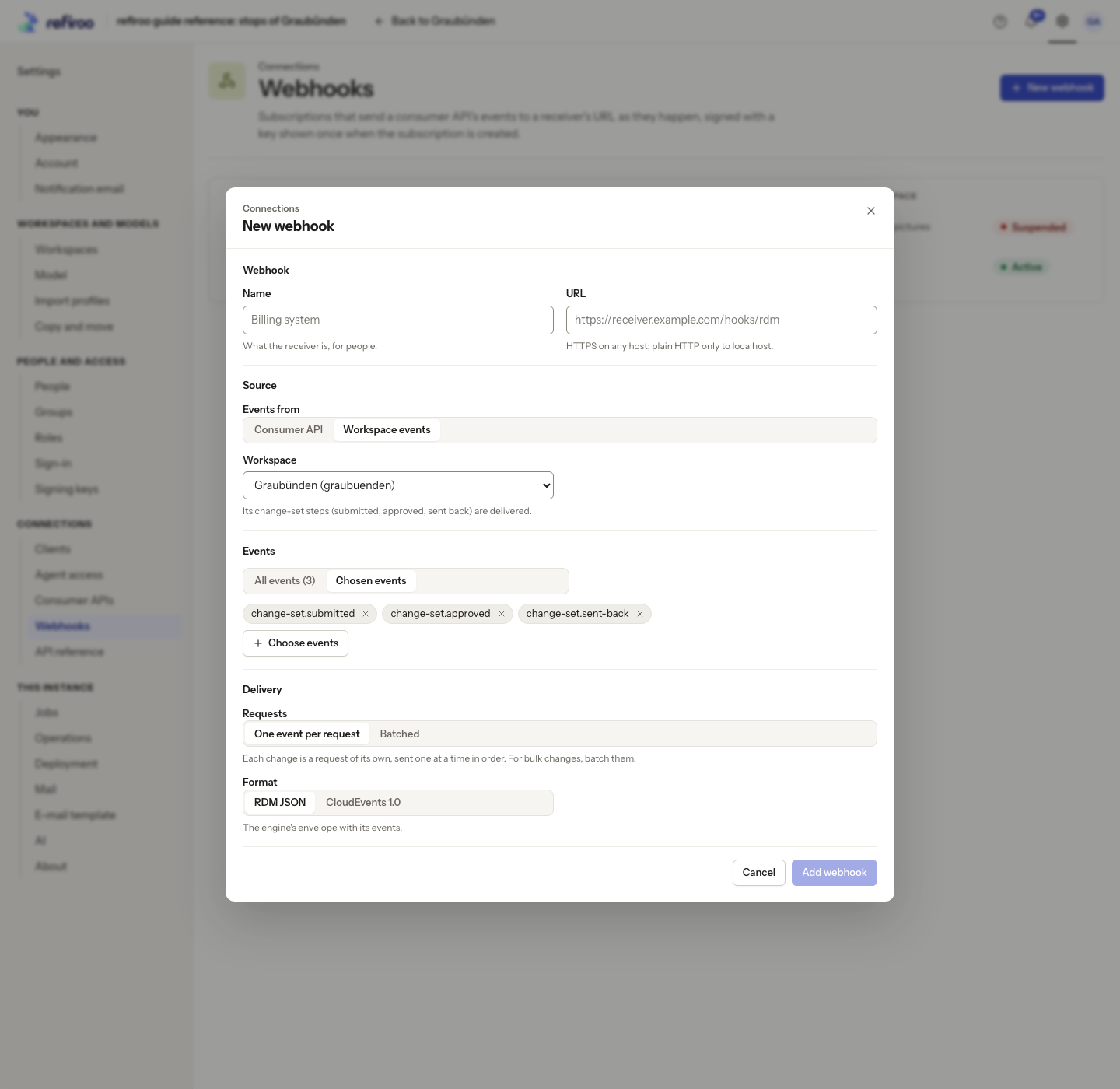
New webhook is available even when no consumer API declares events. In that case, Events from offers Workspace events alone. When Webhooks are off in this deployment appears, there is no New webhook button. Open Deployment leads to the deployment information; ask the operator to enable them and restart the service.
The New webhook and Edit webhook dialogs contain:
| Section | Choices |
|---|---|
| Webhook | Name identifies the receiver for people. URL is its receiving address. Use HTTPS. Private and localhost destinations need the operator to allow them on this instance; plain HTTP is limited to localhost. Link-local destinations are always refused. |
| Source | Events from, then Consumer API when applicable, and Workspace. To change these later, create another webhook. |
| Events | All events or Chosen events, selected with Choose events. The choices describe the record types and changes they watch. |
| Filters | Add filter offers the API’s declared filters. Enter a value and press Enter; several values of one filter are alternatives. With no filters, every event of the chosen kinds is delivered. |
| Delivery | Requests, Content and Format, agreed with the receiver’s owner. |
One event per request is the default. Batched sends waiting events up to Up to (events) and the request-size limit, without waiting to fill a batch. The normal maximum is 1,000 events and 1 MiB; an unusually large single record can exceed that size. The form shows the deployment’s event limit.
For consumer API events, With the object carries the record as it is when sent. Notification only tells the receiver which change happened so it can read what it needs. Format selects RDM JSON or CloudEvents 1.0, as agreed with the receiver. These choices are independent.
For consumer API events, a filter is evaluated when sending, against the record’s current state. A record leaving the filter’s scope is not sent just to tell the receiver it left; deletions are sent. Agree how the receiving system reconciles its copies with its integration owner.
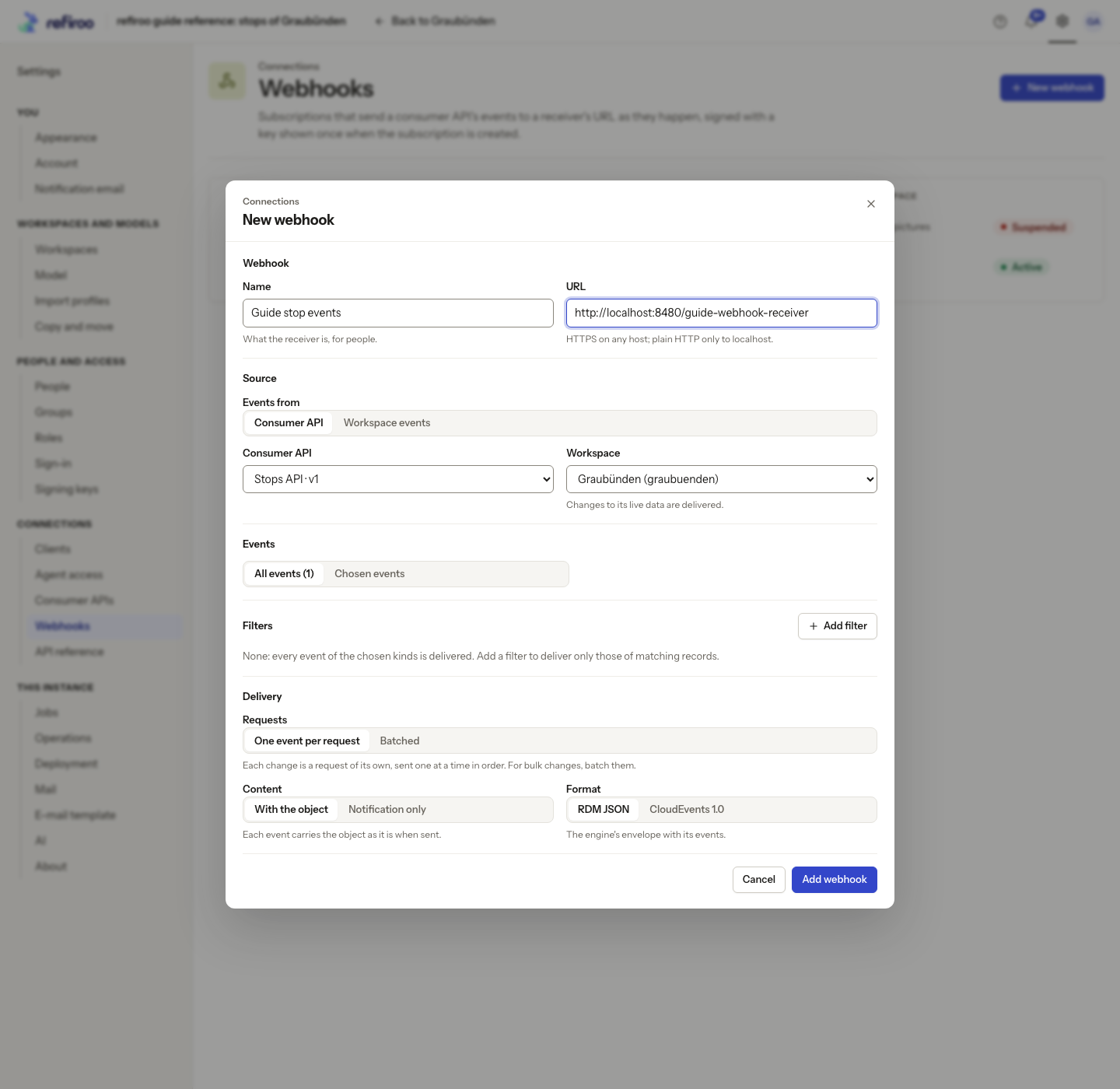
Follow Create a webhook.
State and delivery position
Section titled “State and delivery position”The catalogue shows Active, Retrying or Suspended. Open a webhook’s row for its own page with Configuration and Deliveries tabs. ← Webhooks on the first line returns to the list. Configuration shows its destination, source, events, filters, creator, delivery progress, signing-key dates and any failure or suspension findings.
Suspend stops delivery immediately, without a confirmation. Resume… checks the subscription against the current model and workspace. Choose The first event not acknowledged to continue from where it stopped. Now, with reset skips waiting changes and starts after the current position; arrange a fresh synchronisation with the receiver’s owner. Reset first, then synchronise from the publication identified by the page so changes do not fall between.
A new webhook starts after the current change position. The browser has no choice of an earlier starting position; an integrator can request one separately. Existing records do not arrive just because a webhook was created.
A failed request blocks later delivery for that subscription. Retries start after about 10 seconds, then 30 seconds, 1, 2, 5, 10 and 30 minutes, then hourly, for 24 hours; waits vary slightly. The page shows the last error, attempts and next try. After the retry window it becomes Suspended. Editing the receiving URL retries a waiting request at once.
| Suspension shown | What to do |
|---|---|
| Suspended by a user | Resume when the receiver is ready. |
| The model changed | Edit the subscription to fix the listed missing events, filters or other findings, then resume. |
| The contract version changed | The accepted version stopped being served. Read Accepted and Served now, have the receiver owner confirm compatibility, then resume to accept the current version. |
| The workspace was retired | Ask a workspace administrator to reactivate it, then resume; otherwise delete the webhook. |
| Delivery failed | Repair the receiver, then resume to retry the unacknowledged request. |
| A filter matches nothing | Correct the filter value, then resume. |
| Events expired | Reset and resume, then have the receiver synchronise again from the named publication. |
A consumer webhook stays on its accepted version while that version remains served by the active model. Its events keep that version’s shape. Stopping that version can suspend it; resuming accepts the current version after its events and filters pass the checks. Workspace events do not depend on consumer contract versions.
Follow Find out why a webhook paused for diagnosis.
Signing keys
Section titled “Signing keys”Creating a webhook shows Keep the signing key once. Store it securely with the receiver’s configuration before I have stored the key. It cannot be read back. Each delivery is signed so the receiver can check its origin.
More actions › Rotate key… replaces that webhook’s key. An overlap of 1 hour, 24 hours or 7 days lets the receiver switch while both keys work. Stop it now is for a leaked key: deliveries use the replacement alone and may be refused until the receiver has it. Follow Rotate a webhook key.
This key is separate from client secrets and the instance’s signing keys.
Deliveries
Section titled “Deliveries”The Deliveries tab filters Status to Queued, Sending, Retrying, Succeeded, Failed or Dropped. Choose Refresh for the current state. Each row identifies the event and record, status, attempts, response and sent time. Open the event to inspect Attempts and the saved request and response; select an attempt to inspect its answer. These details can contain record data, so share them only with authorised people.
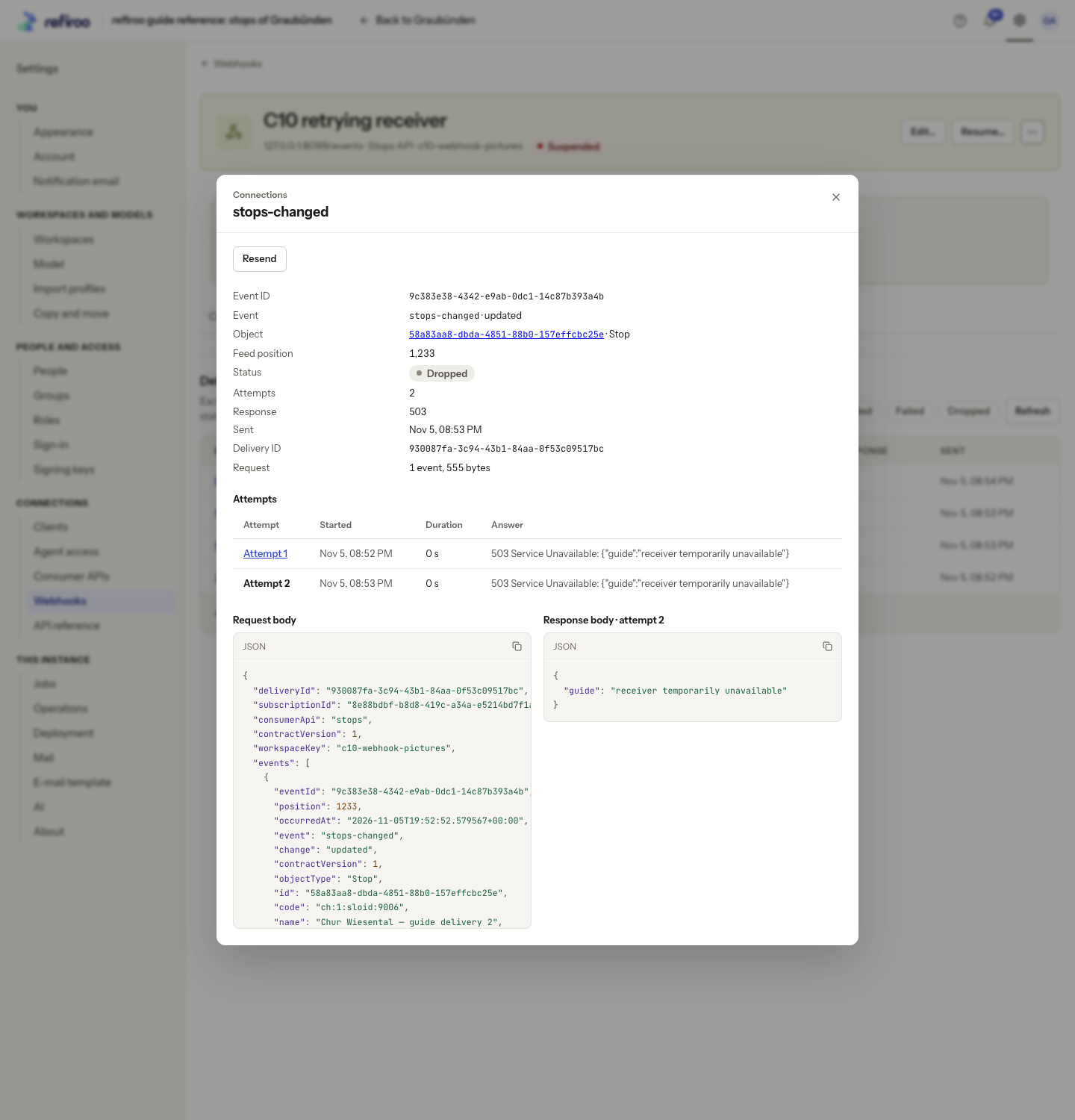
Deliveries are normally kept for seven days; the page states the configured retention. A request still being retried or awaiting resume is kept longer. The list is a delivery log, not permanent data history.
Resend asks Resend a delivered event? Confirm Resend event only with the receiver owner’s agreement, or choose Don’t resend. It sends the saved request again and can repeat an action in the receiving system. It is unavailable when the saved request is no longer held. It does not replace repairing and resuming a suspended webhook.
More actions › Delete… asks Delete this webhook? Confirm Delete webhook to stop sending and discard its signing key, or choose Keep the webhook. A replacement is a new subscription with a new position and key. A workspace with subscriptions cannot be deleted until they are removed.
Edits and actions check that the webhook has not changed meanwhile. If Not saved appears, review the current configuration and the explanation before applying the action again.
Webhook subscriptions are installation settings, separate from a model release. Installing or copying a model does not copy its webhook destinations, keys or delivery positions. Review these separately when moving an integration to another installation.
Change a receiver or stop it permanently
Section titled “Change a receiver or stop it permanently”Use Edit… on the selected webhook to change Name, URL, chosen events, filters or delivery choices, then Save. A rename preserves a request being retried. Other configuration edits clear that saved retry and build the next request from the first event not acknowledged, using the new configuration. The receiver may already have seen an earlier attempt, so agree the change with its owner. Editing a suspended webhook does not resume it; use Resume… after correcting its findings.
A destination must be an absolute address of at most 2,048 characters, with no user name, password or fragment. If the form says The webhook URL must not hold user information: the request is signed instead, use the receiver’s address without credentials and configure it to check the webhook signing key. Redirects are not followed; enter the final destination. The receiving system’s owner handles its HTTPS certificate renewal.
Destinations are checked when saved and on every attempt. If an address is refused, read the reason in Deliveries and ask the operator to review the destination. A host name can become refused if its addresses change. After an upgrade, a private receiver may stop receiving until the operator allows private destinations; resume a suspended webhook once the cause is fixed.
A webhook’s signing key has no scheduled automatic replacement. Rotating again during an overlap immediately ends the key retained from the earlier rotation: only the current replacement and the key it just replaced can sign. Arrange each handover before starting another. Rotation is also possible while suspended; it does not resume delivery.
For temporarily stopping delivery use Suspend; for removing the destination use More actions › Delete…. Deletion has no undo and a new subscription does not restore the old delivery position. An installation restore needs its database and secret storage, through the operator’s backup and restore procedure. Coordinate a restore with receivers: returning to an older acknowledged position can repeat deliveries.