Relationships
Use a relationship to connect records with a named meaning. Its two ends can belong to different applications in the same workspace. For the controls to add, replace and remove a connection, see Relate records.
Meaning, direction and number
Section titled “Meaning, direction and number”The model defines each relationship’s meaning in both directions, the record types it connects, and how many connections each end may hold. The name you read depends on which record you open. One connection appears from both ends; these are not two separately maintained copies.
A relationship can allow one record or several at either end. A section that allows one offers Set when empty and Change when filled. A section allowing several offers Add relationship. A connection may also hold fields of its own. These belong to this connection, rather than to one of its records. The same record can have different values on different connections.
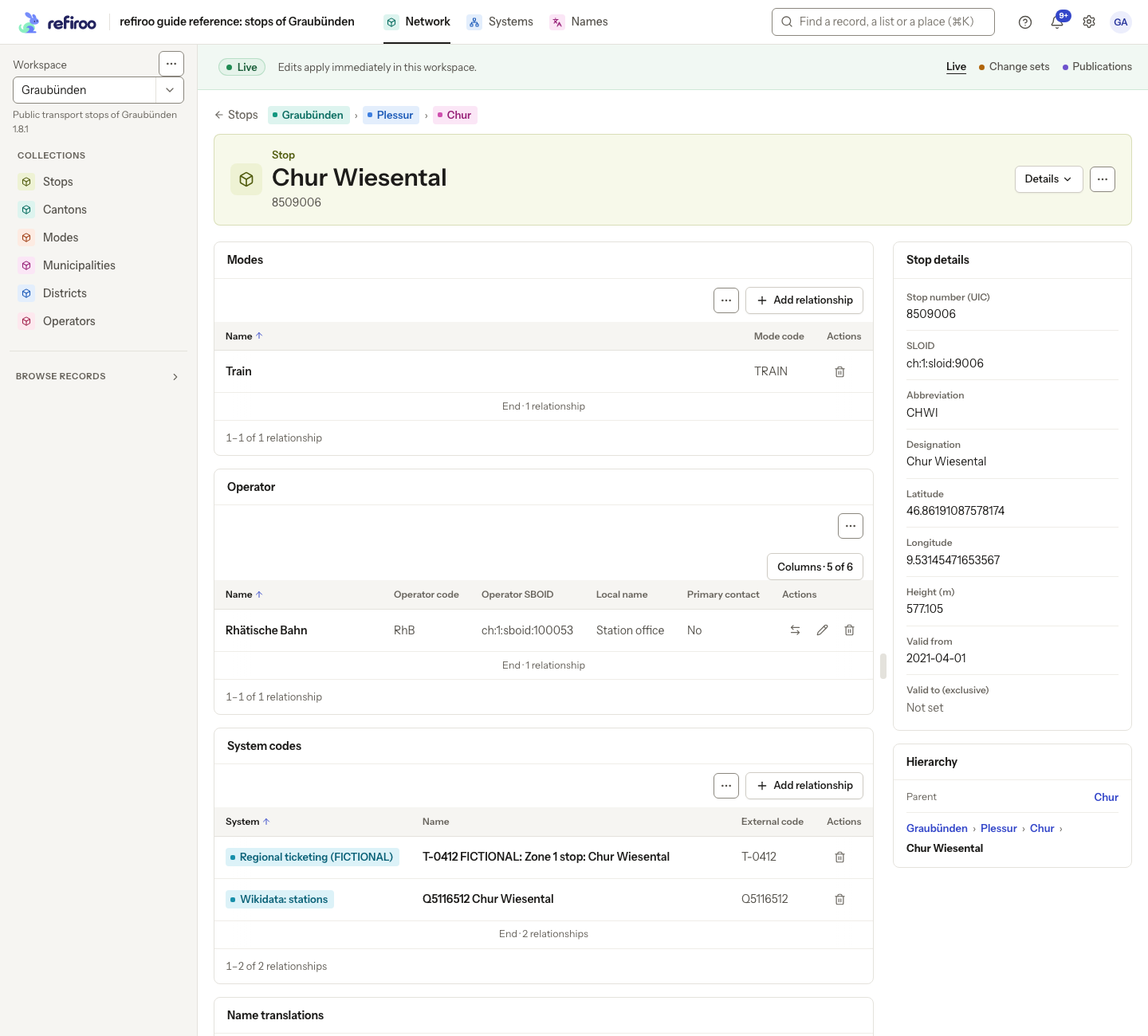
Above: Chur Wiesental in Network has Train under Modes, Rhätische Bahn under Operator, and two System codes. The reference model allows several modes but exactly one operator per stop.
The Relationships panel puts these values in columns after the related record’s fields. Open Display and find Attributes of the relationship to show or hide them. A panel covering several allowed pairs can show a column that does not apply to every row. These columns cannot sort this panel: sort by an offered field of the related record instead. Use the relationship’s edit action to change its values; this does not edit the related record.
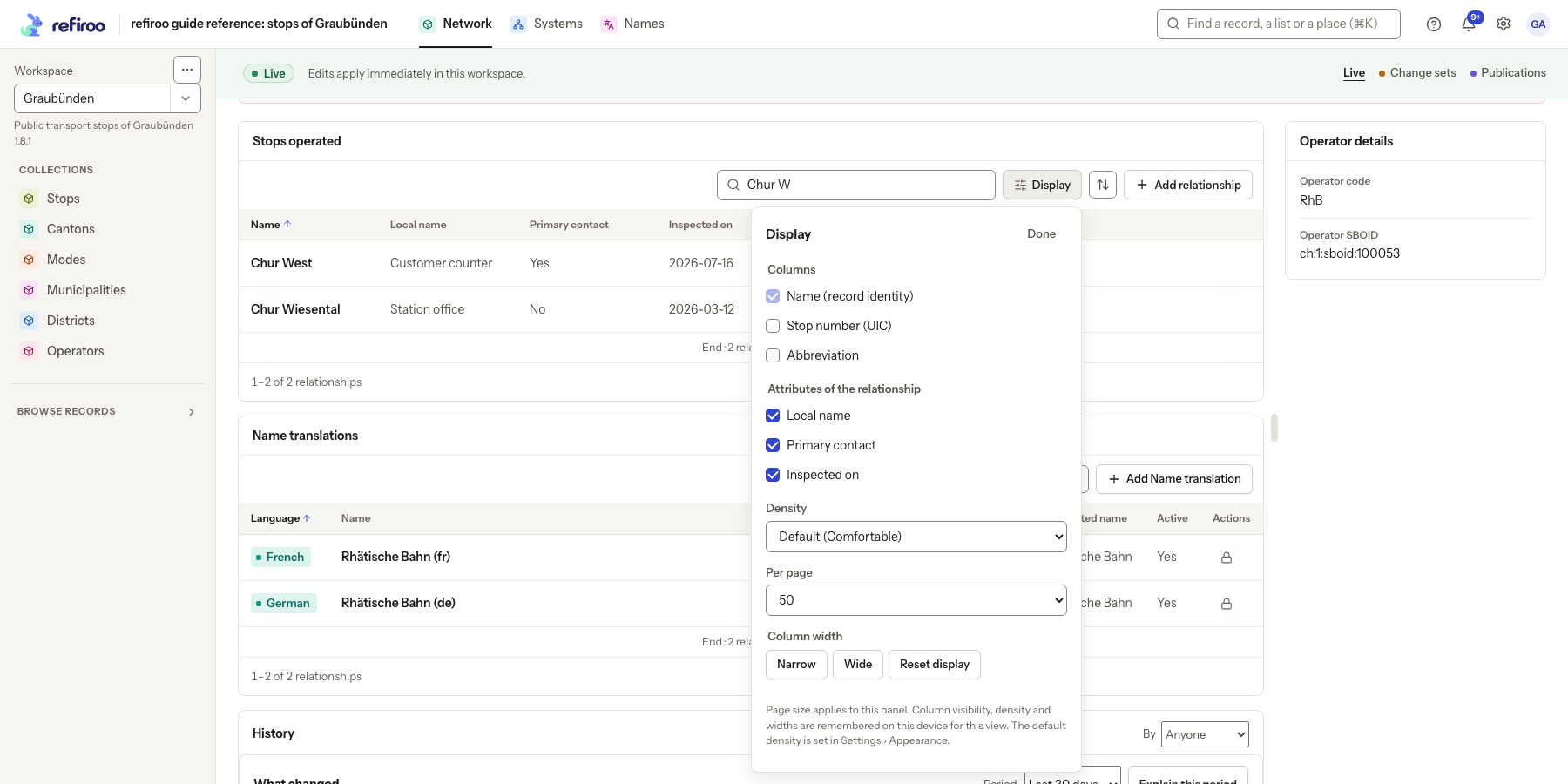
Above: the Rhätische Bahn operator in the Graubünden workspace. Stops operated is filtered to Chur W, showing Chur West with Local name Customer counter and Primary contact. Display lists the record columns separately from Local name, Primary contact and Inspected on under Attributes of the relationship; the column width is Narrow.
For many connections at once, use a relationships table. Its grid can change relationship values in bulk, including links to several shown column records.
Associations, ownership and containment
Section titled “Associations, ownership and containment”An association connects independent records. Removing the connection leaves both records. A voluntary association can also be maintained through a mapping grid.
An owning relationship makes a related record dependent on its owner. It must not be left without its required owner. Deleting an owner can therefore remove the records it owns, including records in another application. Review the deletion impact before confirming; see Deleting a record.
Containment gives a record a parent and its place in a hierarchy. refiroo keeps the parent connection consistent with that place. Change it by moving the record, rather than adding or deleting the parent relationship separately.
Which records you may choose
Section titled “Which records you may choose”The records offered by a relationship search are its candidates. A candidate must be in the same workspace and have an allowed record type. The model can further restrict choices using the record’s fields or fields of its ancestors. A hint below the search explains these conditions where they apply. The record you are starting from may also have to meet conditions; a section can explain why that record cannot hold the relationship.
An expected record can be absent because you are in another workspace or context, your search does not match, or it fails those conditions. When replacing a single connection, the current record is excluded from the replacement choices. Clear or shorten the search and check the hint before asking a model administrator about the rule. Being offered a record does not guarantee a save: number limits, required connections and uniqueness are checked when saving too.
Candidate conditions control new connections. If a record later changes so that it no longer meets them, an existing connection is kept. Its presence is not a promise that the same record would be offered for a new connection now.
Required connections and removal
Section titled “Required connections and removal”An optional connection may be removed on its own. A required connection cannot be removed while its dependent record still needs it. Where only one related record is allowed, Change replaces that record together in one save, avoiding a separate deletion followed by creation.
Choose Remove relationship to remove a permitted connection immediately. Both records remain, and the notice offers Undo. A required-relationship refusal leaves it in place; do not delete an owner to work around the refusal. Review the intended data change first.
Context, permissions and refused changes
Section titled “Context, permissions and refused changes”Readers can inspect relationships with Browse access. Changes need Edit live in Live or Work in change sets in a change set. Scoped grants may limit the records you can change. See Record permissions. Publications and retired workspaces are read-only; a view’s configuration also determines its editing actions.
Live changes take effect immediately; proposed changes stay in the selected change set. If a relationship changed after you read it, a replacement or edit can be refused. Read the message, close and reopen the section to review the current connection before retrying. A failed load is not an empty relationship list. Retry the read before deciding to add anything.
Relation matrices provide another way to inspect and maintain connections across many records.
Reading connections beside a tree
Section titled “Reading connections beside a tree”A record opened beside a tree lists related records under Connected. Each row follows a relationship panel declared for the record, with chips that open the connected records. Open the record’s full page to manage those relationships in their tables.
Single-connection rows offer Change and Delete where permitted. A lock icon explains connections that are required or managed through the parent. Use the row’s edit icon to change the relationship’s own fields. Candidate conditions apply in every place that offers related records, including creation forms, table cells, grids and matrices; a general record search finding something does not make it an allowed relationship candidate.
Screenshot data: Source: opentransportdata.swiss, Service Points (Didok), Federal Office of Transport / SBB, snapshot 2026-11-02. Wikidata, CC0. See The example data for sources and fictional additions.
Connection limits and concurrent edits
Section titled “Connection limits and concurrent edits”A relationship’s allowed type pairs determine which records it may connect. A one-to-one relationship permits one at each end; one-to-many permits one owner at the many-record end; many-to-one permits one target at the source end. Many-to-many has no single-record limit at either end. The same directed connection of the same kind cannot be added twice, including repeated connections in a creation form.
A model can also allow only one counting related record beneath each ancestor of a chosen type. Where a condition decides which targets count, targets not meeting it do not use that slot. This is separate from a unique field value. Review the conflicting record rather than adding another connection with the same counting role. Live writes enforce the rule; a change set may stage a scope conflict that validation or publication then refuses.
Add … can create an owned record with its required relationship already filled. Its creation and connection succeed together. Set relationship fills an empty single-valued connection; the form offers a search labelled with the related type’s name and any fields on the connection, then Set. Other actions use Add followed by the type’s name, Change or Save as appropriate. Remove relationship removes only the connection immediately, keeping both records; the notice offers Undo.
The picker labelled Search by name or attribute… supports arrows across pages and Enter to choose; Ctrl+Home and Ctrl+End reach its ends. Required choices still need a value. If an edit conflicts, Current saved relationship shows its version and your input is preserved. Review before saving again. If the relationship changed after the list was read, close the dialog and reopen it to inspect the current connection.
For a whole set, use Replace a record’s related records. A stale set replacement is refused. For several source records, use Change relationships of many records.
When candidate rules change, existing connections remain and no browser list automatically flags all newly ineligible ones. Ask a model administrator to review a dry-run copy of the workspace when those connections need auditing.
A related-record panel with all its rows loaded, five rows or fewer and no active search puts Search, Display and any available Sort in its ⋯ menu, labelled Search, display and sort for screen readers. A panel’s search box reads Search related records. Choose an item to reveal that control. Larger panels and panels with an active search keep the controls visible.
Longer sets and actions on several records
Section titled “Longer sets and actions on several records”A mapping’s summary can preview only the first twenty targets while reporting the full count. Use Show all … to expand it and continue reading the remaining targets. This differs from an ordinary table column’s +N more, which is a count of chips that do not fit its width. Mapping coverage includes eligible sources as well as sources with relationships already held; a changed candidate rule does not erase an existing connection.
For a selection of records, Change relationships offers allowed relationships in either direction, except parent containment and required ownership. Single-valued connections offer Set to or Clear where permitted; many-valued ones offer Add, Remove or Replace with. Preview the additions, removals and refusals, then apply with the chosen Change the rest or Change none policy. These actions and the selection’s Delete preview are described in Changing many records.