Add a sign-in provider
You need Security administration and help from the organisation’s sign-in administrator. refiroo uses OpenID Connect. Keep a working local administrator account while preparing the provider. Sign-in and second factors explains identities, sessions and recovery.
Create the provider
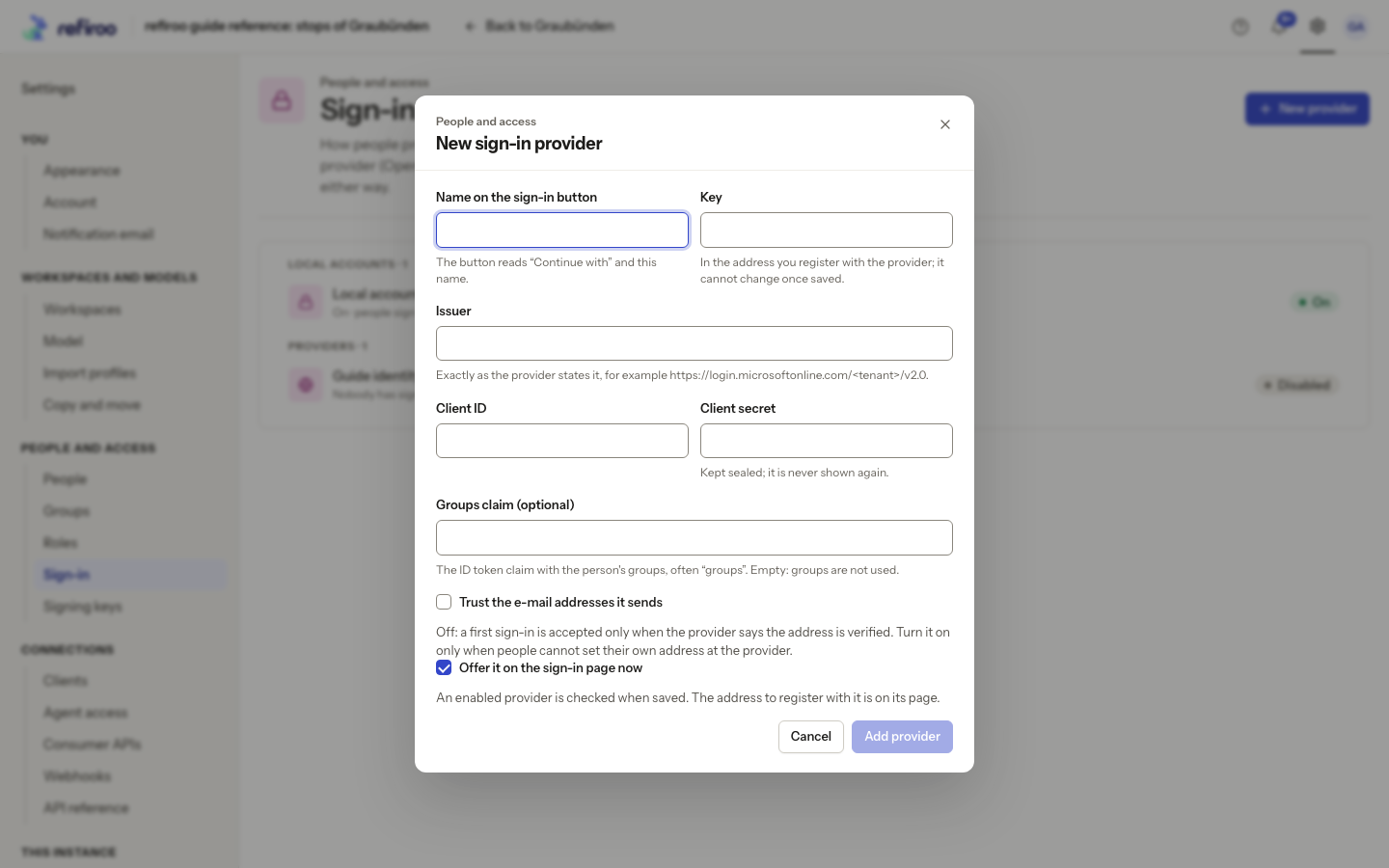
Section titled “Create the provider”- Open Settings › People and access › Sign-in and choose New provider. The catalogue keeps Local accounts separate from Providers.
- Enter Name on the sign-in button. People see Continue with followed by that name. Check the suggested Key: it forms part of the registered address and cannot change after saving. The names password, passkey and local are reserved; choose a distinct key.
- Enter Issuer, Client ID and Client secret from the sign-in administrator’s registration. The issuer must match the provider exactly. The saved secret is kept sealed and never shown again.
- If the provider supplies groups, enter Groups claim, using the field name supplied by its administrator. Empty means provider groups are not used. You can create provider groups and grant their roles before anyone signs in.
- Decide on Trust the e-mail addresses it sends. A person’s e-mail address is their name in refiroo, and administrators add people to groups by it, so refiroo takes an address only when the provider confirms it belongs to the person. Leave the box clear unless the provider’s administrator confirms that people cannot set or change their own address there. With the box clear, a provider that does not mark the address as confirmed (
email_verified) cannot create a person. An address the provider marks as not confirmed is never taken, trusted or not. - Keep Offer it on the sign-in page now selected if it should be enabled, then choose Add provider. It shows Checking and adding… while checking an enabled provider. If The provider was not saved appears, correct the stated issuer, connectivity, certificate or registration problem with the sign-in administrator. Cancel leaves it uncreated.
Register the return address and prove sign-in
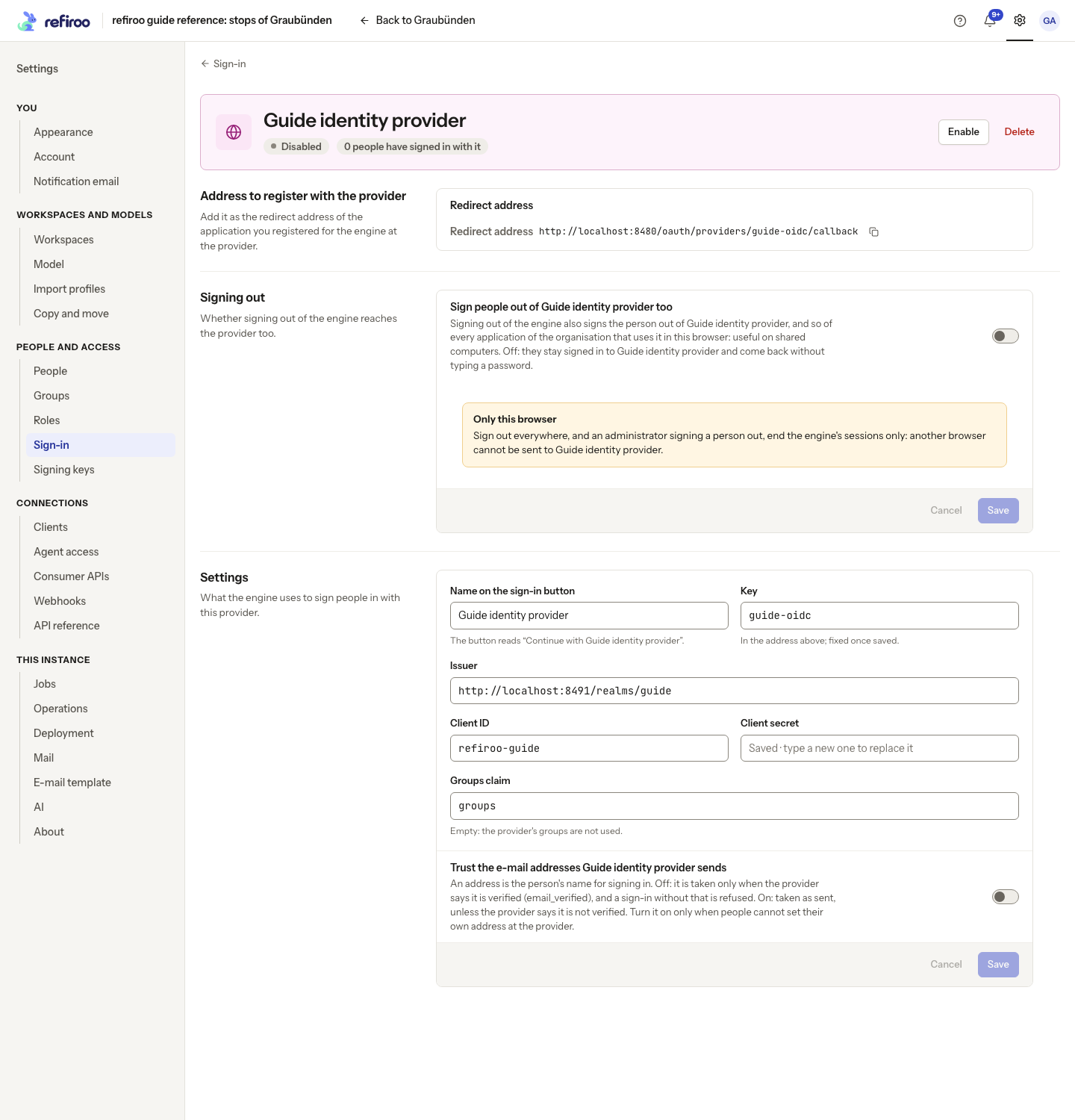
Section titled “Register the return address and prove sign-in”- On the saved provider’s page, find Address to register with the provider. Copy Redirect address and have the sign-in administrator register it exactly. Use the saved page’s address rather than inventing one.
- If the provider is disabled, choose Enable. This acts immediately after the provider checks succeed. Open a separate browser session and choose Continue with …. Complete the organisation’s sign-in and check that refiroo opens the intended person.
- A first sign-in creates a person but grants no access automatically. If the page says the provider did not confirm that the e-mail address it sent is yours, the provider sent no confirmation and is not trusted: check with its administrator, then turn on the trust switch under Settings or ask them to send a confirmed address. Grant their direct or group roles, or link the provider sign-in to an existing person when they already have an account. An e-mail match alone does not link accounts.
- Confirm a complete successful provider sign-in before considering Turn off local sign-in.
Maintain the provider
Section titled “Maintain the provider”The Settings form edits its button name, issuer, registration and groups claim, and the switch Trust the e-mail addresses … sends. Key is fixed. Leave Client secret blank to keep it for an unchanged issuer; enter it again if changing an unused issuer. Once anyone has signed in through the provider, its issuer cannot change. Add another provider and link people instead. Choose Save to apply form edits; Cancel discards them.
Under Signing out, Sign people out of … too also signs the current browser out of the provider. Before turning it on, check provider support and register the displayed Sign-out address. It may sign people out of other organisation applications in that browser. It does not end provider sessions in their other browsers.
Disable acts immediately and ends refiroo sessions started through that provider. A provider used by a person cannot be deleted; disable it to preserve those identities. For an unused provider, Delete asks Delete …? and Delete provider confirms removal. Check remaining sign-in routes before either action. If a concurrent change is reported, reload the provider and review its current state before applying another change.
For public addresses, HTTPS and server recovery, involve the operator; see Configure sign-in.