The JSON view
Most modelling tasks use the visual editor. The JSON view is the specialist workbench for the complete model document, including settings without visual forms. Ask a specialist model author to maintain those settings if you do not work with model documents. Both views edit the same draft; neither directly changes the active workspace.
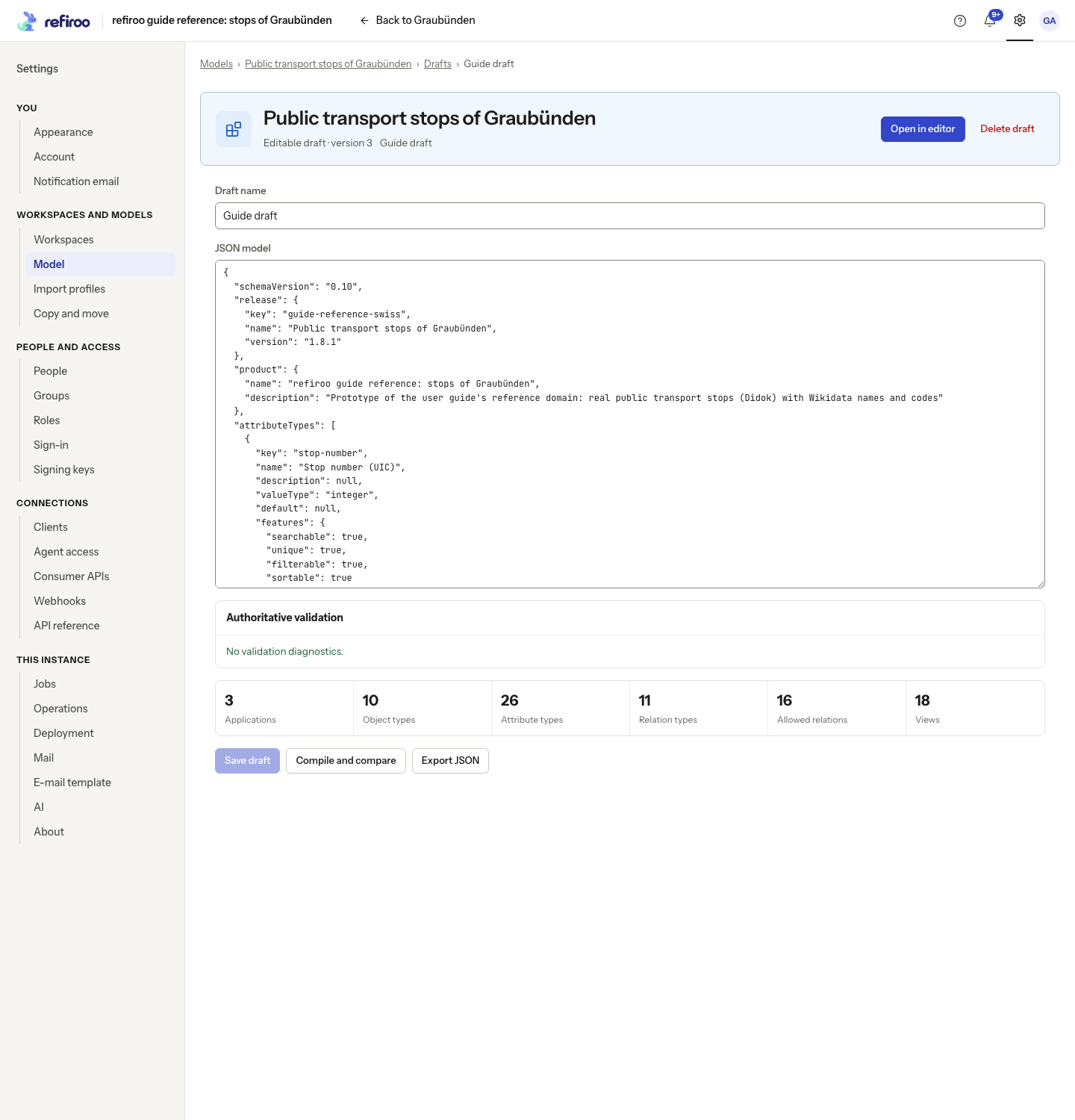
Open JSON in the editor header, or Open as JSON in its menu. The workbench has Draft name, JSON model, Authoritative validation, a summary and Compile and compare. You need Model authoring to save. See Edit a draft as JSON for the workbench controls, without needing to learn document syntax here.
Saving and checking
Section titled “Saving and checking”A syntax error prevents saving the text. Valid syntax does not prove that referenced definitions exist or that the model is usable. Authoritative validation checks those rules and lets you select a diagnostic to reach the affected text. Saving keeps the draft, including work still needing model corrections. Compile and compare uses the saved version and shows Canonical model, Ready for review or Invalid, a model hash and the semantic differences.
Export JSON downloads the current document. It does not install or activate it. Install immutable release… separately confirms creation of an inactive release; activation still requires a workspace compatibility check. The visual editor’s Install and activate… combines those stages. See Releases.
Other editors and unsupported visual settings
Section titled “Other editors and unsupported visual settings”Unsaved text is local to this workbench until Save draft. If another author saves first, A newer draft version exists preserves your text. Copy local JSON keeps it for review; Reload saved version reads the saved draft without merging. Saved document edits appear as JSON edit in History.
The document covers application descriptions and presentation settings; type display, placement and effective periods; shared and relationship attributes; validation and uniqueness rules; full view and panel declarations; consumer contracts; and import-profile instructions where applicable. Visual controls cover only the options described on their pages. Do not infer that an absent form means the model cannot declare a feature. Integrators use Integrate for the model contract details rather than browser steps.
Settings that still need a specialist
Section titled “Settings that still need a specialist”Use the named controls first. The type’s Settings now sets its display attribute, effective period, grouped field requirement and parent relationships; attribute Settings sets numeric limits, Hidden and Help text. Relationship Carries, application Default view, Add a view…, Header and breadcrumbs… and panel Settings… also have forms. See Types, Views and Record pages for those tasks.
These supported choices still require the complete document workbench:
| Choice | What to review with the specialist |
|---|---|
| Model title and description | The product wording used by the top bar comes from the default workspace’s model. A draft title alone does not change it. |
| Application or type icon | Choose an icon supported by refiroo; the visual editor displays it but has no icon picker. |
| Existing application, type or shared-field description | The new-application form takes a description; the element tables do not provide a general description editor. |
| Released field’s value type | A specialist can save the changed definition here when the visual editor refuses it. Compile and compare, install the release, then review the workspace migration before changing stored values. |
| Attribute default | A typed starting value used on creation, not a rule that refills cleared values. |
| Relationship uniqueness within an ancestor and its condition | Review the allowed type pair, ancestor and target field; these rules govern writes, not just one view. |
| Tree actions and detailed ordering | Create, Rename and Move, different ordering per child type, descending order and reading size. The visual tree form controls availability and one common child-order field. |
| Mapping-grid reading size | The visual form chooses endpoints, columns and candidate search, and new grids read 20 rows at a time. |
| Relation-matrix search and reading size | The matrix form sets structure, displayed fields and cell actions; additional row search fields and reading size need the workbench. |
| Full panel declarations | Creating a Table or Hierarchy panel directly, changing a table panel’s record type or a contained panel’s type list after creation. Existing hierarchy and table panels have Settings controls. |
| Detailed consumer declarations | The consumer editor has named forms for ordinary choices; a specialist can edit an entire API or item with Edit as JSON… when a combination has no form. |
Every saved change still needs validation. A free-form setting accepted in a document is not proof that refiroo uses it. Ask the specialist to confirm the behavior and inspect the preview and release checks before activation. Export preserves model definitions; it does not back up workspace records, files, access settings or history. Use the operator’s backup and restore procedure for the installation.
Relationships table configuration
Section titled “Relationships table configuration”Start with the visual relationships-table form.
A specialist maintaining its configuration uses fromColumns and toColumns as ordered,
non-empty lists of name or scalar attribute keys attached to the respective endpoint type.
Each list must contain unique fields. attributeColumns is an ordered list of attribute keys
declared by that specific relationship binding; it may be empty but cannot repeat a key.
A JSON relationship attribute may be a column, but cannot be a filter or sort.
groupBy is from, to or null (no grouping). It heads the rows by the chosen record.
layout is rows by default, or grid: each from record once, with a column group per to
record, headed by the first toColumns field. The grid ignores groupBy; from: sorts
order its rows.
filterFields and sortFields identify the field’s location as from:<field>, to:<field>
or relation:<attribute>. Endpoint fields must be name or attached scalar attributes;
relationship fields must be declared on the binding. Attribute filters require Filterable.
The visual form derives these lists from selected columns, excluding JSON; it starts
defaultSort at from:name and pageSize at 20. A specialist may declare other valid fields.
sortFields must be non-empty, defaultSort must name an entry (optionally prefixed with
- for descending), and pageSize must be 1–100.
Validation identifies the offending location. The following quoted diagnostic fragments are from the validator; words in braces stand for the names in the affected declaration:
| Diagnostic wording | Correction |
|---|---|
| “references unknown object type ‘{key}’” / “references unknown relation type ‘{key}’” | Use existing definitions for both ends and the relationship. |
| “cannot use containment relation type ‘{key}’” | Choose a non-containment relationship. |
| “references a relation binding ({relation}, {from} → {to}) that is not declared in objectTypeRelations” | Declare the directed pair or choose a permitted one. |
| “View {list} must contain unique fields” | Remove repeats from the named column, filter or sort list. |
| “{list} references ‘{field}’, which is not ‘name’ or a scalar attribute attached to ‘{type}’” | Use a field of the correct endpoint type. |
| “attributeColumns references ‘{field}’, which binding ({relation}, {from} → {to}) does not declare in attributeTypeKeys” | Use an attribute carried by that pair. |
| “{purpose} field ‘{ref}’ must be from:<field>, to:<field> or relation:<attribute>” | Qualify the filter or sort with its location. |
| “{purpose} field ‘{ref}’: the binding does not declare attribute ‘{field}’ in attributeTypeKeys” | Correct the relationship attribute reference. |
| “{purpose} field ‘{ref}’: ‘{field}’ is not ‘name’ or a scalar attribute attached to ‘{type}’” | Correct the endpoint reference. |
| “filter field ‘{ref}’: attribute ‘{field}’ is not filterable” | Remove the filter or enable filtering on that attribute. |
| “{purpose} field ‘{ref}’ holds JSON and cannot be used” | Keep JSON as a relationship column only. |
| “defaultSort must name one of its sortFields” | Choose a declared sort field. |