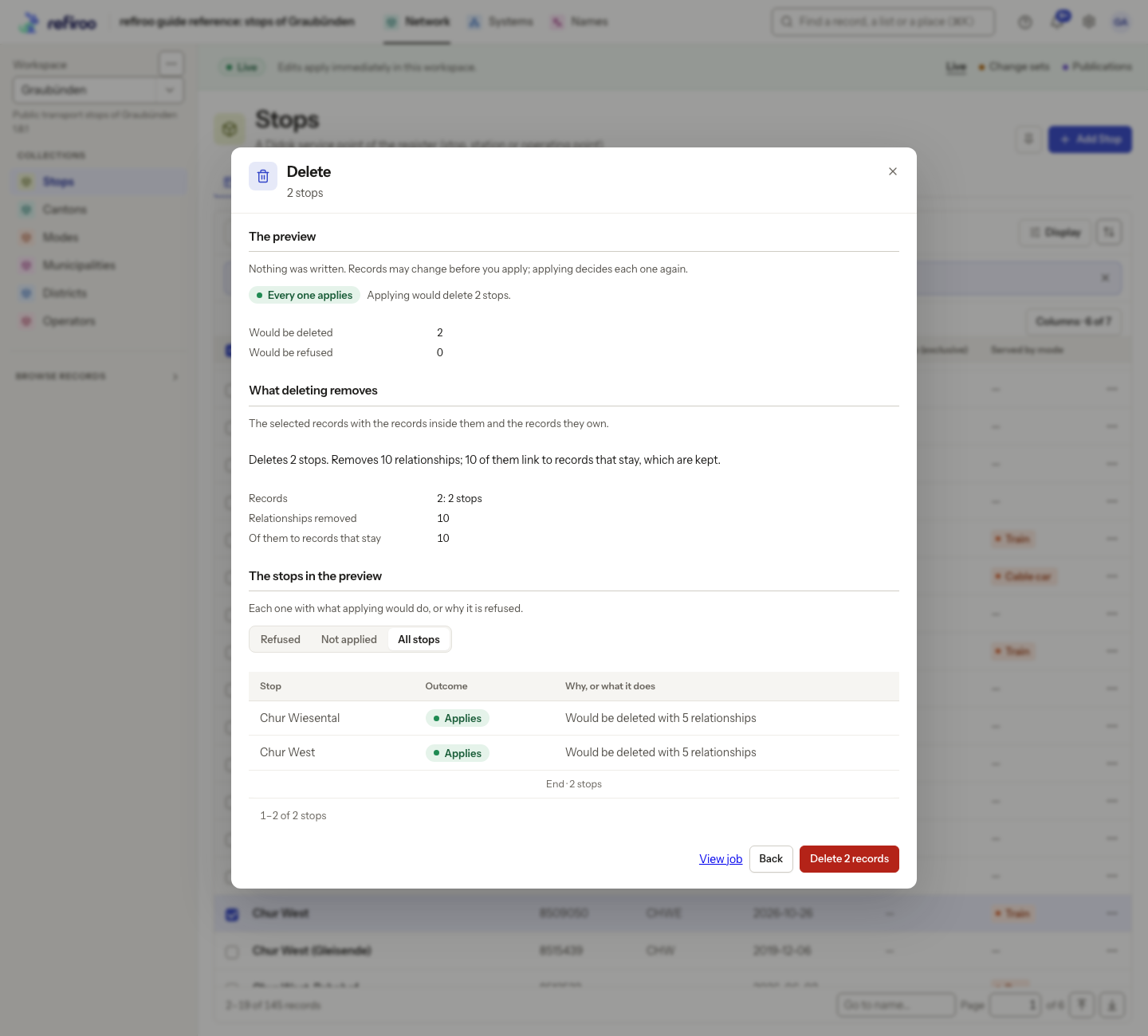
Delete many records
Deletion can remove more records than you selected. Read Changing many records for permissions and Records for ownership rules.
- Select the records in an editable collection. Check the workspace and whether you are in Live or a change set. Choose Delete in the selection bar.
- Read the dialog and choose Delete the rest to continue with valid deletions despite refusals, or Delete none to require all items to pass, where that choice is available. Choose Preview.
- Review selected records, children and owned dependants by type, relationships removed, and the connections reaching records that stay. A selected record may already be included beneath another selected record; do not count it twice.
- Check the final total on Delete … records. This includes dependent records, not only selected rows. Use Back or cancel if the impact is wrong.
- Confirm with Delete … records. Review the result and reasons for refusals. A new child or intervening edit can invalidate an item’s preview. Use Preview again for refused or unprocessed items. For records refused because their version changed, the new preview uses their current versions. Review its updated dependent records and relationships before confirming again; the earlier preview no longer describes the whole impact.
Live removals take effect immediately. In a change set they remain proposals until publication. History and earlier publications remain. A sampled preview cannot authorise deletion of items it did not inspect. Cancellation stops remaining work and leaves already committed removals in place.