AI settings and access
Use Settings › This instance › AI to check the AI features available in your instance and review their use. You need Operations across the instance to open this page and send a test request. The predefined Operator role holds it.
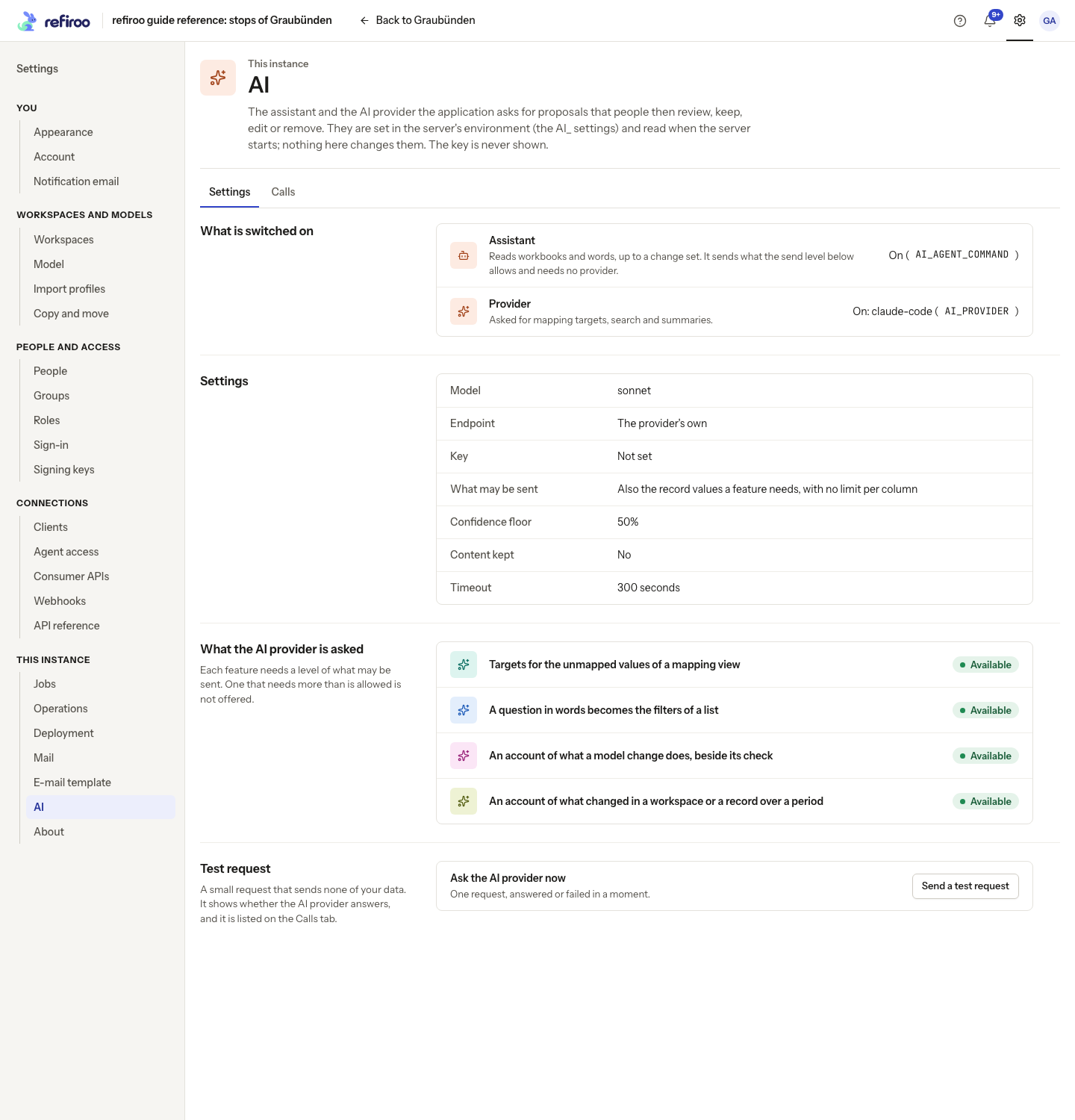
The page displays settings. Ask your operator to change them and restart the server; there is no Save button. For that task, see Set up AI. To check a connection, follow Check the AI provider.
Two separate features
Section titled “Two separate features”On the Settings tab, under What is switched on, Assistant shows whether the built-in Claude Code assistant is on. It reads a workbook or instructions, proposes changes and prepares a change set after the person accepts. It needs no AI provider configured on this page.
Provider shows whether an AI provider is configured for mapping targets, questions in words and explanations of changes. Supported connections include the Claude API and OpenAI-compatible services, including a model run inside your organisation. The provider may be hosted outside your organisation or run inside it. Each feature says what it sends before the request.
Either can be on without the other. With neither, the page says Neither the assistant nor an AI provider is set up and no built-in AI action is offered. Access for external assistants is controlled separately: see Agent access.
What may leave the instance
Section titled “What may leave the instance”Under Settings, read What may be sent before allowing people to use AI. The operator chooses the ceiling; people cannot raise it for their own request.
| Level | What it permits |
|---|---|
| Structure | Names, headers, labels and types, with the question or facts needed for the feature; no record values. Facts can include counts. |
| Samples | Also a limited number of values per column or attribute, normally 20. |
| Values | The record values the feature needs. The sample limit does not cap this level. |
The default is Values. What the AI provider is asked lists each provider feature as Available or Unavailable. A feature needing a higher level is not offered to people.
| Feature | What is sent |
|---|---|
| Built-in assistant | The person’s instructions, the workspace’s model, the workbook if supplied, and records it needs to read. Requires Values. |
| Targets for unmapped values | Source and candidate target names and the fields displayed by the mapping view. Requires Values. |
| A question in words | The question, today’s date, the list’s fields and relationships. Available at every level. At Samples or Values, it also sends the names in a relationship’s list when it holds at most 50 records in the current context. This whole short list is an exception to the sample limit. |
| An account of a model change | The model’s changes and record counts, without record values. Available at every level. |
| An account of what changed | Counts and model labels. Names of records, people, change sets and files are included only at Values. Available at every level. |
Instructions can themselves contain sensitive information. A provider outside the organisation receives the permitted information under your organisation’s agreement with it. Structure still sends information outside the instance. Ask the operator about a locally hosted provider when the information must stay inside the organisation.
These levels govern the built-in AI features. They do not control what an external assistant does with data it reads through Agent access.
Who may use AI
Section titled “Who may use AI”The Use AI proposals action group allows requests for proposals and summaries in the workspaces covered by a grant. The predefined Data steward, Data owner, Model administrator, Workspace administrator and Integration administrator roles hold it. Reader, Contributor, Operator and Security administrator do not receive it from those roles alone. A custom role can include it.
Give this group through Roles and grants, together with the permissions needed for the task:
- Questions and accounts of history also need Browse in the workspace.
- Preparing a workbook load needs Bulk and import; accepting a load needs Work in change sets. Changing the model also needs the relevant model permissions.
- An account of a model change needs Model release in the workspace as well as Use AI proposals.
AI access does not grant editing, model administration or publication rights. An action is offered only when its configuration and required permissions allow it. If permissions change while work is open, read the refusal and arrange the missing grant or ask an authorised colleague to take the step.
Assistant tasks contain the person’s instructions and replies, which can name records. They are visible to the requester and administrators of the target workspace, rather than shared with everyone; opening one also requires Use AI proposals there.
Review and publication
Section titled “Review and publication”AI proposals are never applied on their own. For mapping targets, people review the proposed relationships in a change set, change or remove unsuitable targets and publish through the normal process. Questions become filters that people can edit or remove; a question with an unsupported part leaves the proposed filters for the person to accept. Explanations cite facts to check and can be wrong; they do not decide whether a change is safe.
For the built-in assistant, the person reviews the model proposal, questions and checks, edits the draft or asks for corrections, then accepts the load. Read the checks for filled cells that no source reads, columns deliberately left out, and new records beside records already held. The row check separates refusals from skipped rows; a problem with the proposed file layout goes back to the assistant to correct. The per-sheet changed-record lists let the reviewer inspect the proposed values. See Review the proposal for the screen details. The session holds no more access than the requester, restricted to the target workspace, and cannot write live data, approve, publish or activate a release. Model work needs the requester’s model grants. A dedicated client belongs to each task; these session clients are separate from the agent clients an administrator creates.
Moving a whole type is different from loading a change set: a person with Model release previews and confirms the migration, which moves the records live. Moving part of a type uses a change set and the workspace’s approval policy. See Approval policies and Using the assistant.
The session’s isolation is configured by the operator. In the shipped container it runs as a separate user, but the container does not restrict its network access. Do not assume it can contact only this instance. See The assistant’s session.
Read the settings and calls
Section titled “Read the settings and calls”With a provider configured, Model and Endpoint identify where requests go. Key says Set or Not set; the key itself is never shown. Confidence floor is the minimum confidence for a proposed mapping target, not a promise of correctness. Timeout limits a provider call. Content kept says whether request and answer content is kept in the call list and for how long.
The Calls tab lists provider requests and each built-in assistant turn, newest first. Its columns show When, What for, Asked by, Model, Outcome, Tokens in / out, Cost and Duration. Answered means a response arrived, not that its suggestion is correct. Failed includes the reason. Use Show more to read older entries.
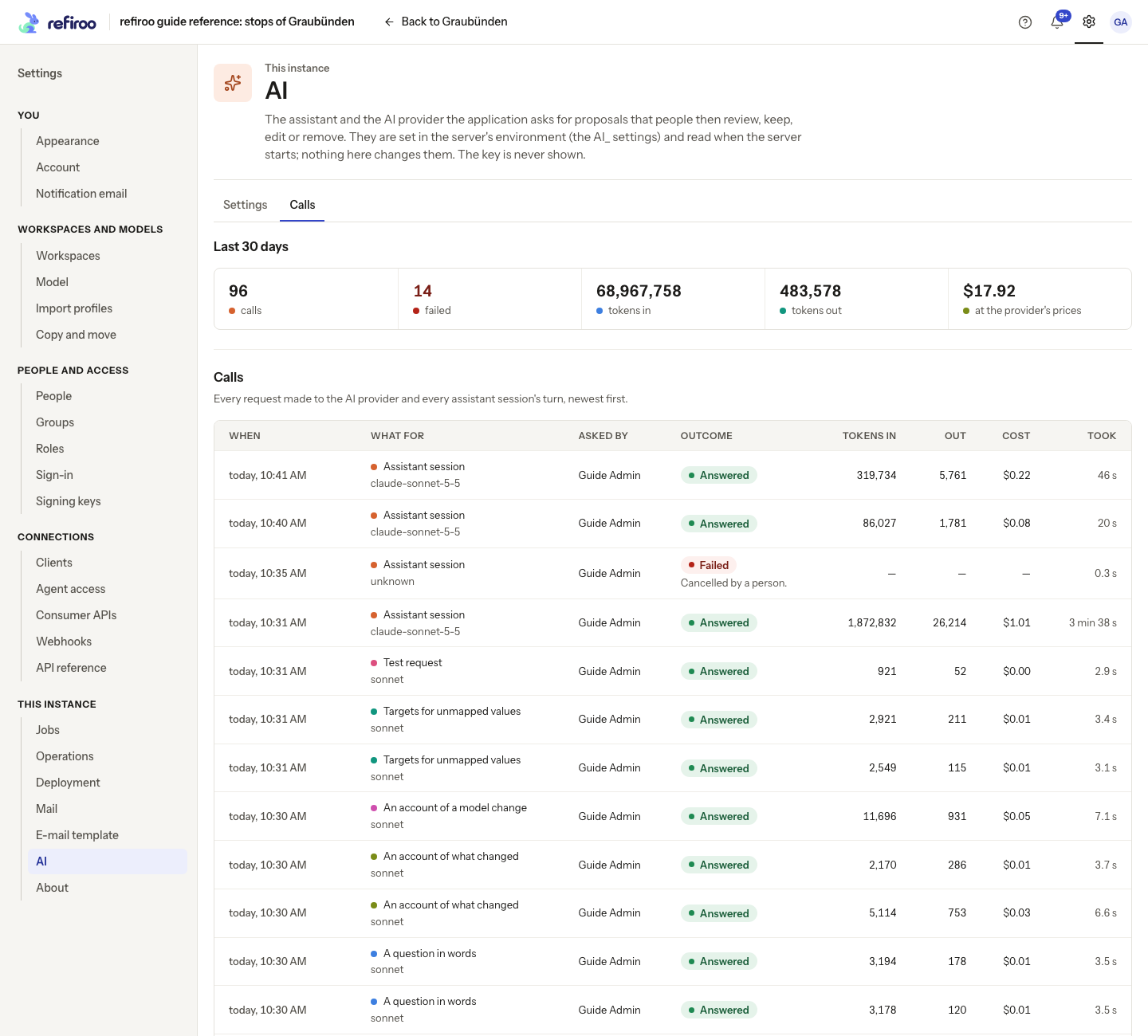
The totals cover the last 30 days. An assistant turn is one call; its tokens include cache reads and writes. Cost appears only when reported. A dash does not mean the call was free, and this list is not a billing statement. Provider requests use the organisation’s provider account; built-in assistant usage follows its Claude Code authentication and billing. A test request can incur usage too. Ask the operator to check charges and limits with the provider.
What is kept
Section titled “What is kept”Call records remain after their request and answer content expires; the 30-day totals are a reporting window, not a deletion deadline. Content is not kept in the call list by default. When enabled, Show what was sent and answered opens it on a call. It normally expires after seven days, leaving the call record. Assistant call content contains the prompt and final answer, not its full transcript.
Turning this content logging off does not remove an assistant task’s workbook, working files or Claude Code transcript. Tasks normally expire after 90 days from completion or their last change. Failed, stopped and loaded tasks keep session files while the person can continue the work. Publication or discard of the change set, confirmation of the migration, or discard or expiry of the task ends that continuation; cleanup removes session files and deactivates the client. Read What is kept for the full retention rules and deployment limits.
refiroo’s retention does not control a provider’s own retention. Review that separately under your organisation’s agreement.
Change or stop AI use
Section titled “Change or stop AI use”To change the provider, its credentials or the send level, agree the change with the operator, who applies the server configuration and restarts. Afterward, reopen AI, read What may be sent and test the provider. Test the built-in assistant separately through a real task; the provider test does not check its Claude Code sign-in.
To remove one person’s access, remove the grants supplying Use AI proposals, including group and whole-instance grants. Other grants can still provide it. To stop a built-in assistant task already under way, use its task controls; taking away a permission can refuse later work but does not recall information already sent.
Turning off the provider removes its proposal, question and explanation actions; it does not undo kept filters, prepared change sets or published work. The built-in assistant and external Agent access are separate and need their own controls. Disabling either built-in feature is not a deletion of its retained records or files.
When neither built-in feature is configured, this page shows only the setup notice; the Calls section is hidden. That does not mean earlier call records were deleted. Ask the operator to inspect retained information when both features are off. There is no call-delete or content-delete button here. Content expiry, task cleanup and instance backup and restore are separate operator concerns; provider-held copies follow the provider’s rules.
At Values, a feature can send all the record values it needs. Do not treat a sample count displayed beside that level as a maximum for those requests. Use Samples when the policy must restrict sampled values; features requiring Values are then unavailable.