History
Use history to find who changed data and when. Start from a record for one item’s past, a workspace for activity across records, or Home for your own work. Follow See who changed what for the steps.
A record’s History
Section titled “A record’s History”In Live, a record page’s History shows the newest entries first. The record History panel is absent inside a change set or publication. Use Review changes for a change set’s prepared differences, or return to Live for the record’s history. All, Values, Relationships and Moves select kinds of event. By narrows the entries to one person; Anyone removes that restriction. Expand an entry with its arrow to see recorded details, including previous values where available.
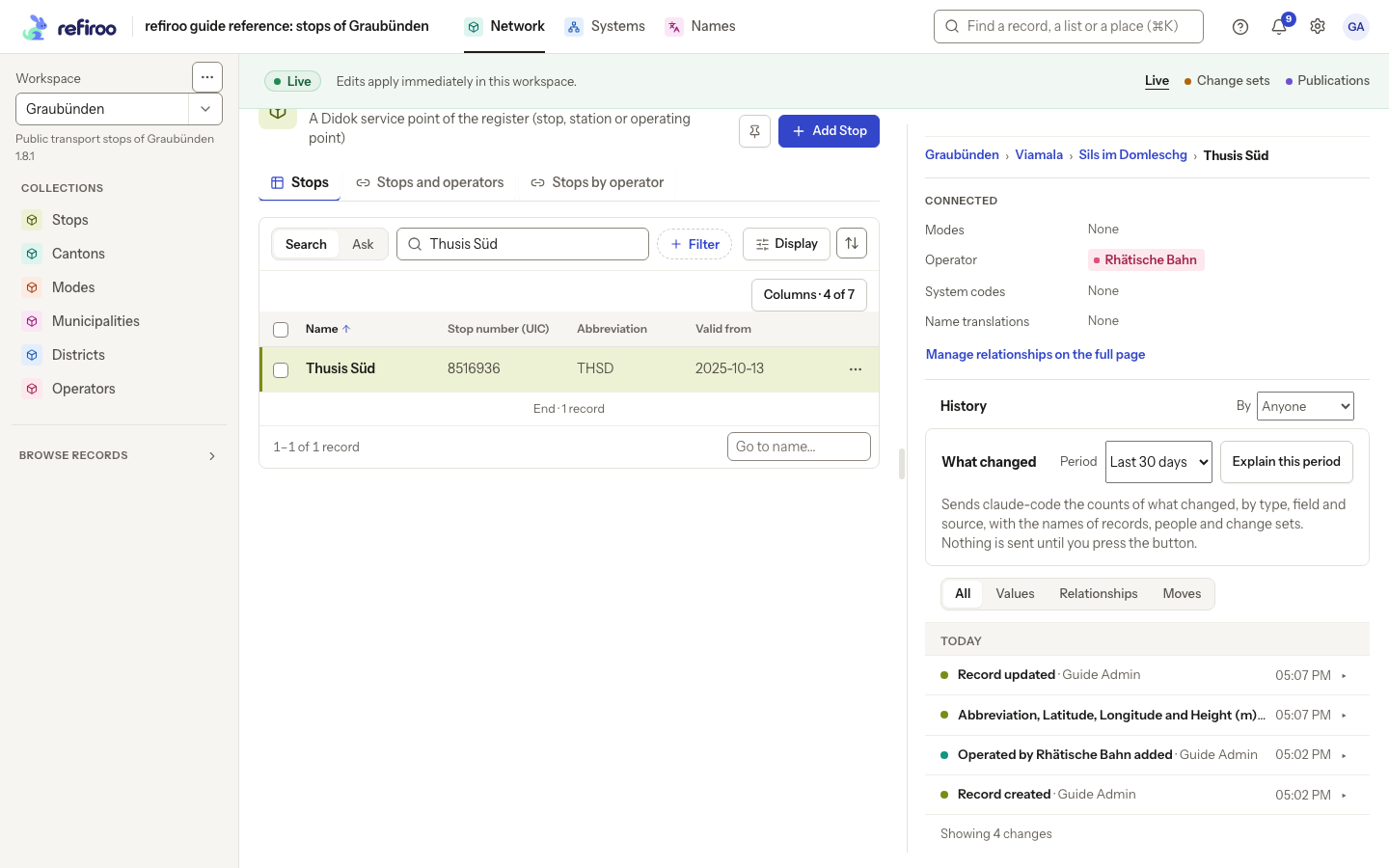
Above: Thusis Süd’s History lists its creation, the operator added, the change to Abbreviation, Latitude, Longitude and Height (m), and the update a publication applied. The table shows the current abbreviation, THSD.
Creation, field changes, relationship changes and moves are different events. A successful Live save appears in history; a refused save is not a saved correction. Work prepared in a change set and work applied by publication have different contexts. Read the cause alongside the person and time rather than assuming two lines mean two direct live edits.
History names the person or client responsible, using their current name. Earlier events recorded before sign-in was recorded read Before sign-in. Renaming a person does not mean another person performed the old action. Read access is limited to workspaces you may browse.
Activity across a workspace
Section titled “Activity across a workspace”The workspace’s page shows What changed, grouped by day with consecutive repeats folded into a count. For more activity, where your access opens workspace management, choose Settings, Workspaces, the workspace, then Activity. Its What choices are Everything, Records, Relationships, Change sets and Publications. Entries identify the action, person and time, and can also name its change set or publication context.
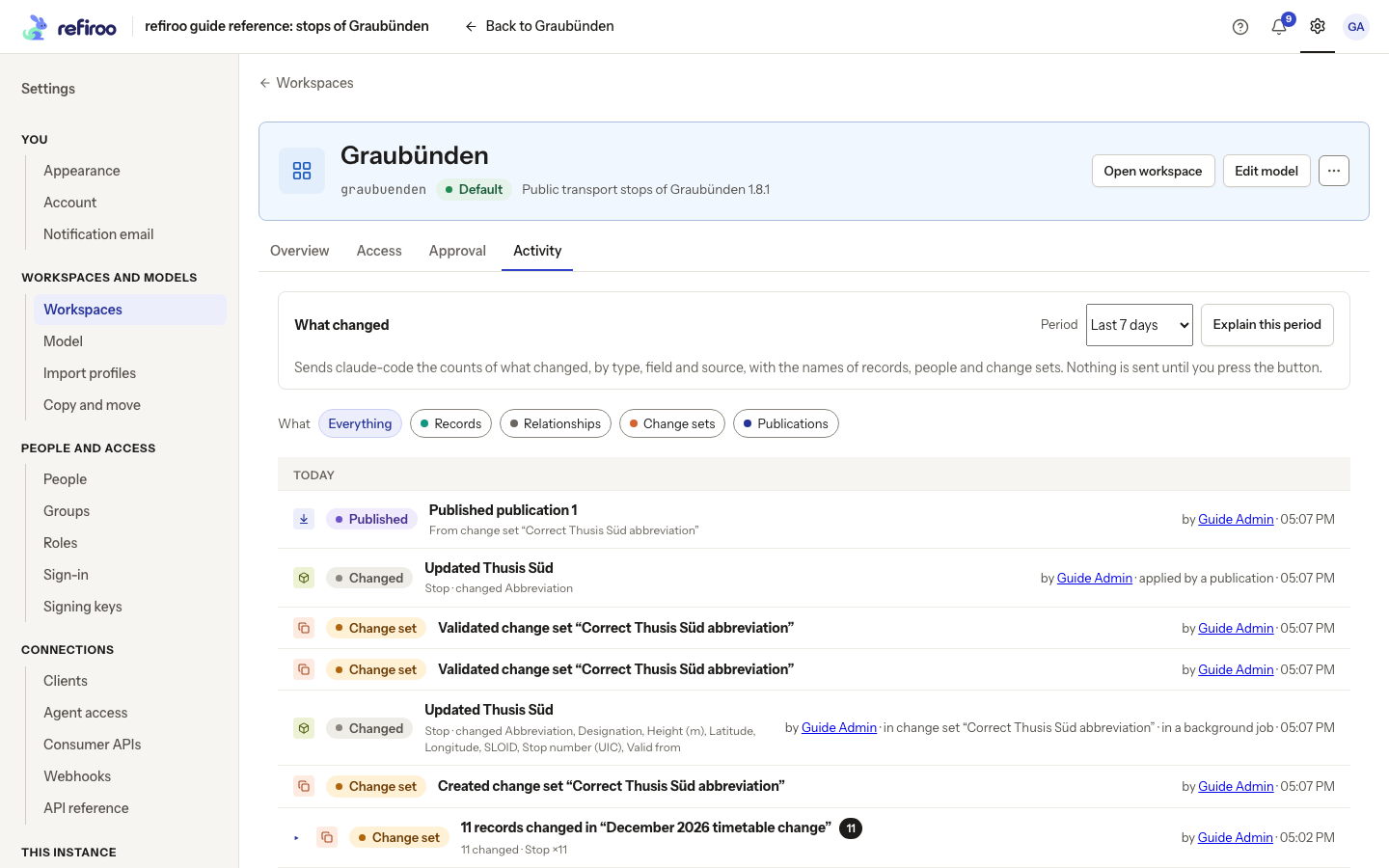
Above: Graubünden’s Activity shows the creation and validation of the correction change set, the record update and Publication 1, newest first.
A person’s changes
Section titled “A person’s changes”On Home, Your recent changes gives a short list. See all your changes opens Your changes. Consecutive steps on one model draft fold into one expandable line with their count. Expand it to read the individual steps. Choose Workspace, What and Period to narrow it. A person’s linked name can also lead to their changes, within the workspaces you may read.
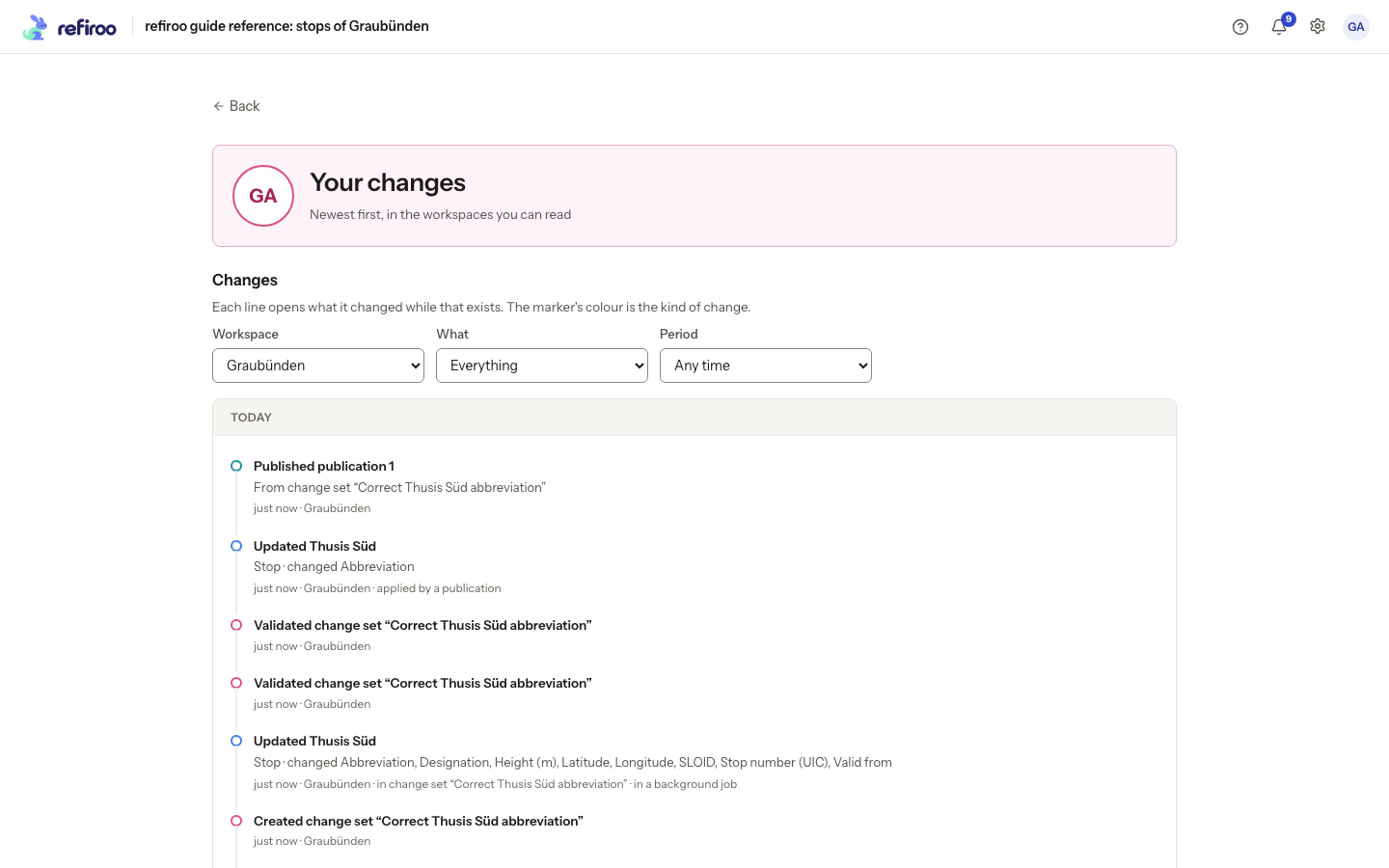
Above: Guide Admin’s changes in Graubünden include the published correction and earlier work.
These lists help locate an action; they do not undo it. To correct current data, follow Correct a record. To read the saved result of a publish, browse a publication.
If a history read fails, retry it. If no entries match, remove the person, kind or period filters. A filtered empty list does not prove that the record has never changed.
Reading more and the limits of the list
Section titled “Reading more and the limits of the list”History groups entries under day headings. It starts with the ten newest; Load older history reads 20 more and Show fewer shortens it again. Jobs are named as the cause of their changes; changes applied by publication name that publication. A system’s author name is marked client. Where an earlier value was not recorded, the expanded entry says so rather than reconstructing it.
The person’s Changes page helps find actions across workspaces. It shows no field values and cannot be exported; open a record’s History for values. It leaves out model-to-model mapping operations. Older changes without a workspace are visible only to someone who reads every workspace. Entries recorded before named sign-in say Before sign-in. Model-administration entries also require Model authoring access.
Empty results and continuing the list
Section titled “Empty results and continuing the list”No history recorded yet. means there are no retained record events. No change matches. means the filters found none: remove By or the event-kind filter before concluding the record never changed. Show all history clears a narrowed history. Loading history… is still a pending read.
The person’s Changes list groups actions by day and reads across workspaces you may browse. Load more reads the next entries. No change matches these filters. calls for loosening the filters; You have not changed anything in the workspaces you can read yet. describes an empty personal list. A different person’s page can be headed Changes by …. These activity lists help locate changes without exposing the record’s full before/after values.
Authors, causes and destinations
Section titled “Authors, causes and destinations”Deactivated people and clients remain named using their current names. Changes made by refiroo itself say the engine. For a job, the author is the person or client who requested it; for publication changes, it is the person who published. A relationship entry identifies the record at the other end. Publication and type-change entries may keep only the changed values, so their earlier values can be unavailable.
The person’s Changes page offers the last 24 hours, 7 days or 30 days and includes live and change-set work, publications and permitted model work. Titles open the affected item while it still exists; a deleted item has no current record to open.
A change set names its creator and the people who edited it. A publication names who published and withdrew it. A job names its requester both in the list and on its page. These names describe different responsibilities; the person publishing need not have prepared every change.
A narrowed workspace Activity list offers Show all activity to clear its narrowing. The wider result still includes only work you may read.
What changed in a period
Section titled “What changed in a period”What changed above workspace Activity and a record’s History can explain a period in a few statements. It appears when a provider is enabled and you hold Browse and Use AI proposals in the workspace. Opening the page sends nothing. Follow Explain a period in history to request an account and check its sources.
The initial period is Last 7 days for a workspace and Last 30 days for a record. Choose dates offers From and To, included; both chosen days are included, using your browser’s time zone. The first day must not follow the last. There is no fixed maximum period.
refiroo counts the live changes across the whole period: records created, changed, moved or deleted by type, fields changed, relationships, jobs and publications, people, change-set events, withdrawn publications and model activations. A publication can identify who prepared its work, the preparation job and who published it. A staged record is counted when published, once; record edits still sitting in an open change set are not counted as live changes. Events such as creating or submitting that set can still be included. A record account concerns that record’s values, relationships and moves, rather than every record in the workspace. Counts can overlap: a record moved while a value changed can appear in both counts. Do not add them as a total of different records.
Explain this period sends counts and model labels to the configured provider. Only the values send level adds names of records, people, change sets and files. Names remain visible in your fact lines whatever the send level. The explanation does not send record field values. Requests may incur costs and are logged; AI and your data explains permissions, content retention and provider privacy.
Each AI statement has numbered sources. A number leads to a fact counted by refiroo, not written by the provider. The facts includes all facts, with Show the other … after the first ten. The provider sees at most 40 facts of each kind and their true totals, so its short account is not a replacement for the whole list. Statements without a valid source are removed and counted. The note Written by AI from the facts below reminds you that the wording can be wrong.
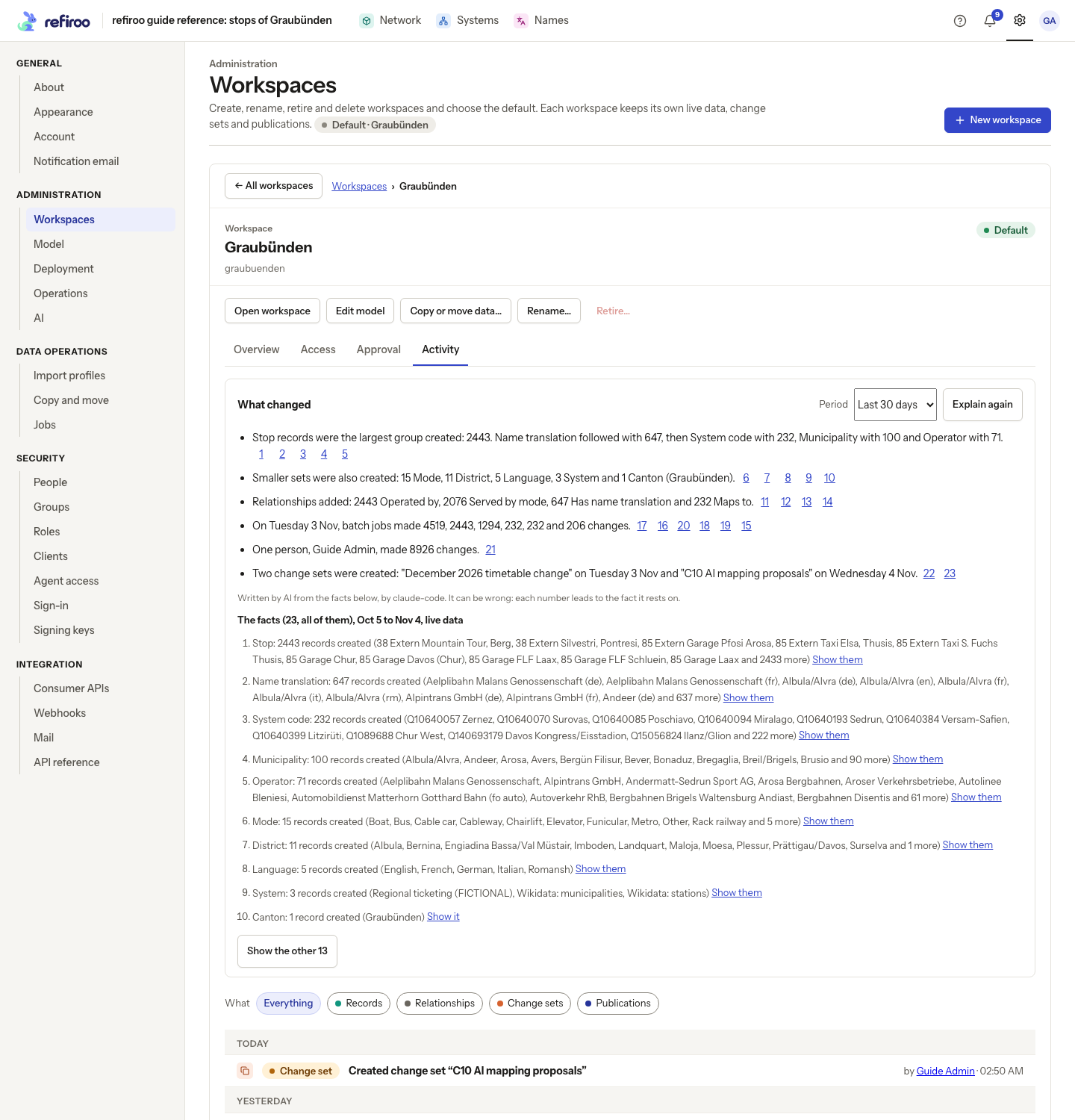
Show it or Show them narrows Activity or the record’s timeline to the changes counted by that fact. Other facts offer Open the change set or Open the job where you may open it. A job deleted after retention has no job link; a deleted record has no current name. Use Show all activity or Show all history to leave the narrowing.
A period with no changes says so and sends nothing to AI. If The account could not be written appears, the facts remain usable and Try again requests the wording again. A request that cannot be made has its own error and retry. The same facts for the same period requested again within an hour reuse the saved account without a second provider call. The preset periods end at the time you ask: Explain again normally changes that end time and can make another paid call. The account itself is temporary, not a permanent history entry. The browser’s account is in English; it is not translated into German. Requesting an explanation changes no record.
Work prepared by an assistant
Section titled “Work prepared by an assistant”History separates who prepared work from who published it. Built-in assistant changes say Proposed by the AI assistant, with the model when recorded, Asked for by the person who requested the task, and Edited by a later editor when present. The mark survives later edits of that prepared row and is kept in published history, including removals, after the task expires. A task’s proposal need not carry a confidence percentage. Mapping suggestions can include confidence and a reason; replacing a mapping target removes that target’s AI mark.
Work from an external connected assistant says Prepared by an assistant: followed by its name, who asked and who edited when available. Its name is the one the assistant gave itself; it is not proof of identity. The entry still names the person who published. The personal Changes page has no separate assistant filter or mark, so inspect a record’s History for this detail. refiroo never turns an assistant’s proposal into publication on its own.
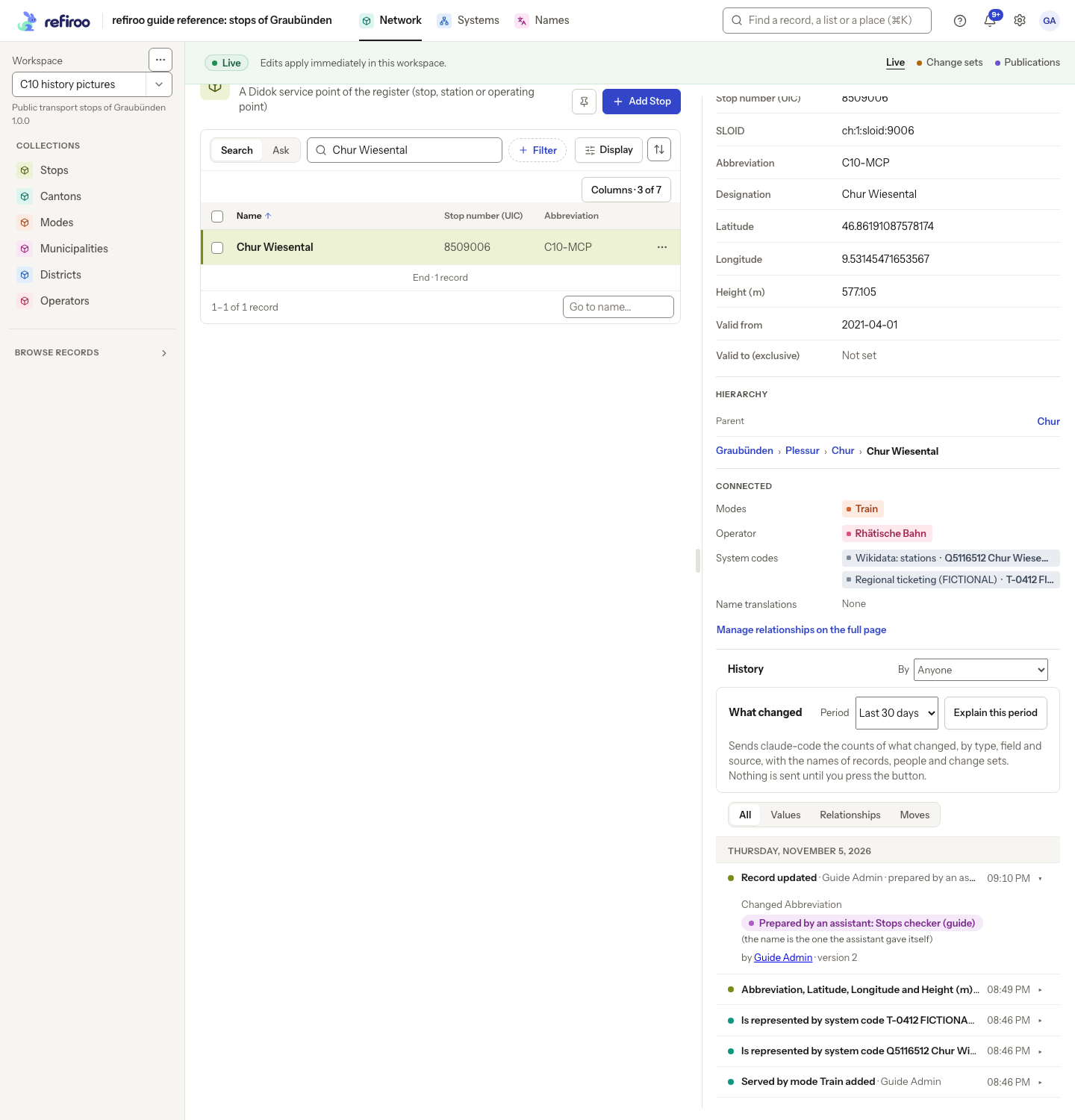
Above: Chur Wiesental’s History attributes an Abbreviation update to Guide Admin and marks it as prepared by Stops checker (guide). A separate entry below names changes made by that assistant’s client.
An external assistant can prepare and submit only change sets created by its own person or client, not a colleague’s. It can add or change records and relationships and set fields, but cannot remove records or relationships, clear values, discard a set, withdraw a submission, change the model, approve or publish. A person reviews the submitted work through change-set review. Withdraw the request before editing a submitted change set; a second-person policy still needs a different approver from the person whose assistant submitted it. Correct mistaken additions yourself or have the assistant prepare a new set. These external-assistant limits differ from the built-in workbook task’s fuller preparation abilities. See AI and your data before allowing an assistant to read your workspace.