Change sets
A change set is a place to prepare related changes away from live data, review their combined effect and publish them together. It belongs to a workspace. It can contain changes across that workspace’s applications, including new records, corrections, moves, relationships and deletions.
Use one when a group of changes needs to go live together or needs review before publication. For an everyday correction that should be visible immediately, you can correct the record in Live. Having an open change set does not prevent direct live work, and changing many records does not by itself require a change set.
For the working sequence, see Prepare and publish a change set.
For preparing specific kinds of change, see Relate records, Arrange records in a tree, Map codes between systems and Fill in a relation matrix.
Where a change set starts
Section titled “Where a change set starts”A change set starts from a copy of data at a particular moment. Its source is shown alongside its name, version and model release in the change-set list; inside it, open Details in the band to read its source, creator, creation time, version and model.
| Source | What the change set initially contains |
|---|---|
| Current live data | Live records and relationships at creation, including direct corrections made since the last publication. |
| A publication | The records and relationships in that retained snapshot, using the model release it was published under. |
New change set, then Start change set, creates the first kind. The form asks for a name; Options shows its start point and, where your Model release access and installed releases allow a choice, its model version. A publication’s menu offers Start a change set from this publication for the second. Neither action changes live data or creates a publication. See the starting instructions.
Starting from an older publication does not restore it over current data. Only changes deliberately made in the change set are applied when it publishes. Newer live records and corrections that the change set leaves untouched remain in place.
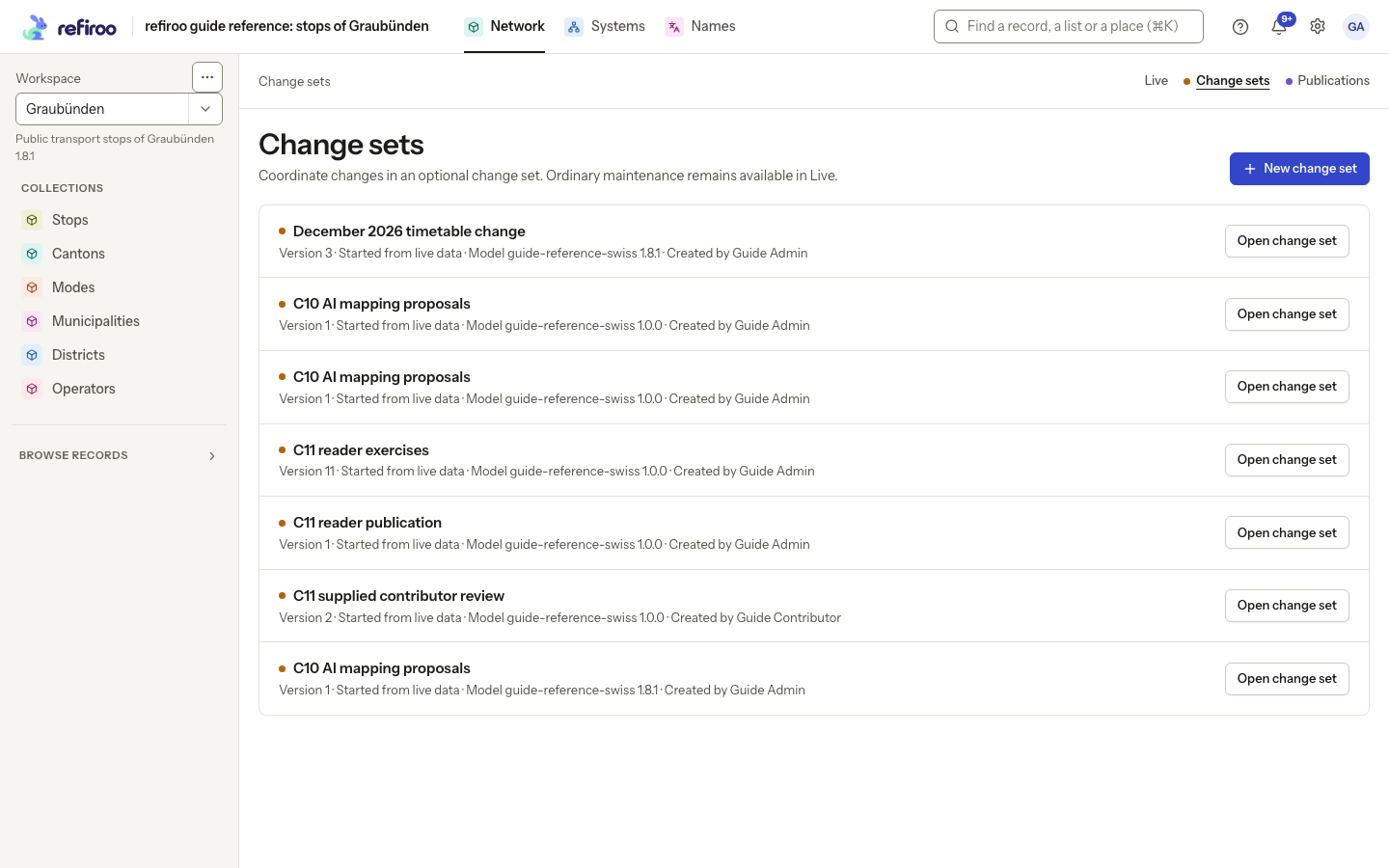
Above: the Network application in the Graubünden workspace lists December 2026 timetable change. It started from current live data. The button offers a separate new change set.
Working apart from Live
Section titled “Working apart from Live”Inside a change set, lists and record pages show the starting copy with your proposed changes applied. Later live edits do not refresh that copy. People reading Live continue to see live data, and other people can keep correcting it while the change set is open.
The orange Change set band shows its name, number of changes and state in one row on a computer. Edits stay in this change set until it is published. The green Live banner says that edits apply immediately in the workspace. Check this context before saving. The ordinary record controls work in either context; their destination is different. See Make the changes and Correct a record.
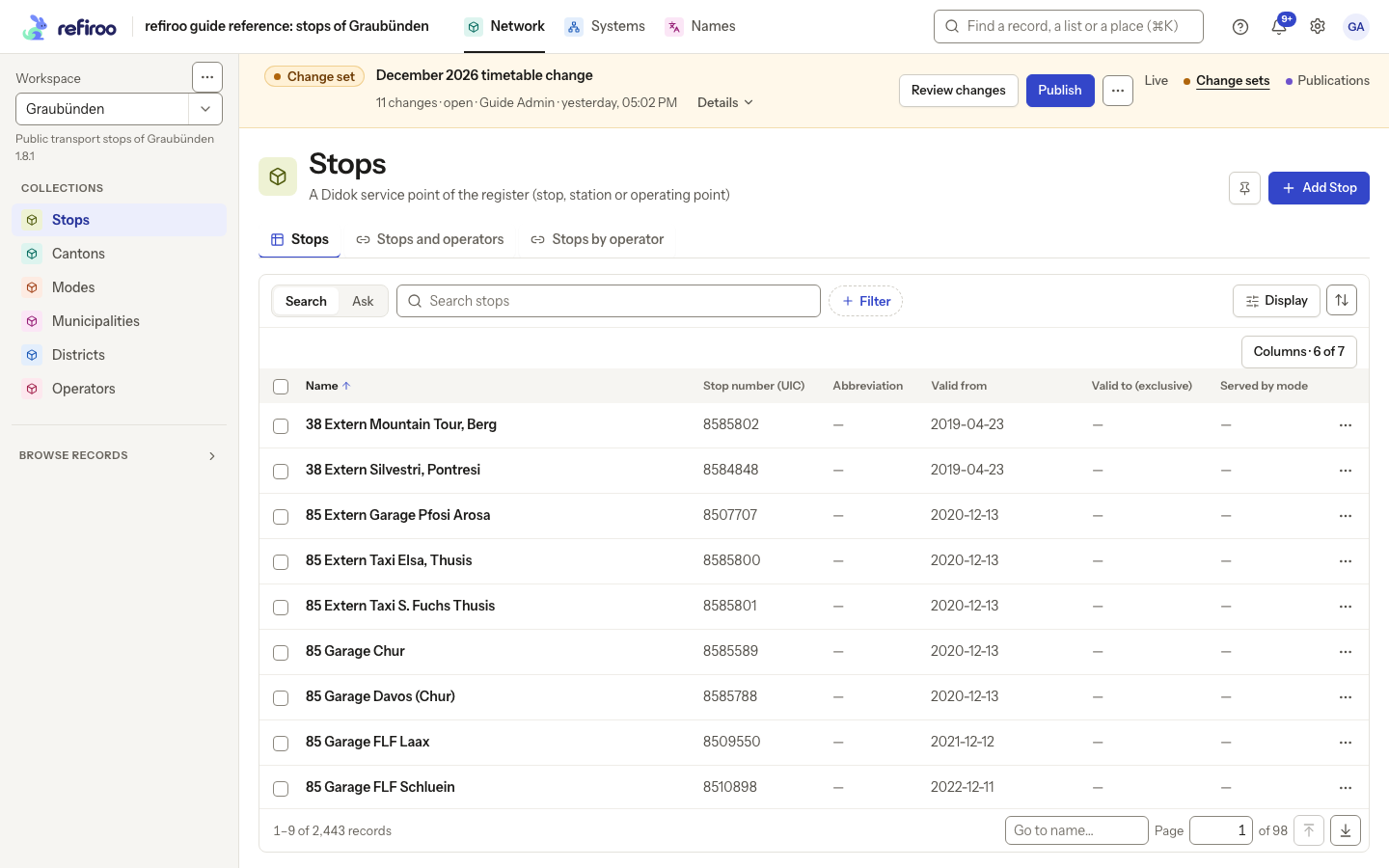
Above: December 2026 timetable change is open over the Stops list. The orange banner identifies the proposed data and offers Details, Review changes, Publish and a menu for further actions.
A change set can be shared by people with access to the workspace. It has its own version, so a save based on an older change-set version can be refused after another person changes it. Refresh and review their work before retrying. This protection is separate from the record version described in Records.
Review explains the differences
Section titled “Review explains the differences”Opening a change set from the list opens Changes in this change set, which compares it with its starting data. Choose See the data with these changes to browse or edit its lists. A newly created change set, or your own open change set from Home’s Continue where you left off, opens on the data. From there, Review changes in the band opens the comparison. Records shows additions, changes and removals, including moves and type changes where applicable. A row identifies the record and its path; expanding it shows the before and after details. Relationships shows changes to connections. Filters help narrow the review to a kind of change or a type.
For a change set started from a publication, “before” means that publication. It does not mean today’s live data. Review describes what the change set proposes; validation and publishing also check whether those proposals can be applied safely now.
Follow Review and validate for the controls and the route back to editing.
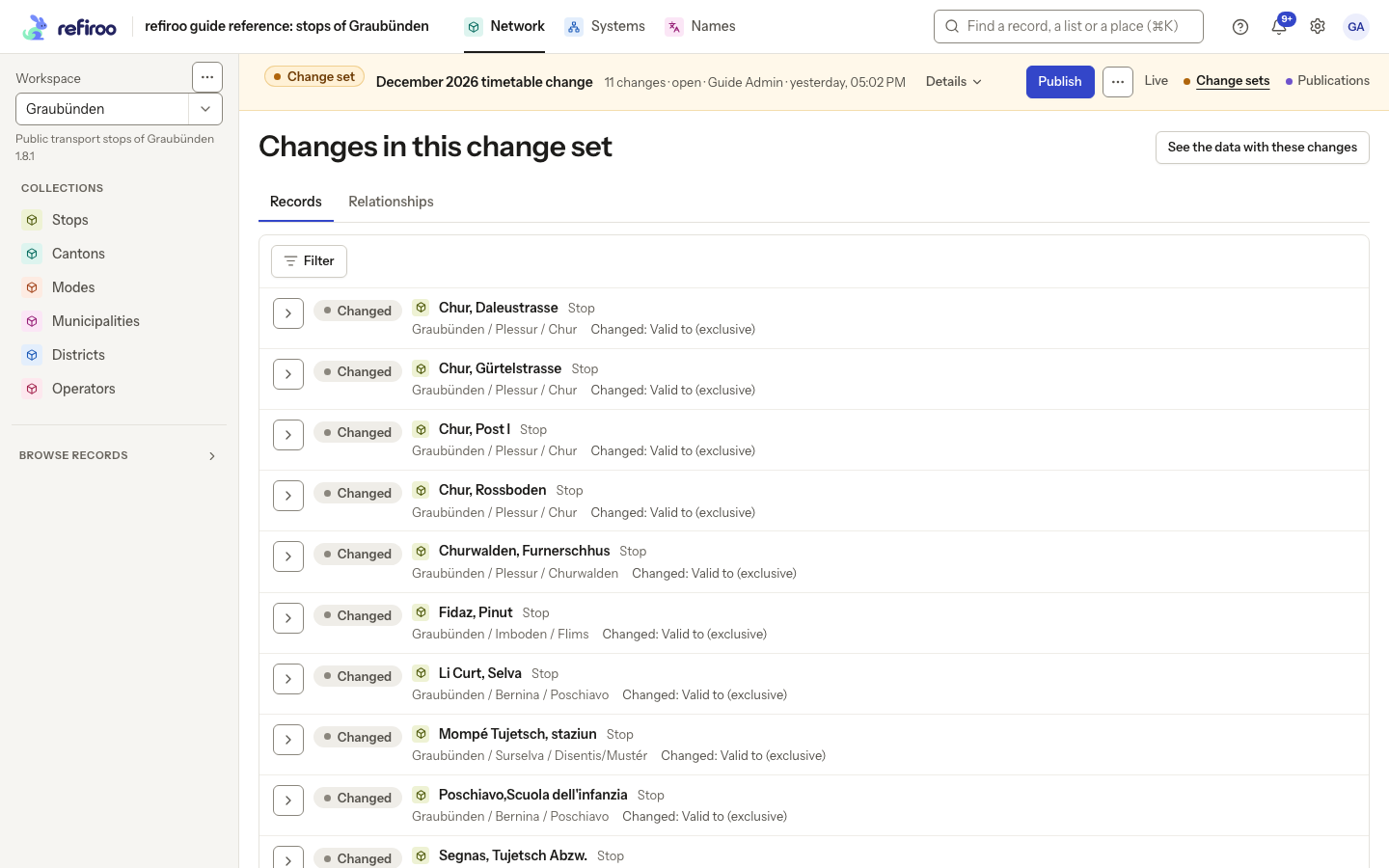
Above: the timetable change proposes changes to Valid to (exclusive) on several stops. The Records tab lists them; Relationships is a separate tab for connection changes.
Validation checks the whole proposal
Section titled “Validation checks the whole proposal”Validate now in More change set actions (⋯) checks the complete proposed data against its model, including required values and relationships, allowed structure and uniqueness rules. Some problems can only be judged across the whole set of records. Individual successful saves do not replace this check.
Validation changes no live data and creates no publication. Problems identify what needs attention. A successful check displays Change set validation passed. Publish also runs validation before opening a confirmation; a separate validation step is optional. A failed check publishes nothing and lists the problems with links to the affected records. After editing, publication checks the new version again.
A passed check is not a reservation of live data. Someone can still make a live edit or publish another change set before you publish. Publishing checks the current situation again. For the sequence, see Review and validate.
Publishing and intervening live work
Section titled “Publishing and intervening live work”Publishing applies the change set’s changes over current live data and records the result as the next publication. The whole operation succeeds together or changes nothing. There is no partially published change set.
Unrelated live work survives. A new live record is kept if the change set has not changed it; a live correction to a record left untouched by the change set is kept too. Publication is not a replacement of Live with the older copy you have been editing.
If both Live and the change set changed the same record, publishing is refused and names the conflict. This can happen even when different fields were changed. The combined result must also satisfy the model: changes that are valid separately can conflict when brought together. An invalid combined result publishes nothing.
The confirmation is also tied to the current publication and the change-set version that were reviewed. If these have changed meanwhile, the stale attempt is refused. Live data and the change set are kept. Review the reported conflicts and the latest live data before preparing another attempt; retrying does not authorise overwriting another person’s work.
The Publish instructions explain the confirmation. Success is reported as Published as Publication followed by its number. The change set’s work is then live and represented by that publication.
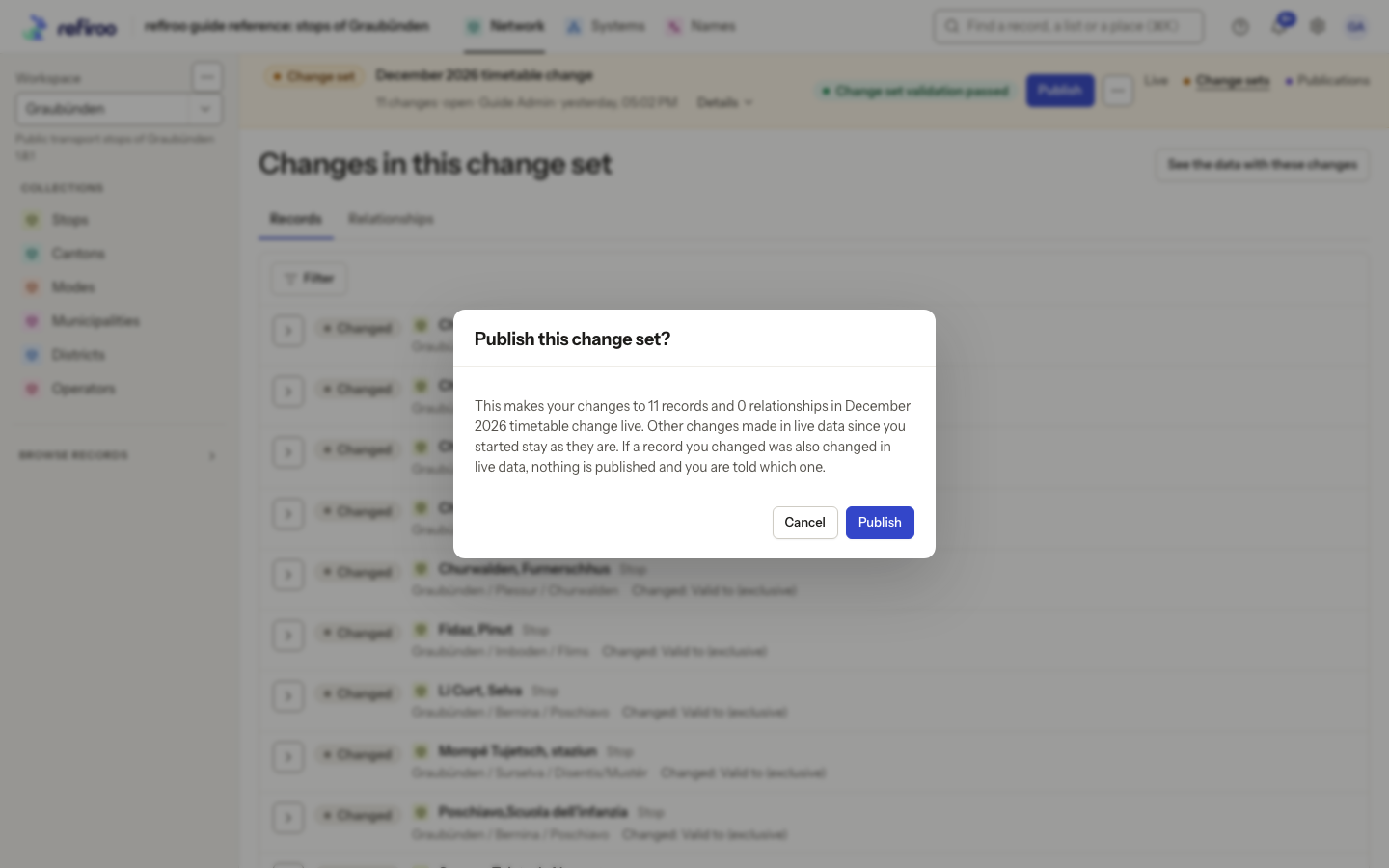
Above: the timetable change has passed validation and the Publish this change set? confirmation is open. The screenshot shows a proposal awaiting confirmation; nothing has been published.
When approval is required
Section titled “When approval is required”A workspace can require approval and a second person to decide. The banner then offers Submit for publication where appropriate; submission validates and waits for a decision, without making changes live. These policies do not remove separately granted Live editing rights. Administrators configure them under Approval policies.
For waiting, withdrawal, sending back and resubmitting, see Inbox and approvals. Follow Approve a change set for the working steps.
Publications keep the result
Section titled “Publications keep the result”A publication is a read-only snapshot of a workspace created by a successful publish. It keeps the model release it was published under, rather than showing its records through today’s definitions. Later live corrections and model changes do not rewrite it.
Publications have numbers within the workspace. A new publication becomes Current, replacing the previous one’s current designation. Older snapshots remain available. Current means the designated publication; it does not mean the snapshot includes live corrections made after it.
The Publications list offers Open publication, its model version, when and by whom it was published, and its source and predecessor. Opening one is read-only. For the relationship between publishing and the resulting snapshot, see Publish.
For snapshot rules, see Publications. To open and inspect one, follow Browse a publication.
Withdraw a request, discard a change set, or withdraw a publication
Section titled “Withdraw a request, discard a change set, or withdraw a publication”These actions have different effects:
| Action | What happens to the proposed work | What happens to Live and publications |
|---|---|---|
| Withdraw request | Ends a pending submission; keeps the change set for further editing. | Nothing changes. |
| Discard change set | Removes the change set and its staged work after confirmation. | Live records and existing publications stay unchanged. |
| Withdraw publication | Keeps the snapshot, marking it Withdrawn and no longer Current. | Live records and history stay unchanged; no publication is current. |
Discard is on the change-set menu when the set is editable. A pending request must first leave its submitted state. Discarding is still possible when the change set’s model release differs from the workspace’s release. See the change-set guide for the editing context.
Withdraw publication is offered for the current publication, with confirmation. It does not restore older data, select an older publication as current, delete records or retire the workspace. A retained publication can still be the source of a new change set, as described under Where a change set starts.
Preparing for another model release
Section titled “Preparing for another model release”A change set uses a particular model release. With the necessary access, a new change set can use an installed newer release while Live keeps using the workspace’s current release. Its forms, fields, rules and views then come from the selected release. Incompatible starting data can prevent creation; refiroo reports the records that do not fit.
The change set cannot publish normally until its release matches the workspace’s active release. The banner explains a mismatch. A model administrator can activate the intended release when the data is compatible. Where migration is available, the banner also offers a reviewed move of the change set to the workspace’s release, or a move of the workspace to the change set’s release with publication. These options depend on permissions and the deployment’s available features.
Change model version can select another release when the existing content fits it. It does not silently convert incompatible records. A refused change leaves the original release and content in place. Discarding remains an alternative for work that is no longer needed.
For ordinary data changes, keep the current Model version in the creation form. Coordinate a different release with a model administrator before preparing work under it.
Who may do what
Section titled “Who may do what”Roles granted directly or through a group determine access in a workspace. Custom roles can combine permissions differently from the predefined roles below.
| Permission | What it allows | Predefined roles that include it |
|---|---|---|
| Browse | Open change sets, read their records, review differences and browse publications. | Reader, Contributor, Data steward, Data owner |
| Work in change sets | Create, edit, validate and discard change sets; submit for publication. | Contributor, Data steward, Data owner |
| Publish | Publish a change set directly, subject to approval policy; withdraw the current publication. | Data steward, Data owner |
| Approve publications | Decide a submitted change set: approve and publish, or send back. | Data owner |
Creating a new change set and opening an existing one need different permissions: opening and reviewing are reads. A reviewer with Browse does not thereby gain approval rights. A person with Publish alone does not gain Approve publications. In the browser, preparing a direct publication also needs Work in change sets to run validation.
Write grants can be narrowed to applications or record types. This includes edits and publication; permission for one type does not authorise publishing changes to other types. Reading is available across the workspace where Browse is granted. Model administration and workspace administration roles do not by themselves give the data permissions above. A retired workspace permits reads but refuses change-set work and publication.
See Prepare and publish a change set for the working flow and Records for direct editing permissions.
Model-version actions on the banner
Section titled “Model-version actions on the banner”The amber strip’s More change set actions menu holds model-version changes and discarding. When the releases differ, Move this change set to … previews converting the proposal onto the workspace’s release. Review converted values, type changes, accepted removals and items that must be fixed, then confirm Move change set. This changes no Live data or workspace release. Unchanged records then read as they are live.
The alternative Move … to … and publish… moves the workspace to the change set’s release. It requires model-release access, model administration and background jobs. Review the migration, explicitly accept any removals and resolve all items to fix, including live conflicts. Confirm Migrate and publish only when ready: migration and publication happen together or neither does. Opening either preview changes nothing. A stale review needs Preview again.
Policy configuration belongs to Approval policies. A pending request may be withdrawn by its submitter or an authorised approver before editing resumes.
Screenshot data: Source: opentransportdata.swiss, Service Points (Didok), Federal Office of Transport / SBB, snapshot 2026-11-02. Wikidata, CC0.
Special review cases and recovery
Section titled “Special review cases and recovery”The list shows each change set’s version, source, model and creator. Untitled change set is the fallback name. Use Load more change sets for older entries. Empty bootstrap identifies a change set with no starting records; its initial changes are additions only. The ordinary browser creation button starts from current Live, not an empty root.
A created record deleted again in the same proposal is omitted from review. A record saved back to its original fields can still appear as Saved unchanged: publishing claims its version and must still check for Live changes. In Relationships, Show parent links reveals containment connections otherwise hidden because moves already appear as Parent changes. Clear filters restores the complete review; No changes yet and Nothing matches have different meanings. Follow Review what a change set changes.
Unique field values are checked immediately, including in a change set. A direct swap of two held unique values is refused; plan an intermediate valid value where permitted. Some ancestor-scoped relationship conflicts can be staged but fail validation or publication. A profile deleting records absent from a file can load only into a change set.
Publishing coordinates with Live writes in the same workspace; unrelated change sets remain available for work. If a colleague changes this change set between background-job chunks, the job can stop at its next chunk and retain earlier applied chunks. Read its results on Jobs before retrying.
A submitted change set cannot be edited or moved to another release until its request is withdrawn by the submitter or an approver. Open work is shared with authorised workers, not reserved for its creator. More change set actions holds Validate now, Change model version, Rename and Discard. Rename opens a form for the name; it keeps the proposed data.
A release switch protects unsaved input and reloads the pinned model before enabling edits. Old list positions are cleared; a disappeared page can lead to another model-declared view. If Model version changed, but the interface could not refresh… appears, the release change already succeeded. Reload and check the pinned release before editing. Other action failures say Change set action could not be completed and keep the diagnostic reason. See Prepare under the next model version.
Other useful tasks are Continue live work, Start from an earlier publication and Propose a change.