Copying and moving records
Copy records when another workspace needs its own data. Move them when the source records should also be removed after the destination is ready. Both operations prepare change sets; neither publishes automatically. Follow Copy or move records to another workspace.
A model mapping describes what source types, fields, parents and relationships become in the destination. It can also identify existing destination records to update. Have a model administrator prepare and check it; see Model mappings. This differs from a mapping grid, which connects records inside one workspace. Switching workspaces alone never copies records.
Access and starting data
Section titled “Access and starting data”Open Settings › Workspaces and models › Copy and move. You need access to read the source and Copy and move for the destination; a move also needs Work in change sets for the source deletion proposal. Review and publication need their own workspace permissions. This page does not give you publication rights. Background jobs and model administration must be enabled; otherwise the page explains why copying and moving are read-only. Ask an administrator about absent workspaces or actions.
Mappings lists saved instructions. Recent copies and moves shows operations and waiting dry runs. Check it before starting the same transfer again. The source and destination must be different workspaces. Their model releases must match the releases used by the mapping.
What is checked before starting
Section titled “What is checked before starting”Choose Copy or Move, then the records to include: Every mapped type, The whole workspace, Chosen types with optional filters, or One record and everything under it. A subtree includes its descendants. A whole-workspace choice can leave out unmapped types; read the report rather than assuming everything will transfer.
The dry run checks every selected record and relationship without writing them. Review records created or updated, records that cannot transfer, relationships carried or dropped, and Values not carried. A record can transfer while losing an unmapped field. Missing required values, unsuitable parents, incompatible values and unresolved relationship ends need attention. Ask the mapping owner to correct its choices; do not invent data just to pass a check.
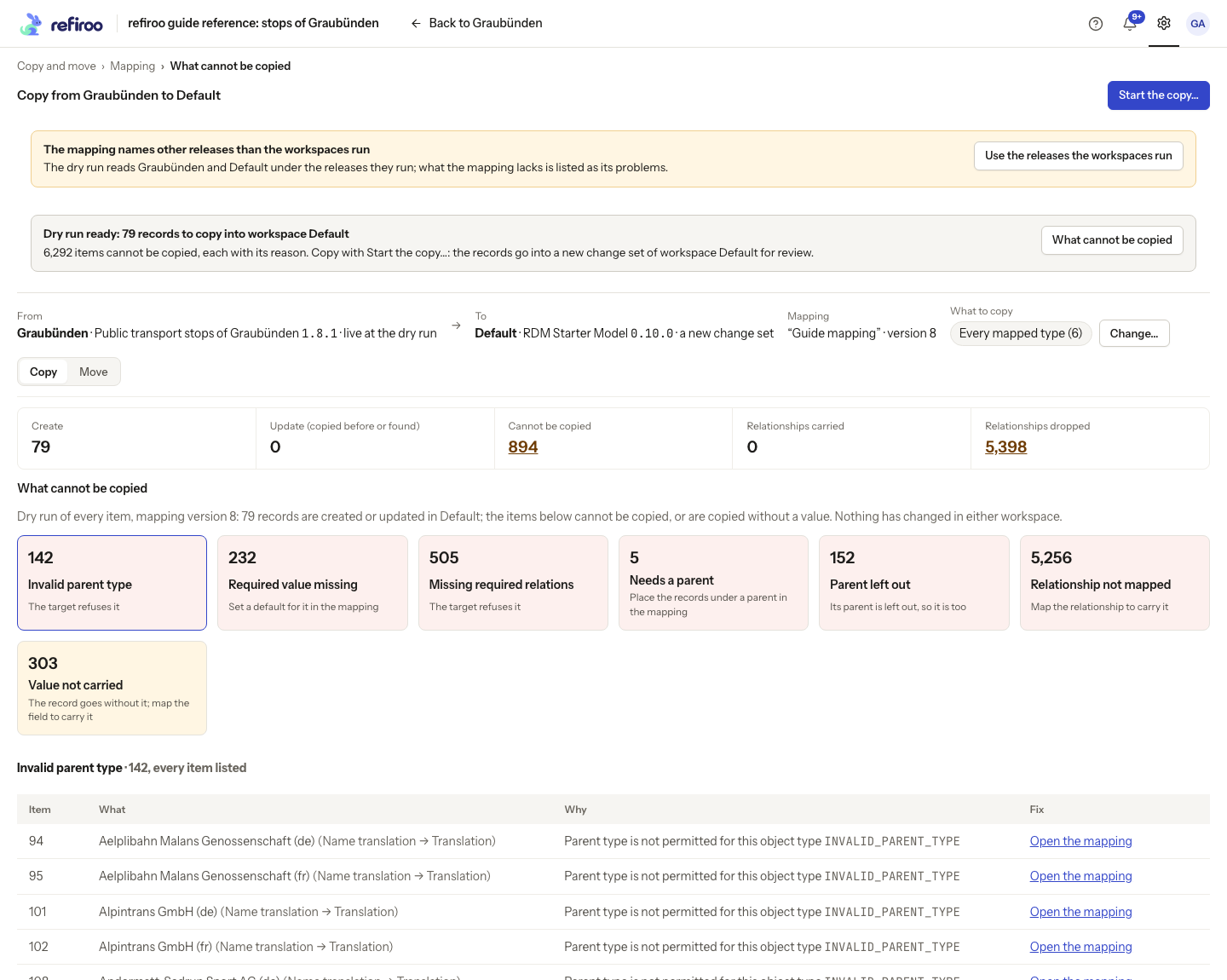
Changing the mapping or selection checks again. If The mapping names other releases than the workspaces run appears, coordinate Use the releases the workspaces run with the mapping owner, inspect the changes and obtain a fresh dry run. Nothing to copy or Nothing to move means no selected record would be created or updated; confirmation cannot make that empty selection useful.
What happens after confirmation
Section titled “What happens after confirmation”Copy prepares a target change set and keeps the source. Move also prepares a source deletion change set. A source record changed since the dry run, or required by records staying behind, is kept with a reason. Publication of the source deletions is refused until the target copy has been published. Review each proposal and its workspace’s approval requirements separately.
The running job continues when you leave the page. Its actual result can differ from the dry run after another person’s changes. Review the change set opens the target proposal; Review the deletions opens the source removal proposal where one was made. The copy did not complete or The move did not complete needs inspection of the job and any retained change sets before retrying. Read Jobs for cancellation and retention; stopping a job is not an undo of proposed chunks already written.
Copies keep their correspondence to the source. A later transfer can update the earlier copy; a move back can update the original or recreate its original identity. Review matching decisions and current values before repeating a transfer. This is a separate dataset, not a continuously synchronised mirror.
Change your mind
Section titled “Change your mind”Before starting, cancel the confirmation to keep the dry run without loading records. After loading, use the ordinary change-set controls to discard an unwanted proposal, after checking for colleagues’ edits. Do not publish its source deletions if you intend to retain the originals. Once published, correcting data requires new reviewed changes; removing a saved mapping does not reverse a transfer. Mapping changes and deletion belong to its administrator and affect future operations, not already published copies.