Find out why a webhook paused
You need Integration administration in the source workspace. Work with the receiver’s owner: a delivery failure can be a receiver, network, certificate or configuration problem. The Webhooks page lists all suspension reasons.
Find the cause
Section titled “Find the cause”- Open Settings › Connections › Webhooks and open the intended receiver’s row. Retrying means refiroo is still trying a failed request; Suspended means sending has stopped.
- Read Configuration, especially the suspension heading, listed findings, last error, attempt count and next attempt. A failed request prevents later changes passing it. After 24 hours of unsuccessful delivery it is suspended.
- Open Deliveries, filter Status if needed and choose Refresh. Open the affected event. Inspect Attempts and the selected attempt’s answer. An unreachable host, TLS failure, timeout, redirect and receiver error need different repairs. Give the relevant reason to the operator or receiver owner; do not share record content unnecessarily.
- For Delivery failed, fix the receiver or use Edit… to correct its URL. Changing a failed destination retries at once. For The model changed or A filter matches nothing, edit the fields identified in the findings and choose Save. If another person changed the webhook, review the reloaded configuration before saving again.
- For The contract version changed, read Accepted and Served now. The version the receiver accepted is no longer served. Ask its owner to check the current version before resuming: resume accepts that version. A version retained by the active model keeps delivering in its own shape; simply raising the current version does not suspend it. If events or filters no longer exist, fix the findings under The model changed first. For The workspace was retired, ask a workspace administrator to reactivate it if delivery should continue. Otherwise delete the subscription after agreeing this with its owner.
A workspace-events webhook does not depend on a consumer contract version. For that source, check the workspace, receiver and selected change-set steps instead. A record edit alone does not produce a workspace change-set notification.
Resume without skipping changes
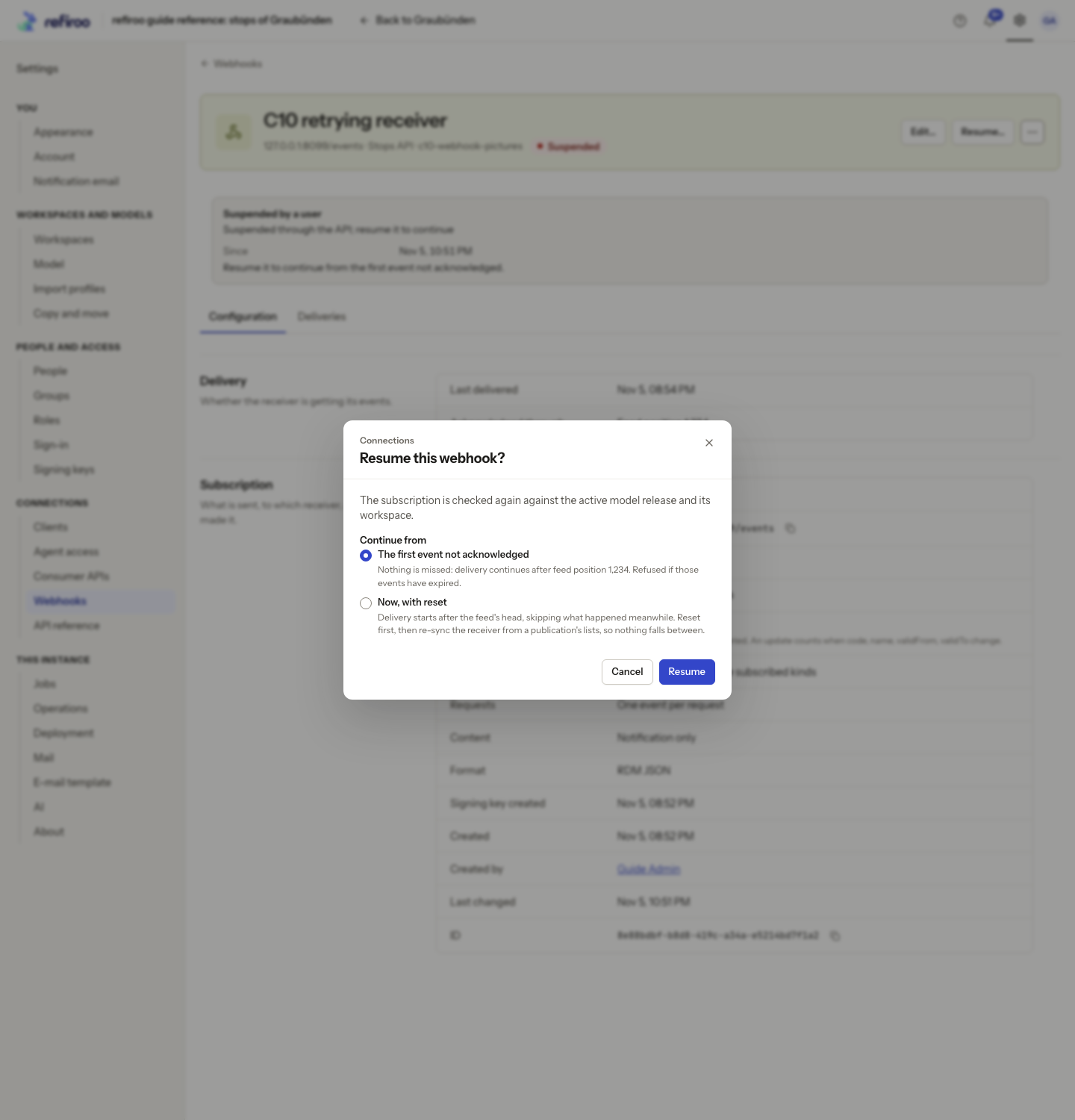
Section titled “Resume without skipping changes”- Once the cause is fixed, choose Resume…. In Resume this webhook?, keep Continue from › The first event not acknowledged.
- Choose Resume. refiroo checks the subscription against the active model and workspace again. If it refuses, read the findings under The webhook was not resumed, correct them and repeat.
- Check Deliveries for a fresh attempt and ask the receiver owner to verify the result. A request can arrive again; the receiver must cope with repeated events.
Recover after events expired
Section titled “Recover after events expired”- If Events expired is shown, record the range lost and the publication named in the details, and arrange a fresh synchronisation with the receiver owner. The publication may be older than the current feed head, so it is not enough on its own. Continuing from the old position is no longer possible.
- Choose Resume…, select Now, with reset and read the warning that waiting changes are skipped. A refusal for expired events also selects reset for you; review it before proceeding.
- Choose Reset and resume. Reset moves the subscription to the feed head shown in the refusal message; changes before it are not delivered. Then have the receiver reload from current data taken after the reset (a new publication or a live export), not from the older publication named in the details. Reset comes first so later changes are still delivered during recovery.
- Verify the refreshed data and subsequent deliveries with the receiver owner. Do not use reset merely to clear an unexplained error.
Resend on a saved delivery repeats that request. It does not repair the cause or resume a suspended subscription; use it only for an agreed replay. See Deliveries.